

A chapter academic dashboard exists to do three things: track every member's GPA and grade trends in one place, flag academic risk before it becomes probation, and centralize the deadlines a chapter is already required to meet. An academic dashboard for student organizations can combine syllabus parsing, real-time GPA tracking, and slumping-grade alerts into one system that scales from a single chapter roster to multi-chapter organization accounts.
TL;DR:
- Chapters should set alert thresholds above their official GPA standards to give officers early warning before members fall below minimum requirements.
- Running grade checks at pre-midterm, post-midterm, and pre-finals points ensures timely intervention and monitoring of member progress.
- Accurate data requires written consent, designated officer responsibility, minimal privacy-sensitive fields, and regular reconciliation with official campus reports.
- Relying on member-uploaded grade data and avoiding direct SIS integration prevents privacy breaches and campus IT issues.
- Implementing a weekly dashboard routine, rather than a semester-end review, allows officers to address academic issues early and consistently.
Table of Contents
- Core Features Every Academic Dashboard for Chapters Should Include
- When Should Chapters Run Grade Checks Each Semester?
- Which KPIs Actually Predict Chapter Academic Trouble?
- Setting Up a Chapter Dashboard Without Creating a Privacy Problem
- Does a Chapter Dashboard Need to Connect to the School's SIS?
- How Much Should You Customize a Dashboard for Your Chapter?
- Keeping Chapter Grade Data Accurate Term After Term
- What Effective Chapter Dashboards Look Like in Practice
- Why Dashboards Change the Advisor-Officer Relationship
- How Semesterflow Puts This Playbook Into Practice
- Sources
Core Features Every Academic Dashboard for Chapters Should Include
A student performance dashboard built for a chapter isn't a spreadsheet with better formatting. It's a working system officers open weekly, not just before advisor meetings.
The roster is the foundation. Every member entry needs a consent flag, declared major, and previous-term GPA visible at a glance, since chapters that skip consent tracking run into trouble the moment grades get shared beyond the scholarship chair. Advising manuals consistently point to accurate rosters as a baseline requirement for chapters to stay in good standing with campus life offices, not just an internal nicety.
From there, the dashboard needs a grades cockpit: a per-class view showing each member's trend across the term, not just a single number. A member sitting at a 2.9 overall GPA but failing organic chemistry needs different support than one whose grades are uniformly soft.
Beyond individual views, chapters need:
- A chapter-level GPA summary with distribution charts, not just an average
- Exportable reports formatted for scholastic standards submissions
- Deadline aggregation that syncs exam dates and study session times to a shared calendar
- Automated alerts when a member's grades slip toward a risk threshold
- A log of which officer took what action, and when
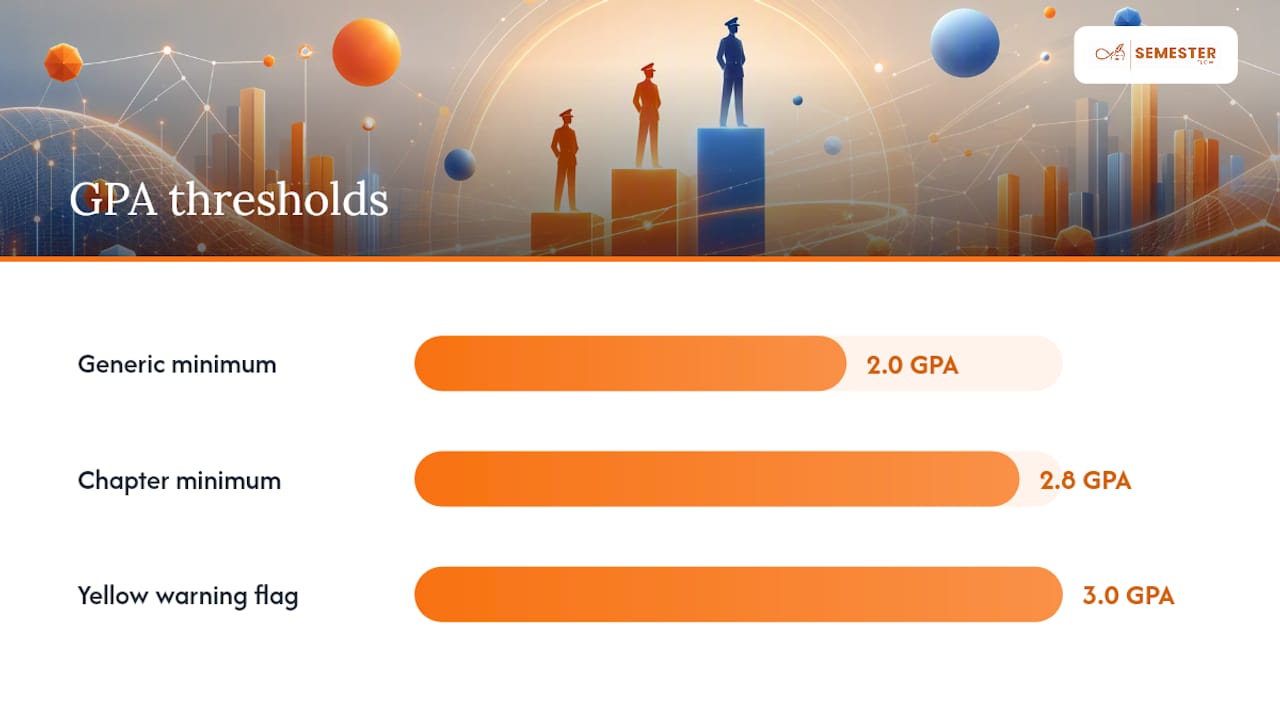
Pro Tip: Build the alert threshold around your chapter's actual minimum, not a generic 2.0. If your chapter's scholastic standard sits at 2.8, set the yellow flag at 3.0 so officers get a warning before a member crosses into real danger.
Some campus Greek-life offices publish minimum chapter GPA standards, like a 2.8 threshold with staged sanctions for chapters that fall below it. A dashboard that can't map its alerts to that exact number isn't doing its job.
When Should Chapters Run Grade Checks Each Semester?
Run grade checks multiple times each semester, spaced around midterm and final exam periods for timely academic intervention, following a clinical hours tracking approach to document and monitor member progress effectively. That cadence isn't arbitrary. Grade-check tutorials built for fraternity and sorority officers recommend these exact windows because each one catches a different kind of problem while there's still time to act.
Here's how to run each one:
- Pre-midterm check. Capture previous-term GPA, current attendance in classes, and a self-reported confidence score. This catches members who are already behind before the first exam.
- Post-midterm check. Pull current term average from whatever grades members are willing to share, note the goal GPA each member set, and assign interventions where the gap is widening.
- Pre-finals check. Review whether assigned interventions, tutoring, study groups, check-ins, actually moved the needle, and flag anyone still trending toward probation for a plan before grades post.
The fields that matter at each check are consistent: previous-term GPA, current term average, goal GPA, and interventions assigned. Skipping the "interventions assigned" field is the most common mistake chapters make, because without it, nobody can tell whether last semester's plan worked or just happened alongside a member's own effort.
Pro Tip: Separate "mild concern" from "immediate intervention" explicitly in your dashboard's flagging logic. A member two-tenths below the chapter minimum needs a check-in email. A member on academic probation needs a scheduled meeting with the scholarship chair and, often, a written improvement plan.
Which KPIs Actually Predict Chapter Academic Trouble?
Chapter average GPA tells you almost nothing on its own. A chapter can post a healthy 3.1 average while five members quietly slide toward probation, hidden by a handful of high performers pulling the number up.
The metrics that actually catch trouble early:
- Percent of members below the chapter's minimum GPA threshold — a more honest signal than the average
- Percent on academic probation, tracked as a running count, not a snapshot
- Three-term trend per member, since one bad semester reads differently than a steady decline
- Study session attendance and tutoring uptake, since engagement data captured through consolidated event platforms tends to correlate with grade recovery
- Per-class failure or withdrawal flags, especially clustered by major, which can reveal a specific course or professor pattern worth addressing chapter-wide
Set your chapter's GPA target above the campus minimum, not at it. A chapter aiming exactly for the sanction threshold is one bad semester from crossing it. Use a distribution chart instead of a single average whenever you're reporting to advisors. A distribution shows whether risk is concentrated in a few members or spread evenly, and that distinction changes what kind of intervention makes sense.
Setting Up a Chapter Dashboard Without Creating a Privacy Problem
Rolling out an academic reporting system means handling real grade data for real people, and that comes with obligations most chapter officers haven't thought through carefully.
Follow this order:
- Collect written consent first. Record a consent flag on every roster entry before importing a single grade. Advisor manuals across campuses treat accurate, consent backed rosters as a prerequisite for chapters to stay in good standing, not an afterthought.
- Define officer roles with real limits. The scholarship chair might see individual grades; the social chair should only ever see aggregated numbers.
- Set minimal export fields. When you send a report to your advisor or student government office, include only what the report requires. Extra personal details don't belong in a shared document.
- Test the escalation path before you need it. Decide in advance who contacts a flagged member, what resources you'll point them to (tutoring, academic coaching, the writing center), and how that contact gets logged.
- Document every transition. When officers change each year, the roster, consent flags, and intervention history need to transfer cleanly, a point advisor handbooks consistently emphasize.
Pro Tip: If you're ever unsure whether a report crosses a line, get written consent for that specific use before sending it. FERPA protects student education records, and campus counsel or your student affairs office can tell you fast whether a report format is fine or needs to change.
Does a Chapter Dashboard Need to Connect to the School's SIS?
Not necessarily, and for most chapters, it shouldn't try to. Chapters don't have institutional access to a school's student information system the way a registrar or academic advising office does. Chapter officers are volunteers, not university employees, and campus data policies generally restrict direct SIS access to authorized staff.
What actually works is member-reported and member-uploaded data flowing into the chapter dashboard, layered on top of whatever official reporting the campus Greek-life or student affairs office already runs. Members upload their own grade reports or share screenshots from the school portal; the dashboard organizes that input into GPA trends and flags. Meanwhile, the official record, the one used for scholastic standards enforcement, still comes from the institution itself, calculated centrally the way UConn's Greek-life office and similar campus offices do it.
This two-track approach avoids a real headache: chapters trying to build unauthorized SIS integrations, which almost never survive a campus IT security review anyway. Instead, the chapter dashboard becomes a member-facing early-warning layer that sits alongside, not inside, the institution's own system. Where a campus office does publish per-chapter GPA reports, the officer's job is simply importing those numbers into the dashboard once they're released, keeping the internal early-warning data and the official institutional number reconciled each term.
How Much Should You Customize a Dashboard for Your Chapter?
Every chapter's academic culture looks different, and a curriculum overview dashboard built for a 40-person academic club needs different settings than one built for a 120-member sorority chapter with a formal scholarship committee.
The customization that actually matters isn't cosmetic. It's threshold and workflow configuration:
- GPA threshold alignment. Set alert levels to match your chapter's actual scholastic standard, not a generic default, since standards vary from campus to campus and even chapter to chapter within the same campus.
- Role permissions by chapter structure. A chapter with a dedicated scholarship committee needs more granular access tiers than one where the president handles everything.
- Reporting cadence. Some campuses want a per-semester report; others expect quarterly updates for multi-chapter regional organizations, similar to the regional reporting structure TidyHQ describes for professional societies tracking chapter activity across a region.
- Intervention library. Build a chapter-specific list of resources (your campus writing center, specific tutoring programs, peer mentors within the chapter) rather than relying on generic suggestions.
Skip customizing anything that doesn't change officer behavior. A dashboard with twenty configurable settings that nobody adjusts is worse than one with five settings everyone actually uses.
Keeping Chapter Grade Data Accurate Term After Term
An academic dashboard is only as good as its last accurate update, and stale data is worse than no data because officers make decisions on it without knowing it's wrong.
Three habits keep chapter data trustworthy. First, set a fixed update rhythm tied to the grade-check cadence already covered, not an ad hoc "whenever someone remembers" schedule. Second, require members to confirm or correct their own GPA and major information each term rather than assuming last year's entry still holds; students switch majors and retake classes, and a dashboard that never refreshes those fields drifts out of date fast. Third, assign one officer, typically the scholarship chair, as the single point of accountability for data entry, since shared ownership across multiple officers tends to mean nobody actually owns it.
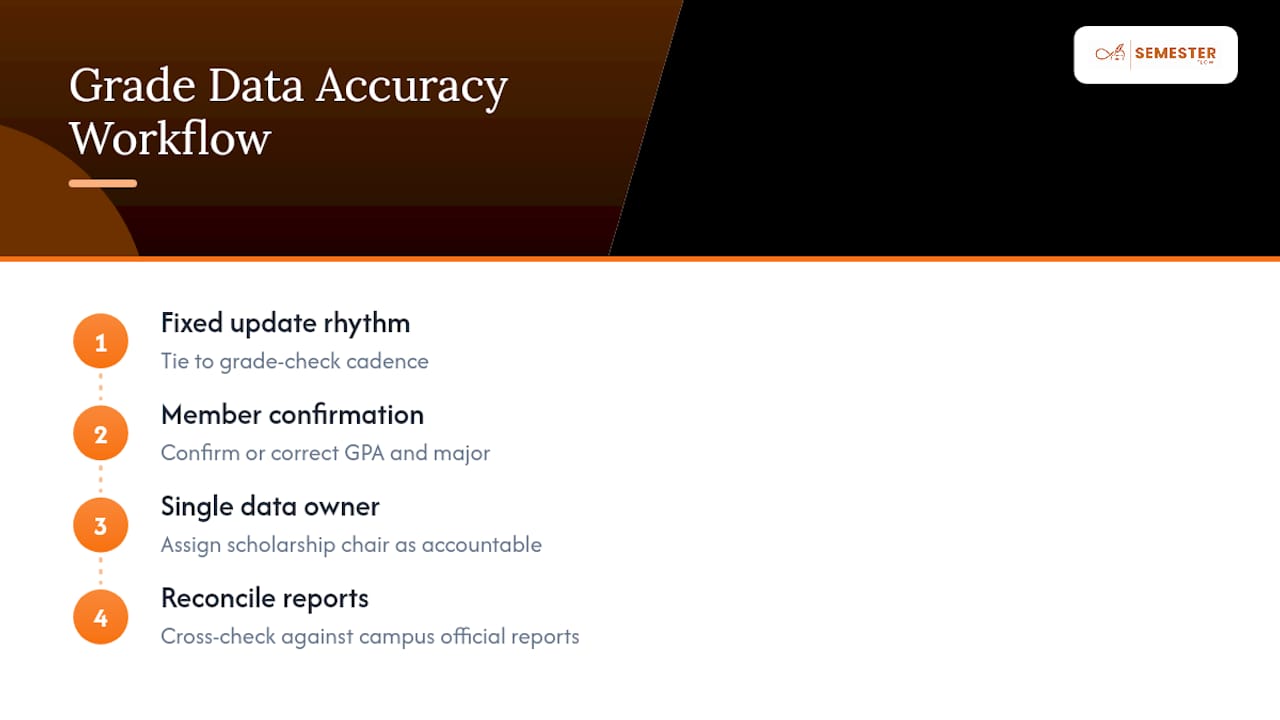
Cross-check your internal numbers against official campus reports whenever they're published. If your chapter dashboard shows a 3.05 average but the Greek-life office's official calculation comes back at 2.94, something in your import process needs fixing before the next report goes out. That kind of reconciliation catches errors early, before they show up in a sanctions letter.
What Effective Chapter Dashboards Look Like in Practice
The chapters that get real value from academic dashboards share a pattern: they treat the tool as a weekly habit, not a semester-end scramble.
A scholarship chair running weekly fifteen-minute reviews, checking who's flagged, confirming interventions are actually happening, catches problems months before a formal probation letter arrives. Compare that to a chapter that only opens its dashboard right before an advisor meeting. The data might be technically accurate, but by then it's too late to change the outcome for members already trending down.
Multi-chapter organizations get an added benefit from consolidated dashboards: national or regional officers can see which local chapters are engaged and which have gone quiet, without waiting on manual reports from each one. That's the same pattern regional professional societies use when monitoring chapter activity across a broader footprint, applied to academic tracking instead of event participation.
The common failure mode isn't a bad dashboard. It's a good dashboard nobody opens. Chapters that succeed build the check-in into an existing routine, an exec board meeting, a weekly officer sync, rather than treating it as a separate task competing for attention.
Why Dashboards Change the Advisor-Officer Relationship
Academic advising for student organizations has always balanced two failure modes: the advisor who micromanages every member's transcript, and the one who stays hands-off until a chapter is already on probation. Neither extreme works well, and research on advising student organizations points to objective data as the tool that lets advisors support students without falling into either trap.
A dashboard changes that dynamic by removing guesswork from the conversation. Instead of an advisor asking a scholarship chair to "check on everyone," the dashboard already shows who's flagged and why, and it holds a record of what interventions were tried. That record matters more than most officers expect. When a chapter faces a scholastic standards review, having a documented history of who was flagged, when, and what happened next is the difference between a credible response and a shrug.
Officers and advisors should agree on a review cadence early, ideally tied to the grade-check windows already in place, and treat the dashboard's history as the shared source of truth rather than memory or scattered emails.
— Haden
How Semesterflow Puts This Playbook Into Practice
Semesterflow gives chapters a faster path to the exact system this playbook describes, without building a tracking spreadsheet from scratch every fall. Members upload their syllabi, and the AI extracts class schedules, assignments, and exams, syncing everything straight to Google Calendar so the deadline aggregation piece runs itself instead of relying on someone manually building a shared calendar.

The grades cockpit tracks real-time GPA and flags slumping grades before they become a probation conversation, and members can set goal GPAs that the system checks progress against automatically. For chapter leadership, that means less time chasing members for updates and more time acting on flags that are already sitting in the dashboard.
Bulk accounts are available for chapter-wide rollout, with a free trial before committing to a paid plan. If your chapter is still running grade checks off a shared spreadsheet, start with the Semesterflow landing page to see how the syllabus-to-calendar workflow and GPA tracking fit your chapter's roster.
Sources
- Student organization advising manual (Pace University)
- Chapter scholastic standard (UConn)
- Grade checks tutorial
- Modernize student org workflows | iCommunify