

Yes, assignment batching works: grouping similar tasks into focused blocks, mapped against one merged deadline view, cuts down the panic-cramming that wrecks a semester. Start small tonight. Pull every due date from this week's syllabi into one list, then block two 45-minute batching sessions on your calendar before you close this tab.
TL;DR:
- Batching tasks by type reduces mental fatigue, predicts heavy workload weeks, and prevents all-nighters by distributing work more evenly.
- Creating a weekly routine involves collecting deadlines, grouping tasks, estimating times, scheduling specific blocks, and reserving buffer days for surprises.
- Using automation tools like syllabus parsers can cut setup time significantly and help identify deadline collisions that are hard to see otherwise.
- Students are more likely to sustain batching when starting small with one or two sessions per week and involving accountability for consistency.
- Simple trackers and merged calendar views are effective, with tools like Semester Flow offering automated syllabus extraction and deadline synchronization to streamline the process.
Table of Contents
- What Is Assignment Batching, and Why Does It Help College Students?
- How Do You Build a Weekly Batching Routine?
- Which Templates and Tools Make Batching Faster?
- Copy This Weekly Batching Checklist and Two-Week Sample
- How Does Syllabus Automation Make Batching More Realistic?
- What Actually Keeps Students Batching Past Week One
- Try Semester Flow to Skip the Manual Setup
- Templates and Guides Worth Bookmarking
- Sources
- FAQ
What Is Assignment Batching, and Why Does It Help College Students?
Assignment batching means grouping similar academic tasks (all your readings, all your problem sets, all your quick writing responses) and knocking them out in one focused sitting instead of bouncing between five different types of work in a single afternoon. Your brain pays a real cost every time it switches from reading dense theory to solving equations to drafting a paragraph. Batching cuts that switching down to almost nothing.
The payoff shows up in three ways:
- Less mental fatigue from constant context-switching between subjects
- Predictable heavy weeks you can see coming instead of discovering at 11 p.m. on a Sunday
- Fewer all-nighters, since work gets distributed instead of stacked at the deadline
Batching has limits, though. A single long-term project, like a 15-page research paper, needs spaced repetition across many days rather than one giant block. Cramming a paper into one Saturday marathon defeats the purpose of batching entirely. Save batching for the repeatable, similar-shaped tasks and treat big papers as their own category, discussed in the templates section below.
How Do You Build a Weekly Batching Routine?
A repeatable weekly routine beats any one-time organizational binge. Here's the five-step cycle that keeps assignment batching sustainable across a full semester.
- Collect. Once a week, usually Sunday evening, pull every deadline from your syllabi and course pages into one running list. This single step catches most of the surprises that would otherwise blindside you midweek.
- Group. Sort what you collected by task type: readings, problem sets, short writing responses, long papers, group work. This is the actual "batch" forming.
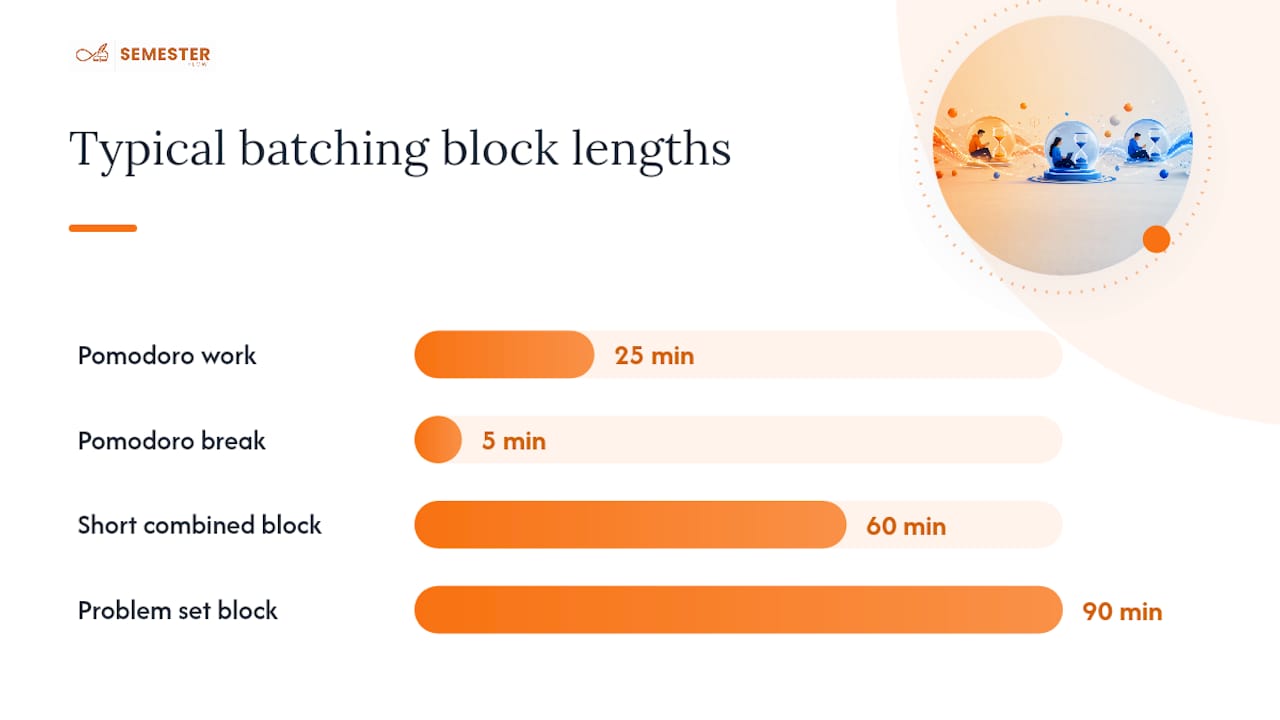
- Estimate. Assign a rough time to each item and translate that into batching blocks of 25 to 90 minutes. A stack of three short reading responses might become one 60-minute block; a problem set alone might need 90.
- Schedule. Drop each block into your calendar with a specific title, not a vague "homework" entry, and leave buffer time between blocks. Never stack two deep-focus blocks back to back without a break in between.
- Buffer. Keep one rolling buffer day, often a Friday or Sunday, reserved for whatever collides or slips. Something always slips.
For execution, the Pomodoro Technique works well for short batches like reading responses or quick problem sets, where 25 minutes on and 5 off keeps momentum without burning you out. Long papers deserve different treatment: reserve one or two large, uninterrupted blocks per week rather than trying to Pomodoro your way through a thesis statement. Breaking a big assignment into smaller pieces and tracking them across several days measurably reduces the stress of facing it as one monolithic task.
Pro Tip: Title your calendar blocks by task type, not by class name. "Reading batch" tells your brain what mode to switch into faster than "BIO 201" does.
Which Templates and Tools Make Batching Faster?
You need exactly two things to run this system: a tracker and a merged calendar view. Everything else is optional.
For the tracker, a simple spreadsheet or checklist with these columns covers almost every case:
- Course
- Assignment
- Due date
- Estimated time
- Batch group (reading, problem set, writing, long paper, group work)
- Scheduled block
- Notes
For the calendar side, the goal is a single merged view of every deadline across every class, since juggling five separate course pages is exactly the fragmentation that makes batching hard in the first place. A browser-based semester planner can merge multiple syllabi into one chronological timeline and export the whole thing as a combined .ics file you import into Google Calendar, Apple Calendar, or Outlook in a couple of clicks.
Here's how the common low-friction options stack up:
| Tool type | Setup time | Best for |
|---|---|---|
| Plain spreadsheet checklist | 10 minutes | Students who want full manual control |
| Browser-based semester planner | 15 minutes | Seeing collisions across multiple syllabi at once |
| Standalone calendar app | 5 minutes per class | Students already living inside one calendar app |
| Kitchen timer or phone timer | Instant | Running Pomodoro-style batching blocks |
Save your checklist as a master template once, then copy it fresh at the start of each week. That ten-minute setup cost only happens once.
Copy This Weekly Batching Checklist and Two-Week Sample
Copy this layout directly into a notes app or spreadsheet, and fill in your own courses and deadlines.
Weekly checklist template:
- Course: ___________
- Assignment: ___________
- Due date: ___________
- Time estimate: ___________
- Batch group: ___________
- Scheduled block: ___________
- Notes: ___________
Two-week sample schedule:
- Week 1, Monday: Reading batch, three chapters across two classes, 60 minutes
- Week 1, Wednesday: Problem set batch, two courses, 90 minutes
- Week 1, Friday: Buffer day, catch anything that slipped
- Week 2, Monday: Reading batch again, 45 minutes
- Week 2, Tuesday and Thursday: Two 90-minute blocks reserved for the long paper due at the end of the month
- Week 2, Sunday: Weekly collect and regroup for week 3
Adjust the sample for heavy weeks by adding a third batching session, and for group projects by scheduling a shared block your teammates actually confirm in advance, not just one you assume works for everyone.
How Does Syllabus Automation Make Batching More Realistic?

The single biggest reason students abandon batching by week three isn't laziness. It's the setup cost. Manually transcribing six syllabi into one spreadsheet eats an hour you don't have, and most students quit before the system ever pays off.
This is where syllabus-parsing automation earns its place. Semester Flow reads an uploaded syllabus and extracts class schedules, assignments, and exam dates automatically, then syncs everything directly with Google Calendar. That single step replaces the most tedious part of the weekly collect phase.
The real value of parsing every syllabus into one unified timeline isn't convenience. It's what the merged view reveals: the week where three professors independently scheduled major deadlines on the same Thursday, the collision you'd never spot reading each syllabus in isolation.
Semester Flow also tracks GPA in real time and flags at-risk courses before a slipping grade becomes a crisis, which turns batching from a scheduling trick into an early-warning system.
What Actually Keeps Students Batching Past Week One
Most students who try batching quit within two weeks, not because the method fails, but because they try to overhaul their entire schedule overnight. Start with one or two batches a week. A single reading batch on Monday and one problem-set batch on Wednesday is enough to prove the concept before you scale it up.
Accountability matters more than willpower here. A study buddy who batches at the same time, or a calendar visible enough that a roommate notices when you skip it, does more for consistency than any app reminder.
Exam weeks need a different rhythm entirely. Swap long batching blocks for shorter, more frequent review sessions spaced across days rather than one marathon cram session the night before.
— Haden
Try Semester Flow to Skip the Manual Setup
Assignment batching works with nothing more than a spreadsheet and a calendar, and everything above this section runs fine without buying anything. But if the syllabus-collection step is the part you keep putting off, Semester Flow is built for exactly that gap: upload your syllabi, and the AI extracts assignments, exams, and class schedules, then syncs them straight into Google Calendar so your merged timeline exists in minutes instead of an evening.

Beyond the calendar sync, this kind of planner can track GPA and flag courses trending toward trouble before the drop deadline passes, giving your batching schedule an actual stake in your grades, not just your to-do list. The Pro plan runs $7.99 per month, and a Parent plan is available at $15 per month for families who want visibility too. Start with the free trial and see whether automated syllabus import saves you the setup hour this article just walked you through.
Templates and Guides Worth Bookmarking
For the merged timeline workflow described above, the Semester Assignment Planner offers a free browser tool that flags collisions and exports a combined .ics file. For a deeper look at breaking assignments into manageable pieces, the Dealing With Assignments chapter from an open academic skills textbook covers the reasoning behind spaced task tracking in more detail than any blog post will.
Sources
- Semester Assignment Planner (Free) — One Calendar for All Your Syllabi
- Dealing With Assignments – A Guide for Successful Students
FAQ
What Is the Best Way to Organize Assignments in College?
The most reliable method combines one merged deadline list, pulled from every syllabus, with weekly batching sessions grouped by task type. Students who break large assignments into smaller tracked pieces report less stress and more consistent completion than those who tackle work as it lands.
Is 60% a Failing Grade in College?
It depends entirely on the institution and the specific course's grading scale, since there's no universal cutoff across colleges.
What Is the 10-Minute Rule for Homework?
The 10-minute rule is most commonly used in K to 12 education, where homework time roughly equals about 10 minutes per grade level each night. It doesn't translate directly to college workloads, where course-specific time estimates during your weekly batching review are a more useful guide.
What Is the Hardest Year for College Students?
Many students point to sophomore year as the toughest stretch, since the initial excitement of freshman year fades while course difficulty and independent workload both climb. Junior year often runs a close second once major-specific coursework and internship pressure stack on top of a heavier class load.
Does Semester Flow Replace Manual Batching?
No, and it isn't meant to. Semester Flow automates the syllabus-collection and calendar-sync steps that eat the most setup time, but you still choose how to group and schedule your own batching blocks.