

An at-risk course alert is an automated, student-facing notice that your projected final grade in a specific class has dropped below your goal (or below passing), triggered by your actual grades, missing work, and syllabus weights. The point isn't to scare you. A good alert also hands you concrete next steps, like what score you need on the next exam or which assignments to turn in first. Tools like AI-powered academic planners build this directly into grade tracking, so the warning shows up before the semester is unrecoverable.
TL;DR:
- Alerts are most reliable when based on course-specific scores, trends, missing work, and course weightings, rather than random or incomplete data.
- Setting alert thresholds at 5 points below your target and verifying grade entries can prevent false alarms and improve response effectiveness.
- Parental monitoring requires checking who receives alerts and reviewing privacy settings to ensure data sharing aligns with your comfort level.
- An AI academic planner can be set up in under fifteen minutes, providing real-time grade projections and action checklists to help students stay on track.
Table of Contents
- How At-Risk Course Alerts Work
- What Data and Thresholds Make an Alert Reliable
- What Should You Do When an Alert Fires?
- How Accurate Are These Alerts, Really?
- Privacy and Parental Monitoring: What to Check
- Setting Up Alerts in an AI Academic Planner
- Using Alerts Without Spiraling
- Why an AI Planner Catches Problems Before Report Cards Do
- Sources
How At-Risk Course Alerts Work
An alert isn't a guess. It's math run against your syllabus and your gradebook, updated every time something changes.
The system needs a few inputs to work: the syllabus weights for each category (homework, midterms, finals), your actual grade entries as they post, whether assignments got turned in on time, and a calendar sync that keeps deadlines current. Once those pieces are in place, the logic is fairly simple.
- Your current weighted score compared to your target grade or the class average
- A negative trend across the last two or three grade entries
- A pattern of missing or late assignments building up
Parsing the syllabus matters more than it sounds like it should. Without it, you'd have to manually enter every grading category and its weight, and most students never bother, which is exactly why so many surprises show up at finals. One thing to keep in mind: alerts are course-specific by design, since a class graded on a steep curve behaves nothing like one graded on straight percentages.
What Data and Thresholds Make an Alert Reliable
Not every alert deserves the same level of concern, and knowing what's actually feeding the alarm helps you judge how seriously to take it.
The signals worth checking first:
- Your cumulative percentage in the course right now
- What share of assignments you've actually completed
- Any late or missing work sitting in the gradebook
- Your grade trend over the last several entries, up or down
Attendance and LMS login activity add useful context where a platform can access them, since feature analysis in predictive models consistently ranks attendance and task averages among the strongest signals for classifying student risk.
Thresholds come in two flavors. A relative threshold flags you when you fall a set percentage below the class average, similar to how some university early-alert programs trigger below 50% of the section average. An absolute threshold flags you at a fixed cutoff, like dropping under 60%. Relative thresholds catch trouble in hard classes early; absolute ones are simpler but can miss you in a class where everyone is struggling. False positives usually trace back to one thing: a single dropped quiz or an extra-credit assignment the system hasn't logged yet.
What Should You Do When an Alert Fires?
The alert itself is just the starting gun. What you do in the next 48 hours decides whether it becomes a footnote or a real problem.
- Check the underlying numbers. Pull up the actual gradebook entry and compare it against the syllabus weighting. Sometimes an alert fires because one assignment got logged wrong.
- Run a quick projection. Figure out what score you need on the next test or paper to land back at your target grade. A projection tool does this instantly instead of you guessing with a calculator.
- Message the instructor or TA. Keep it specific: "I'm at 71% going into the midterm. Is there extra credit, and can I review my last essay's rubric?" Vague messages get vague answers.
- Book the help you need. Office hours, a tutoring center appointment, or a study group, whichever fits the gap. Add it to a checklist so it doesn't slide.
- If your account is parent-monitored, set terms. Agree on what gets discussed and when, so the alert starts a conversation instead of a standoff.
Pro Tip: Screenshot your grade projection the moment you get an alert. If your professor updates the gradebook later and the math shifts, you'll have a clear record of what the numbers actually said when you acted.
Students who treat an alert as a checklist item, not a verdict, tend to recover fastest. The data backs that instinct up.
How Accurate Are These Alerts, Really?
Predictive models built on gradebook and LMS data aren't guessing randomly. Course-specific models in one validated study reached a balanced AUC of about 0.85 with recall near 0.75, meaning they correctly separate at-risk students from on-track ones most of the time, and catch roughly three out of four students who are genuinely struggling.
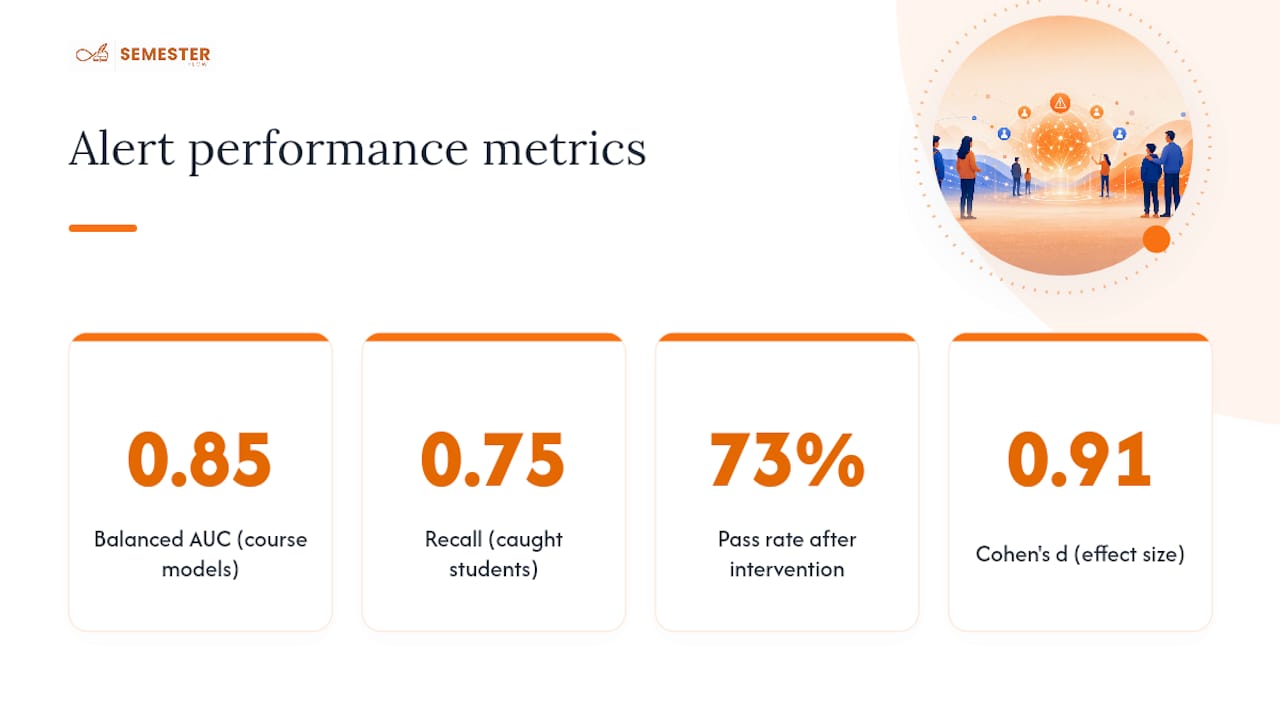
The stronger number is what happens after the alert fires. A 2025 pilot study found that 73% of students flagged as at-risk who received a personalized intervention went on to pass, with a large effect size (Cohen's d of about 0.91). That's not a small bump.
The catch: accuracy depends on data completeness, and course structures vary enough that a model tuned for one class can misfire in another. Alerts work best paired with a real follow-up step, not left to sit unread in a notifications tab.
Privacy and Parental Monitoring: What to Check
Parent-monitored accounts change who sees what, and it's worth knowing the defaults before you assume anything.
- Confirm who actually receives the alert: student only, or student and parent
- Review calendar sharing settings so you're not exposing more than intended
- Check notification permissions for granularity (some apps let you separate grade alerts from deadline reminders)
- Look for an explicit security and privacy page covering encryption and data retention
Pro Tip: If you're on a parent-monitored plan, ask what happens to your data if you switch to an individual account later. A platform with clear retention policies will answer that in writing, not in a support chat.
Setting Up Alerts in an AI Academic Planner
Getting alerts running takes less time than most students expect, usually under fifteen minutes for a full course load.
- Upload your syllabus for each class so the planner can parse grading weights, deadlines, and exam dates automatically.
- Sync your grades, either through an LMS connection or manual entry, and confirm your calendar sync is pulling live dates.
- Set your thresholds and notification channels. Start conservative (say, 5 points below your target) so you're not drowning in noise the first week.
- Turn on action checklists that auto-populate when an alert fires, so the notification arrives with a task list attached, not just a warning.
Semester Flow maps to each of these steps directly: per-class grade profiles track where you stand in every course, grade projection tells you what score you need going forward, and calendar sync keeps deadlines current without manual re-entry. Multi-channel setups like this, alerts in-app and by email or calendar, tend to get noticed and acted on faster than a single dashboard notice buried behind a login.
Using Alerts Without Spiraling
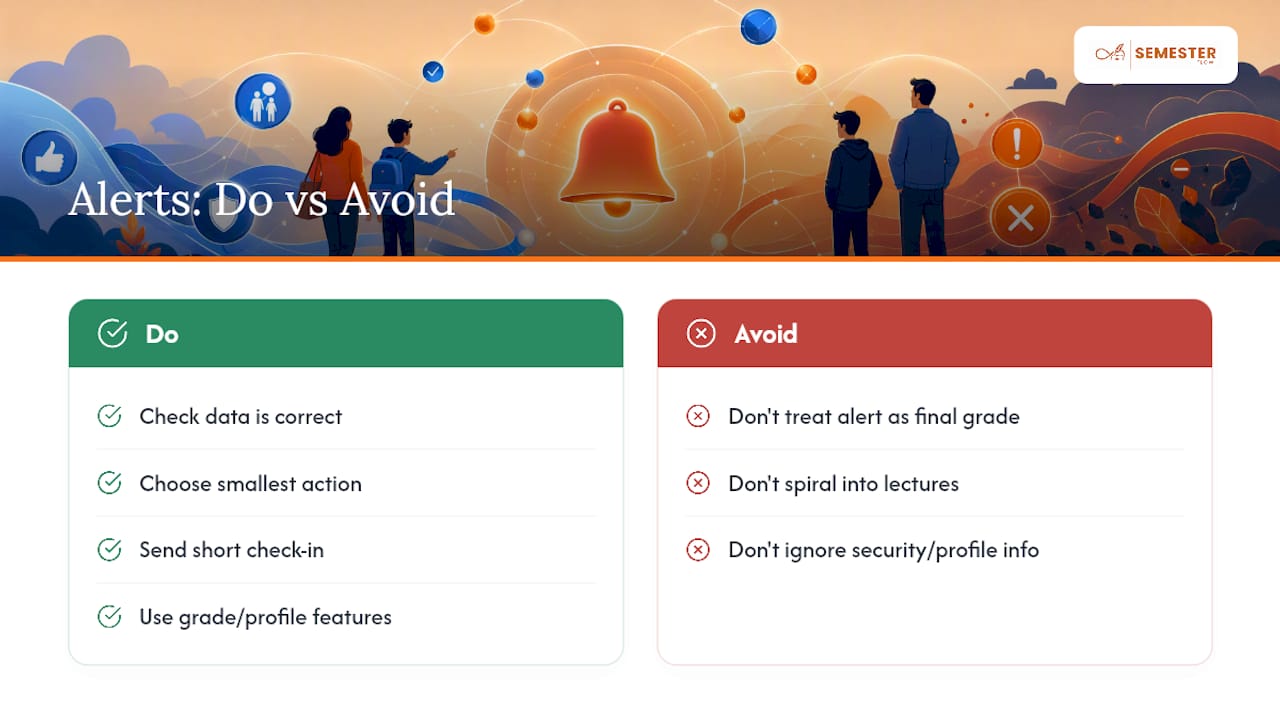
Here's the thing most students get backwards: an alert isn't a grade. It's a projection based on where things stand today, and projections change the moment you turn in the next assignment.
I'd treat every alert as a two-part question: is the data right, and what's the smallest action that moves the number? Skip the spiral. If you're on a parent-monitored account, agree ahead of time that an alert triggers a short check-in, not a lecture. Something like "saw the alert, here's my plan" closes the loop faster than either side scrambling. Features like grade profiles and a documented security page exist precisely so the data stays trustworthy enough to act on without second-guessing it.
— Haden
Why an AI Planner Catches Problems Before Report Cards Do
Report cards tell you about a class after the semester's mostly decided. A planner that watches your grades in real time tells you while there's still room to fix things, which is the entire advantage over checking your grades manually once a month.

An AI academic planner parses your syllabus the day you upload it, builds a grade profile for every course, and projects what you need on upcoming work to hit your target grade, all synced to your calendar so nothing slips through. You get the alert and the fix in the same place instead of piecing it together from three different apps. If you're a parent looking to monitor without micromanaging, some academic planners offer monitored-account options that provide visibility without taking over your student's inbox. Check the plans for students, parents, and organizations or head straight to Semester Flow to upload your first syllabus and see your grade profile within minutes.
Sources
- Developing an Early Warning System with Personalized Interventions to Enhance Academic Outcomes for At-Risk Students
- EduPredict: An AI-Driven Academic Performance Prediction System for Early Identification and Personalized Intervention of At-Risk College Students
- Why Real-Time Grade Tracking is Essential for Modern Education - Dutable