

Yes, you can automate syllabus management: AI parsers now read a PDF or photo of your syllabus and extract due dates, exams, and reading assignments with minimal manual review, then push them straight into a calendar. Some academic planners do exactly this for students, parents running monitored accounts, and student organizations onboarding whole chapters at once. The fastest way to see it work is to upload one syllabus and watch the events populate before you touch a single date by hand.
TL;DR:
- Automated syllabus parsers understand ambiguous date formats better when explicitly referencing the month and year, reducing errors.
- Linking calendar events via OAuth or exporting ICS files depends on the user's platform preferences and privacy concerns.
- Manual review of flagged low-confidence syllabus items takes less than a minute and is vital for ensuring correct scheduling.
- Batch uploading multiple syllabi at the start of the semester prevents scheduling conflicts and improves grade-aware planning.
- Custom rules based on grade weights, categories, or priority help filter and highlight important deadlines within a large calendar.
Table of Contents
- How Syllabus Parsers Turn Text Into Calendar Events
- Real Time Savings From Automated Syllabus Tracking
- Setting Up Automated Syllabus Tracking Step by Step
- Privacy Trade-offs in Automated Syllabus Parsing
- Fixing Common Syllabus Parsing Mistakes
- Does It Connect With Canvas, Blackboard, or Moodle?
- Turning Extracted Deadlines Into Reminders That Actually Work
- Managing Several Courses and Syllabi at Once
- Custom Rules for Prioritizing Syllabus Events
- Balancing Automation With Human Oversight
- Try Semesterflow to Automate Your Own Syllabus Calendar
- Sources
How Syllabus Parsers Turn Text Into Calendar Events
A syllabus parser doesn't "read" the way you do. It runs a pipeline, and understanding that pipeline explains both why it works so well and where it occasionally trips up.
First comes ingestion. Most tools accept PDFs and Word documents natively; scanned pages or screenshots get routed through optical character recognition (OCR) to convert the image into text the parser can actually search. From there, the system hunts for date-like strings, everything from "Oct 14" to "week 6" to "the Friday before Thanksgiving."
That's where things get tricky, and where normalization matters. A date like "12/3" is ambiguous. Is that December 3rd or March 12th? Parser logic built for this problem typically weights explicit year and month cues, then falls back on the term's midpoint as a tiebreaker when the format alone doesn't settle it.
Every extracted item gets a confidence score. High-confidence entries ("Midterm Exam, Tuesday, October 14") sync automatically. Lower-confidence ones get flagged for a quick human check before anything lands on your calendar.
Once you approve events, calendar sync handles the rest:
- Google OAuth connects directly to Google Calendar, so events appear without re-entering anything.
- .ics export works for Apple Calendar, Outlook, or any planner that accepts standard calendar files.
- Recurring lecture and lab times get created as a single repeating series instead of dozens of individual entries.
Semesterflow layers grade tracking on top of this same extraction: assignment weights pulled from the syllabus feed directly into per-class grade profiles, so a missed deadline shows up as a grade risk, not just a calendar gap.
Real Time Savings From Automated Syllabus Tracking
A typical course load of four or five classes can easily produce dozens of deadlines once you count readings, quizzes, labs, and papers. Typing every one of those into a calendar by hand, checking the syllabus PDF each time to confirm the date, eats a surprising amount of time at the start of a semester.
Parsing pipelines cut that setup dramatically by batching the work: detection, normalization, and calendar creation happen for an entire course in one pass instead of one entry at a time. Validated AI planning tools built on this same approach have shown measurable gains in planning efficiency and user satisfaction during testing, and the same rule-based logic has cut institutional scheduling time from weeks to hours in higher-education settings.
The takeaway: the time you save isn't just data entry. It's the mental overhead of remembering which syllabus has which deadline in the first place. Consistent reminders, color-coded classes, and grade projections tied to those same dates turn a calendar into an early-warning system instead of a static list. For organizations onboarding new members each term, that same batching means a chapter's officers upload once instead of walking every pledge through manual entry.
Setting Up Automated Syllabus Tracking Step by Step
Getting from a stack of PDFs to a synced calendar takes less time than most students expect once you know the order of operations.
- Gather your syllabi first. Collect every course document before you start, and confirm the term dates and your time zone are correct in your calendar settings. A wrong time zone silently shifts every event by hours.
- Upload or photograph each syllabus. A clean PDF parses fastest; a phone photo works too, since OCR fallback handles image files, though scanned copies with unusual fonts sometimes need extra review.
- Let the parser run, then scan for flags. Anything marked low-confidence, usually vague phrasing like "due before spring break", needs your eyes before it goes anywhere near your calendar.
- Verify, color-code, and set reminders. Confirm the parsed events match the actual syllabus, assign each class a color, and choose reminder timing (a day before for readings, a week before for papers).
- Sync and save. Connect Google Calendar through OAuth for automatic sync, or export an .ics file if you use another platform.
This upload, review, and save sequence mirrors the workflow documented in practical syllabus-to-calendar guides, and it holds whether you're managing one course or a full load.
For monitored accounts and organization bulk access, batch uploading multiple syllabi at once and assigning an admin to spot-check flagged items saves real time during onboarding week.
Pro Tip: Run the parser on your syllabus the same day your professor posts it. Syllabi rarely change much after the first week, so you get accurate dates locked in before deadlines start piling up.
Privacy Trade-offs in Automated Syllabus Parsing
Not every parsing failure is a bug. Relative dates ("two weeks after the midterm"), open-ended ranges ("readings due throughout unit 3"), and inconsistent formatting between professors are genuinely hard for any parser, which is exactly why confidence scores exist as a safety net rather than an inconvenience.
Privacy works on a similar trade-off. Some tools process syllabi entirely client-side in the browser, which keeps your document off any server but tends to handle fewer edge cases. Cloud-based OCR is generally more capable with messy scans but requires clear answers about how long your document is stored.
A few things worth checking before you connect any account:
- What OAuth scopes the tool requests. Calendar read/write access is normal; access to your Gmail contacts or Drive files beyond what's needed is a red flag.
- Whether you can revoke calendar access at any time through your Google account settings, not just through the app itself.
- For parent-monitored accounts specifically, whether the student, the parent, or both can see uploaded documents and grade data.
Fixing Common Syllabus Parsing Mistakes
Most parsing errors take under a minute to fix once you know what to look for.
Ambiguous dates are the most frequent culprit. If the review screen shows "3/4" with a low confidence flag, correct it once and the tool typically applies the same format assumption to the rest of that document. For recurring lecture times misread as one-off events, batch-editing them into a single series saves you from fixing the same mistake ten separate times.
Date ranges deserve a decision, not a default. A syllabus that lists "Group project: weeks 9 through 11" should either become one multi-day event or three separate milestones, depending on how you actually plan to work. Pick one approach and stick with it across your calendar.
A few habits keep things clean over the long run:
- Export an .ics backup after any big review session, so a bad sync never costs you the whole term's work.
- Double-check the time zone on imported events, especially after daylight saving changes.
- Re-run the parser if a professor issues a revised syllabus, rather than manually hunting for what changed.
- Set a five-minute weekly check to confirm nothing drifted after an LMS update.
Pro Tip: Keep the original syllabus PDF saved even after parsing. When a due date gets disputed weeks later, having the source document settles it in seconds.
Does It Connect With Canvas, Blackboard, or Moodle?
Most syllabus automation tools work independently of your school's learning management system (LMS), and that's by design. Canvas, Blackboard, and Moodle each store assignment data differently, and many professors post the "official" syllabus as a static PDF outside the LMS entirely, with the LMS calendar reflecting only whatever the instructor manually entered.
That gap is precisely the problem syllabus parsing solves. Rather than depending on an LMS export or integration, a parser reads the syllabus document itself, the same one every student already has, and extracts dates directly from it. This approach works the same way whether your school uses Canvas, Blackboard, Moodle, or a system that has nothing to do with any of them.
The practical upshot: you're not stuck waiting on your university's IT department to enable an integration, and you're not limited to whatever a professor happened to update inside the LMS calendar. If the syllabus document has the date, the parser can find it, independent of which platform your school licenses. For students juggling classes across different departments that sometimes use different systems, that consistency matters more than any single LMS connection would.
Turning Extracted Deadlines Into Reminders That Actually Work
A calendar full of correct dates still fails you if the reminders arrive too late to matter, or so early that you tune them out.
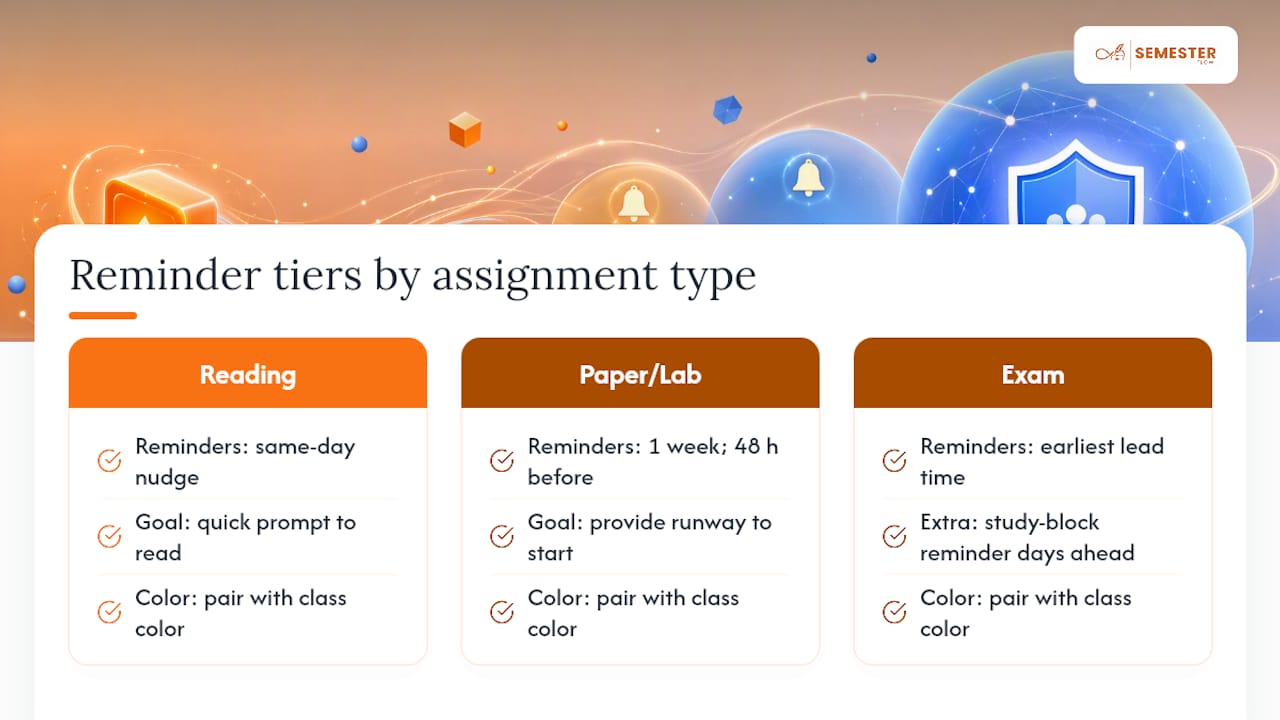
The fix is tiering reminder timing by assignment type rather than using one blanket setting. A short reading response might only need a same-day nudge. A term paper or lab report benefits from a first reminder a week out and a second one 48 hours before, giving you enough runway to actually start rather than just panic. Exams tend to warrant the earliest lead time of all, often paired with a study-block reminder several days ahead.
Color-coding by class helps too, but it works best paired with reminder tiers rather than instead of them. Seeing that Thursday is "orange" for Organic Chemistry tells you which class; a well-timed notification tells you what's actually due and when to start.
For parent-monitored accounts, notifications can extend beyond the student. A parent watching a monitored account can receive a lighter-touch alert, such as a weekly digest of upcoming deadlines, rather than every single reminder the student gets, which keeps oversight useful without turning into constant checking.
The habit that makes this stick: review your reminder settings once at the start of the semester, then leave them alone. Constantly adjusting notification timing defeats the purpose of automating it in the first place.
Managing Several Courses and Syllabi at Once
Running one syllabus through a parser is straightforward. Running five, each with its own grading scheme, deadline format, and professor's shorthand, is where a real system needs to hold up.
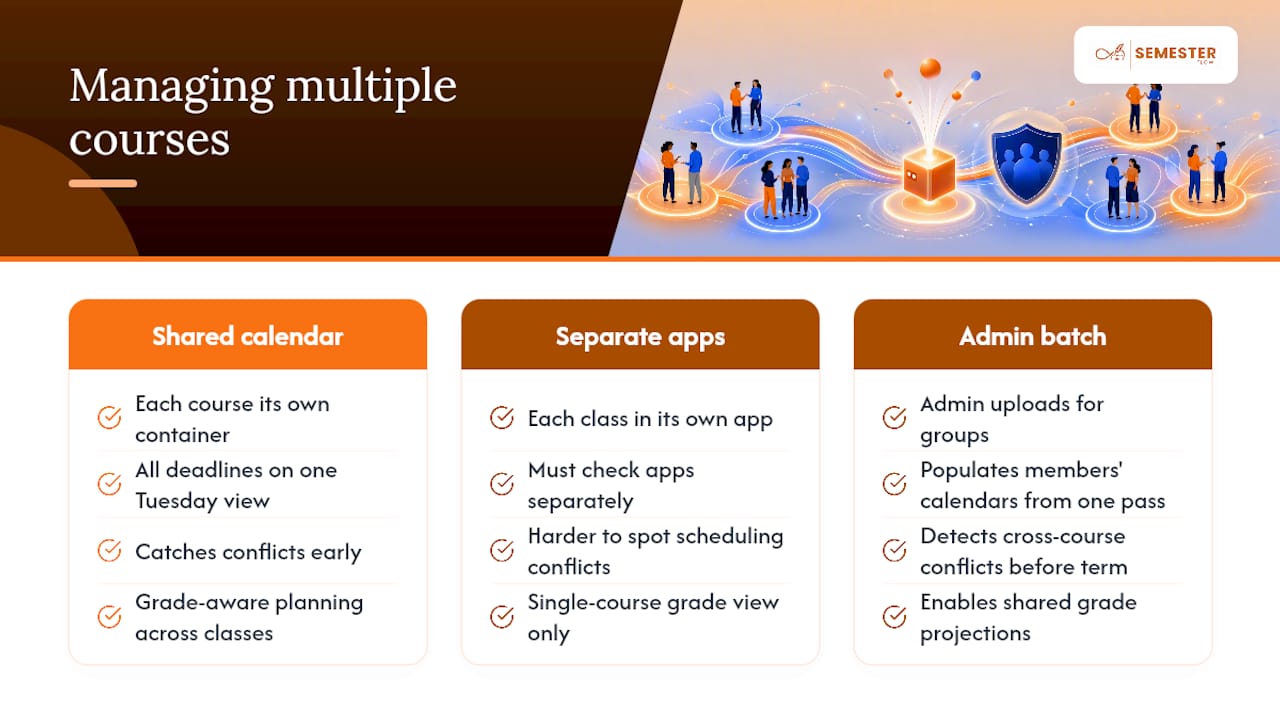
The practical answer is treating each course as its own container inside one shared calendar view. Every class gets its own color and its own grade profile, but all of it lives on the same calendar, so a Tuesday view shows every class's deadlines side by side rather than requiring you to check five separate apps.
Concurrent uploads work best when you process syllabi in a batch at the start of the term rather than one at a time as classes start. This lets you catch scheduling conflicts early, like two professors both scheduling midterms during the same week, before they become a crisis. For organizations managing bulk access across dozens of members, the same batching principle applies at scale: an admin uploads on behalf of the group, and each member's calendar populates from a shared parsing pass rather than requiring individual setup.
One underrated benefit of handling multiple courses in a single system: grade-aware planning gets sharper. When Semesterflow's grade projection feature sees deadlines and weights across every class simultaneously, it can flag that your Thursday is unusually deadline-heavy across three different courses, something no single-course view would ever catch.
Custom Rules for Prioritizing Syllabus Events
Custom filtering solves this by letting you set rules based on what the syllabus itself already tells you. If an assignment's grade weight, often pulled directly from the syllabus's grading breakdown, crosses a threshold you set, it gets flagged as high priority automatically. Assignments under a certain weight can be filtered into a lower-visibility view so your main calendar isn't cluttered with every single reading check.
Category-based rules work well too. You might want every exam labeled distinctly regardless of weight, since exams carry a different kind of prep timeline than a paper does. Or you might want group project milestones tagged separately so you can coordinate with teammates without digging through your whole semester.
The most effective setups combine both approaches: weight-based priority for how much a reminder should stand out, and category tags for what kind of prep it needs. A parser that surfaces grading percentages as part of its extraction, the same data that feeds GPA projections, makes this kind of filtering possible without you manually re-entering weights anywhere.
Balancing Automation With Human Oversight
Full automation makes sense once a syllabus is stable and deadline-heavy: a lecture course with a fixed exam schedule barely needs a second look after the first review pass. Hybrid oversight earns its keep when grading schemes are murky, group projects have shifting milestones, or a professor tends to revise dates mid-semester.
The smartest rollout isn't all-or-nothing. Try one course first, keep a five-minute weekly glance at what synced, and let automation earn the trust that lets you stop double-checking everything by hand. That freed-up attention belongs on actual study strategy, not date entry.
— Haden
Try Semesterflow to Automate Your Own Syllabus Calendar
Some academic planners turn the workflow described above into one upload instead of a semester of manual entry. Upload a syllabus and a parser can extract your class schedule, assignments, and exams, then sync everything directly to Google Calendar with confidence scoring on anything that needs a second look.

Beyond calendar sync, Semesterflow tracks real-time GPA and flags at-risk courses before a slumping grade becomes a surprise, projects what you'd need on remaining assignments to hit a target grade, and organizes your course documents automatically. Students can start on an individual account; parents can set up a monitored account for accountability without micromanaging; and student organizations get admin dashboards built for onboarding a whole chapter's worth of members at once. Full feature and pricing details are on the site, along with a breakdown of how account security and data handling work.
Start with the free tier: upload one syllabus, review what the parser catches, and connect your Google Calendar to see your semester laid out in a few minutes at Semesterflow.
Sources
For the research behind AI-driven planning, see the smart study planner validation study and the rule-based timetabling case study. For hands-on parser mechanics, check SyllabusSync's documentation and Syllabus Kitty.
- Automated timetabling rule-based AI case study (i-jet)
- An AI-Based Smart Study Planner for University Class Scheduling Optimization (IJIC)
- Turn syllabus screenshots into calendar events automatically (Calendara blog)
- SyllabusSync project documentation (Devpost)