

Yes, you can subscribe your Blackboard calendar to Google, Apple, or Outlook by copying the ICS link from Blackboard's Calendar Settings and pasting it into your calendar app. It's a one-way subscription, not a two-way sync, and updates can lag behind Blackboard by roughly 12 to 48 hours. Always check Blackboard or your syllabus directly before an urgent deadline.
TL;DR:
- Blackboard's calendar feed updates can lag by 12 to 48 hours, so rely on the syllabus for the most accurate deadlines.
- Sharing the ICS link grants access to anyone with it, requiring careful handling and privacy caution to prevent unwanted visibility.
- Subscription setup varies by app: Google Calendar refreshes every 12 to 48 hours, Apple requires subscribing on Mac or iCloud, and Outlook's subscribe vs import options are critical.
- Blackboard automatically exports only graded assignments, instructor-created events, and officially entered due dates, leaving out non-graded tasks and third-party work.
- To mitigate gaps and delays, cross-check the subscription with the syllabus weekly and consider using syllabus-parsing tools for more comprehensive schedule management.
Table of Contents
- How to Get the Blackboard Calendar Subscription Link
- Add Blackboard Assignments to Google Calendar
- Add Blackboard Assignments to Apple Calendar
- Add Blackboard Assignments to Outlook or Office 365
- What Blackboard Actually Exports (and What It Skips)
- Fixing Sync Problems: Refresh Delays, Time Zones, and Missing Events
- The Real Problem Isn't the Sync, It's the Gaps
- The Hands-Off Way to Skip the Manual Checking
- Where to Verify These Steps Yourself
- Sources
- FAQ
How to Get the Blackboard Calendar Subscription Link
Every subscription starts in the same place: Blackboard's global calendar, not any single course page. That distinction trips up a lot of students who go hunting inside a specific class and never find a "share" button.
Here's the actual path:
- Open the global Calendar from your Blackboard course list menu (not a course-level calendar tab).
- Click Calendar Settings, usually a gear icon or the three-dot ellipsis menu.
- Select Share Calendar.
- Click Copy Link to grab the ICS subscription URL.
That link works across every course you're enrolled in at once. There's no way to share just one class's calendar. If the share option doesn't produce a link, try regenerating it or checking your institution's sharing permissions, since some campuses restrict external sharing by default.
One more thing worth taking seriously: that URL grants calendar access to anyone who has it. Treat it the way you'd treat a password. Don't paste it into a group chat, a public Google Doc, or a shared class Slack. Anyone with the link can see your assignment titles and due dates for the entire semester.
Add Blackboard Assignments to Google Calendar
Google Calendar is the most common destination for this, and the setup takes about two minutes once you have the link copied.
- Open Google Calendar on desktop.
- Find Other calendars in the left sidebar and click the plus icon.
- Choose From URL.
- Paste the Blackboard ICS link and click Add calendar.
The new calendar shows up as its own entry under "Other calendars," with its own color and its own on/off toggle, so it won't blend into your personal events. Click the three-dot menu next to it to turn on notifications if you want reminders for upcoming due dates. Google typically refreshes subscribed calendars every 12 to 48 hours, so a brand-new assignment posted this morning might not appear until tomorrow.
Pro Tip: After adding the calendar, find one assignment you already know the due date for and confirm it shows up correctly. That single check catches a bad link or a settings mismatch before it costs you a missed deadline.
Add Blackboard Assignments to Apple Calendar
Apple's setup works a little differently depending on whether you start on a Mac or an iPhone, and that difference matters more than most guides let on.
- On a Mac, open Calendar, then go to File → New Calendar Subscription, paste the ICS URL, and hit Subscribe.
- In the subscription settings, set the auto-refresh frequency. Apple defaults to a longer interval, so bumping it to every 15 minutes or every hour gets you closer to real-time updates.
- On iOS, there's no direct "add by URL" option buried in Settings the way there is on Mac. The reliable path is subscribing on a Mac or through iCloud.com first, since a calendar added to iCloud syncs automatically to every device signed into that Apple ID, including iPhone and iPad.
- Test it with an assignment due in the next few days, then check that it carried over to your iPhone.
If nothing shows up on mobile after a subscription on Mac, give it a few minutes. iCloud propagation isn't instant either.
Add Blackboard Assignments to Outlook or Office 365
Outlook treats calendar subscriptions and calendar imports as genuinely different features, and picking the wrong one causes most of the confusion here.
- In Outlook on the web, click Add calendar, then Subscribe from web.
- Paste the Blackboard ICS URL and give the calendar a name you'll recognize later.
- In the desktop app, go to Account Settings → Internet Calendars → New, and paste the same URL.
Subscribing keeps the calendar updated automatically as Blackboard changes; importing an .ics file only creates a one-time snapshot that goes stale the moment your professor moves a deadline. Subscribe whenever you have the choice. If your school runs Outlook through a managed Microsoft 365 tenant, IT policy can sometimes block external calendar subscriptions entirely. If yours doesn't show up after a few tries, that's worth a quick email to campus IT before you assume you did something wrong.
What Blackboard Actually Exports (and What It Skips)
Blackboard's calendar feed isn't a complete mirror of your coursework, and assuming it is leads to missed work that technically was never going to show up in the first place.
What typically comes through automatically:
- Graded assignments and tests with due dates entered directly into Blackboard.
- Instructor-created calendar events, as long as they were built inside Blackboard's own calendar tool.
What often gets left out:
- Non-graded tasks and reading assignments that don't have a formal due-date field attached.
- Work assigned through third-party tools (publisher platforms, external homework systems) that aren't fully integrated with Blackboard's gradebook.
- Announcements about deadline changes made verbally or in a class email rather than updated inside Blackboard itself.
Blackboard's own guidance to students is blunt about this: the calendar is a convenience layer, and the syllabus remains the authoritative source for deadlines. That's not a knock on the feature. It just means your subscribed calendar is a strong first line of defense, not the entire defense.
Fixing Sync Problems: Refresh Delays, Time Zones, and Missing Events
Most "broken sync" complaints aren't actually broken. They're just running into the normal refresh delay, which campus IT support pages consistently flag as a real source of confusion. Students who assume Blackboard updates propagate instantly can end up with a false sense of security right before a deadline changes.
- If a new assignment isn't showing up, wait. The refresh window runs roughly 12 to 48 hours depending on the calendar app.
- Still nothing after two days? Regenerate the Blackboard share link and re-subscribe with the new URL. That forces a fresh pull instead of waiting on the old sync cycle.
- Check time zone settings in both Blackboard and your calendar app. A mismatched time zone can shift a due time by hours without any error message telling you it happened.
- If an assignment is missing entirely rather than just delayed, check the course content page directly, then message the instructor. Chances are it was never entered into Blackboard's calendar tool at all.
Pro Tip: Turn on notifications for your subscribed Blackboard calendar the same day you add it. A silent calendar entry is barely better than no entry, since you still have to remember to look.
The Real Problem Isn't the Sync, It's the Gaps
The mechanics of getting Blackboard assignments to calendar are easy enough that any student can follow the steps in ten minutes. What the conventional advice glosses over is that the sync itself was never the hard part. The hard part is that Blackboard's calendar typically reflects only the assignments and events instructors enter correctly, and some instructors may not update it fully.
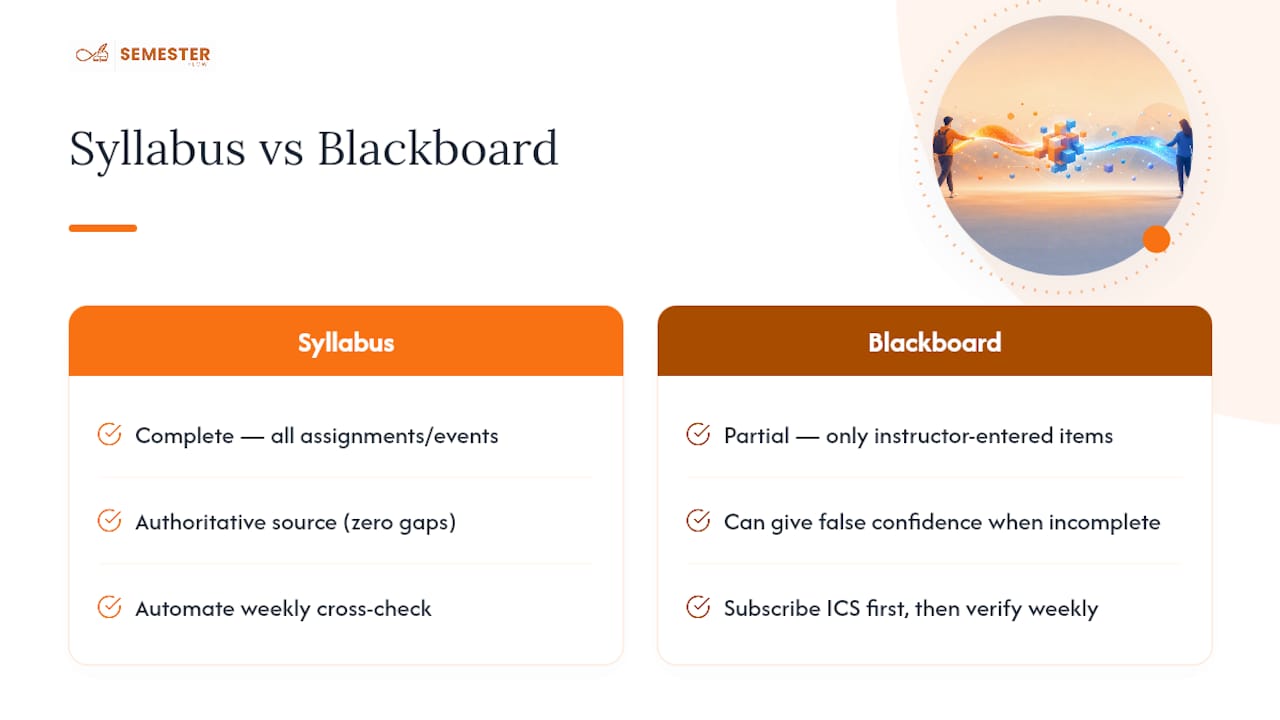
That's the gap most "how to sync your calendar" guides skip past. They walk you through copying a link and call it solved. It isn't solved, because a subscribed calendar full of holes is worse than an obviously incomplete one. It gives you false confidence right up until the reading assignment nobody logged into Blackboard turns out to be due tomorrow.
If you want a real fix instead of a partial one, the priority order should be: get the ICS subscription running first, since it's free and takes minutes. Then build in a weekly habit of cross-checking against the actual syllabus, because that's the only document with zero gaps by definition. Automating the syllabus side of that equation, rather than relying on whatever an instructor manually typed into a course shell, is where the bigger win sits.
— Haden
The Hands-Off Way to Skip the Manual Checking
There are syllabus-parsing tools that read a syllabus and build a full schedule of assignments, tests, and deadlines directly, then sync the whole thing to Google Calendar.

That matters most in the classes where Blackboard is thin. Plenty of instructors post a syllabus PDF and call it done, updating Blackboard's calendar tool sporadically or not at all. Semesterflow reads the syllabus itself, so a reading assignment or project deadline buried in a paragraph gets captured the same way a formal Blackboard entry would. On top of the calendar sync, it tracks your GPA in real time and flags a class before a slumping grade turns into a semester-ending problem, and it keeps your course documents organized alongside the schedule instead of scattered across a dozen browser tabs.
If your Blackboard calendar has ever left you scrambling over an assignment nobody warned you about, try the free tier at Semester Flow and see whether your next syllabus tells a fuller story than your Blackboard feed does.
Where to Verify These Steps Yourself
For institution-specific menu differences or a visual walkthrough, check Anthology's official Blackboard calendar help documentation, your campus IT knowledge base, and Microsoft's support page on subscribing versus importing calendars. If you want a live demo of the subscription steps rather than a written one, The Lead Lab's webinar library covers similar calendar walkthroughs.
Sources
- Blackboard: Share Calendar (Campus IT article)
- Connect Blackboard Assignments to Google Calendar - Info Tech News (Fordham)
- Import or subscribe to a calendar in Outlook.com or Outlook on the web - Microsoft Support
FAQ
Can I Connect Blackboard to My Calendar?
Yes. Copy the ICS subscription link from Blackboard's Calendar Settings under Share Calendar, then add it to Google Calendar, Apple Calendar, or Outlook using each app's "subscribe" or "from URL" feature.
Why Are Schools Moving Away from Blackboard?
Some institutions are migrating to other learning management systems for cost, interface, or integration reasons, but Blackboard remains widely used, and the calendar subscription method described here works the same way regardless of what your specific campus decides.
How Do I Import a Blackboard Schedule into a Calendar?
Get the ICS link from Blackboard's Share Calendar option, then choose "subscribe" rather than a one-time import in your calendar app of choice, since subscribing keeps future changes flowing in automatically instead of freezing the schedule at the moment you added it.
How Do I Transfer a Blackboard Calendar to Apple Calendar?
On a Mac, use File → New Calendar Subscription and paste the Blackboard ICS URL; since iCloud syncs that subscription across your devices, it will also appear on your iPhone and iPad without a separate setup step.
Why Are Some of My Assignments Missing from the Synced Calendar?
Blackboard only exports items with due dates entered directly into its calendar tool, so non-graded tasks or work assigned through third-party platforms often don't appear; cross-checking your syllabus weekly, or using a syllabus-parsing tool like Semesterflow, catches what the Blackboard feed misses.