

You can move exam dates from a syllabus into Google Calendar in minutes: upload or paste the syllabus, let an AI parser pull out the dates, check its work, then export or sync to your calendar. Tools like Semesterflow handle the extraction and the sync in one pass, but every date still needs a quick human check before it locks into your schedule.
TL;DR:
- Extracted exam dates from syllabi are most accurate when cropped and optimized images are used, with manual review needed to catch errors.
- Subscription feeds offer ongoing updates for rescheduled exams, while static imports require re-importing to reflect any date changes.
- Tools like Semesterflow enable quick syllabus-to-calendar transfers and support direct sync, reducing manual data entry and minimizing mistakes.
- Review confidence scores and verify relative dates against syllabus start dates to prevent scheduling errors, especially for ambiguous or low-confidence extractions.
- Organizing exam events in a dedicated, color-coded calendar layer with reminders and links to study materials improves study planning and calendar clarity.
Table of Contents
- Quick Checklist: Paste, Upload, Manual Entry, or an AI Planner?
- Step by Step: Extracting Exam Dates From a PDF, Screenshot, or Pasted Text
- How to Get Parsed Exam Dates Into Google Calendar
- How to Catch Parsing Mistakes Before They Hit Your Calendar
- Best Practices for Organizing Your Exam Calendar
- Why Automating Syllabus Extraction Actually Matters
- Skip the Manual Work With Semesterflow
- Sources
- FAQ
Quick Checklist: Paste, Upload, Manual Entry, or an AI Planner?
The right method depends on what your syllabus looks like and how often it changes.
- Paste the text when your syllabus is a Word doc or web page you can copy cleanly. This is the fastest route into an AI parser, since there's no image processing involved.
- Upload a PDF or screenshot when the exam dates live inside a scanned document or a photo of a printed schedule. You'll want a tool with OCR (optical character recognition) built in, since plain text extraction fails on images.
- Type it in by hand if you've only got one short syllabus and no plans to update it. It works, but it's slow, and it's the easiest way to fat finger a date.
- Use a subscribable calendar feed or an app with direct calendar sync when your professor tends to shift exam dates mid semester. A one time import won't catch that change; a live feed will.
Step by Step: Extracting Exam Dates From a PDF, Screenshot, or Pasted Text
Getting clean output starts before you ever touch an AI tool. Here's the sequence that actually works.
- Trim the document first. Crop or copy only the pages that contain dates, grading breakdowns, or the exam schedule table. Feeding an entire 20-page syllabus to a parser adds noise and increases the odds it misreads something.
- Optimize images before uploading. If you're working from a screenshot or a scanned page, shoot for high contrast, crop tightly around the date section, and save as a PNG or PDF rather than a compressed JPEG. Blurry or low-contrast captures are the single biggest cause of bad OCR output, according to case studies on document processing pipelines for student tools.
- Upload or paste into a parser and let it run. A well-built pipeline runs the text through pdf.js or OCR, filters for date-like content, then sends that to a language model for structured extraction, a workflow documented in the open source SyllaSync project. Expect structured output with fields like event title, date, time, and a confidence score for each item.
- Group by course and sort by confidence. Review the lowest-confidence items first, since those are the ones most likely to be wrong. For anything phrased as a relative date, "Week 9," "the Monday after spring break," map it against your syllabus's stated term dates or first day of class to convert it into an actual calendar date.
- Save per-course or export per-course .ics files. If you're juggling five classes, a single unified calendar gets noisy fast. Splitting exports by course, or at least color-coding within one calendar, keeps Organic Chemistry finals from blending into your Econ midterm.
The whole process, from upload to a reviewed, saved event, can run a few minutes per course—approximately five seconds to upload, about twenty seconds for AI extraction, roughly two minutes to review, and a few seconds to save—based on a walkthrough of syllabus-to-calendar extraction. For a typical semester with multiple classes, this saves significant time compared to typing every date in by hand and double-checking it against the syllabus PDF.
How to Get Parsed Exam Dates Into Google Calendar
Once you've got a clean list of extracted dates, you have three real options for getting them into Google Calendar, and they are not equally good.
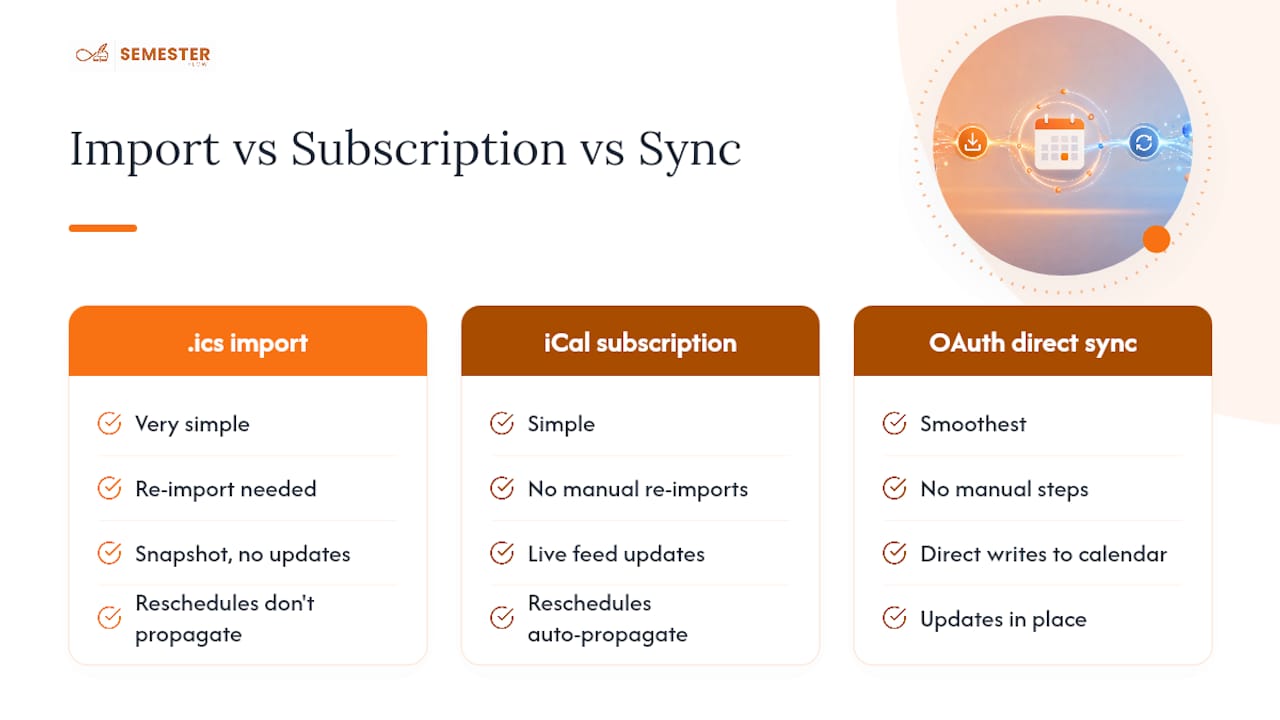
One-time .ics import is the simplest. In Google Calendar's web interface, go to Settings, choose Import & Export, then upload the .ics file your parsing tool generated. It works, but it's a snapshot: if your professor moves the final exam two weeks later, that change never reaches your calendar unless you re-import manually.
Calendar subscription via an iCal URL solves that problem. Instead of importing a static file, you add a live feed address under "Add calendar" > "From URL." Any updates the source pushes, a syllabus revision, a rescheduled midterm, flow into your calendar automatically. Product notes from SylCampus point out this is specifically why a subscribable feed beats a one-time export for anything that might change mid-semester, which describes most college syllabi by week six.
OAuth-based direct sync is the smoothest option when a tool supports it. Instead of files or feeds, the app connects directly to your Google account and writes events straight into your calendar, updating them in place if something changes. This is an approach used by some tools, and it eliminates the manual file-juggling step entirely.
One detail that trips people up: timezone handling. Exam times need to import as timed events (say, 2:00 PM to 4:00 PM), not all-day blocks, or you'll show up expecting an exam that already started. Projects that focus on export quality, like the Datemate calendar-sync tool, normalize dates to the ISO 8601 standard specifically to avoid this kind of cross-platform mismatch between Google, Apple, and Outlook calendars.
How to Catch Parsing Mistakes Before They Hit Your Calendar
AI extraction is fast, but it isn't infallible, and syllabus formatting is genuinely inconsistent from professor to professor. Academic research on parsing course outlines confirms that semi-structured documents, tables mixed with prose, inconsistent date formats, embedded images, are a real technical challenge even with dedicated information extraction techniques. A few checks catch most problems before they become a missed exam:
Confirm the year got mapped correctly. A syllabus rarely spells out "2026" next to every date, so a parser working from "October 14" alone can misfire if it defaults to the wrong term. Resolve any relative language, "by the end of Week 6," "the Monday before finals," against your syllabus's own stated start date rather than guessing. Watch for table-parsing errors, where a date column and a grading-weight column get scrambled, and double-check AM/PM on any time that looks off, since a "10:00" with no marker is a coin flip for most parsers.
Review confidence scores before anything else. Tools that group results by course and flag low-confidence items, an approach used in projects like Syllabus Simplify, make this step fast: you're checking three shaky entries instead of thirty. Once you're confident an event is right, add the room number or building if your syllabus lists one, so the calendar entry is useful the morning of the exam, not just a reminder that something is happening.

Best Practices for Organizing Your Exam Calendar
A pile of correctly dated events isn't the same as a calendar you'll actually use to study. A few habits make the difference.
Create a dedicated "Exams" calendar layer inside Google Calendar and color-code it separately from lectures, assignments, and social events. When you glance at your week, exams should visually jump out, not blend into the general noise of a packed college schedule.
- Set layered reminders: one week out, 48 hours out, and day-of. A single notification the morning of a final is not a study plan.
- Build backward-counting study blocks in the days before each exam, treating them as their own calendar events with their own reminders.
- Attach the relevant syllabus page or a study guide link, stored in Google Drive, directly to the calendar event so materials are one click away instead of buried in an email thread.
- Favor a subscribable feed or direct sync over repeated manual imports, since it's the only option that keeps up when a professor reschedules.
Pro Tip: Name each event with the course code first, "CHEM 201: Final Exam" instead of just "Final," so a quick glance at your phone's lock screen tells you exactly which class is coming up without opening the app.
Why Automating Syllabus Extraction Actually Matters
A semester's worth of syllabi, five or six classes, each with midterms, finals, and quizzes scattered across a PDF, adds up to a lot of manual data entry if you do it by hand. Automating that extraction doesn't just save time; it removes the specific kind of error that happens when you're tired and copying a date at 1 AM. That said, automation isn't a substitute for judgment. Every parser needs a human review pass, because confidence scores flag uncertainty, they don't resolve it. Keep it simple: one calendar per course, or a single well-organized "Exams" layer, and you'll spend exam season thinking about content instead of logistics.
— Haden
Skip the Manual Work With Semesterflow
Some AI-powered academic planners are built for workflows like the one described, offering features such as uploading a syllabus and extracting exam dates, assignment deadlines, and office hours, with confidence scores to help identify items for review before they write to your calendar. These tools may allow exporting a .ics file or syncing directly to Google Calendar over OAuth, reducing the need for manual file transfers when professors update due dates.

Some academic planners also offer features such as GPA tracking, alerts for courses at risk of slipping, and organization of syllabi and study materials in cloud storage, helping students keep materials accessible without searching through emails. If you're curious how the grade tracking side works, the grade profile feature breaks down how per-class trends get surfaced. Ready to stop manually copying dates every semester? Check the Semesterflow plans and get your next syllabus onto your calendar today.
Sources
- Turn Syllabus Screenshots into Calendar Events Automatically
- SyllaSync (syllabus to calendar example project)
- Course outline data extraction (CODE) — information extraction techniques applied to syllabi
FAQ
Can I really get exam dates from a syllabus into Google Calendar automatically?
Yes. Upload or paste the syllabus into an AI parser, review the extracted dates and confidence scores, then export an .ics file, subscribe to a feed, or sync directly through OAuth with a tool like Semesterflow.
What's the difference between .ics import and calendar subscription?
An .ics import is a one-time snapshot that won't update if your professor changes a date, while a subscription pulls in a live feed so schedule changes flow into your calendar automatically.
Why does the AI sometimes get exam dates wrong?
Syllabus formatting varies wildly, tables, relative dates like "Week 9," missing years, and scanned images all trip up parsers, which is why reviewing low-confidence items before saving matters.
Do I need a separate calendar for each class?
Not necessarily. A single color-coded "Exams" layer inside Google Calendar works well for most students, though separate calendars per course can help if you're managing a heavy course load.
How much time does this actually save compared to typing dates manually?
Processing a full syllabus this way can take about three minutes per course from upload to a reviewed calendar entry, according to one documented workflow, versus considerably longer when you're manually cross-checking each date by hand.