

Projected GPA equals your current quality points plus your planned quality points, divided by your total credits once those new courses are done. Written out: Projected GPA = (current GPA × current credits + planned grade points) ÷ (current credits + planned credits). You need three numbers to run it yourself:
- Your current cumulative GPA
- Your total completed credits (GPA hours)
- Your planned courses, with expected grades and credit values for each
Do the math by hand once so you trust it, then let a tool like Semester Flow keep the projection current as grades actually post.
Key Takeaways
Accurate GPA prediction depends on exact transcript inputs, the correct grading scale, and honest grade estimates run through the standard weighted-average formula.
| Point | Details |
|---|---|
| Formula first | Projected GPA = (current GPA × current credits + planned grade points) ÷ total credits. |
| Use real transcript numbers | Pull current GPA and credit hours from your registrar portal, not memory. |
| Model both extremes | Run best-case and worst-case scenarios before trusting a single projected number. |
| Check school policy | Confirm retake, transfer, and pass/fail rules before setting planner options. |
| Automate with Semester Flow | Its Grade Goal Projection and Grades Cockpit update your GPA forecast as grades post. |
Table of Contents
- How Gpa Prediction Math Actually Works
- Setting Up A Gpa Calculator The Right Way
- Modeling Best Case, Worst Case, And Your Target Gpa
- Institutional Rules That Change Your Projected Gpa
- Where To Put Your Effort For The Biggest Gpa Gain
- How Semester Flow Automates The Whole Projection
- Authoritative Calculators And Registrar Tools
- What Most Advice On Gpa Planning Gets Wrong
- Turn Your Gpa Projection Into A Live Dashboard
- Frequently Asked Questions About Gpa Prediction
- Sources
How Gpa Prediction Math Actually Works
Every GPA prediction starts with quality points. A quality point is what you get when you multiply a course's credit hours by the numeric value of the grade you earned in it. Most US schools run on a 4.0 scale: A = 4.0, B = 3.0, C = 2.0, D = 1.0, F = 0.0. Plenty of schools go further, using plus/minus increments where an A− lands at 3.7 and a B+ sits at 3.3, and some even recognize an A+ as 4.3. That distinction changes your projection more than most students realize, since a school that caps GPA at 4.0 handles an A+ differently than one that rewards it above 4.0. Check your own school's exact scale before you run any numbers, because a projection built on the wrong scale is wrong by design and not by accident.
The formula itself: Projected GPA = (current GPA × current credits + sum of planned grade points) ÷ (current credits + planned credits).
Here's a worked example. Say you're sitting at a 3.2 GPA with 60 credits completed. You're planning 15 more credits this semester: a 4-credit class where you expect an A (4.0), a 3-credit class where you expect a B+ (3.3), a 5-credit class where you expect a B (3.0), and a 3-credit class where you expect an A− (3.7).
| Step | Calculation | Result |
|---|---|---|
| Current quality points | 3.2 × 60 | 192 |
| Planned quality points | (4×4.0)+(3×3.3)+(5×3.0)+(3×3.7) | 16+9.9+15+11.1 = 52 |
| Total quality points | 192 + 52.0 | 244 |
| Total credits | 60 + 15 | 75 |
| Projected GPA | 244 ÷ 75 | 3.25 |
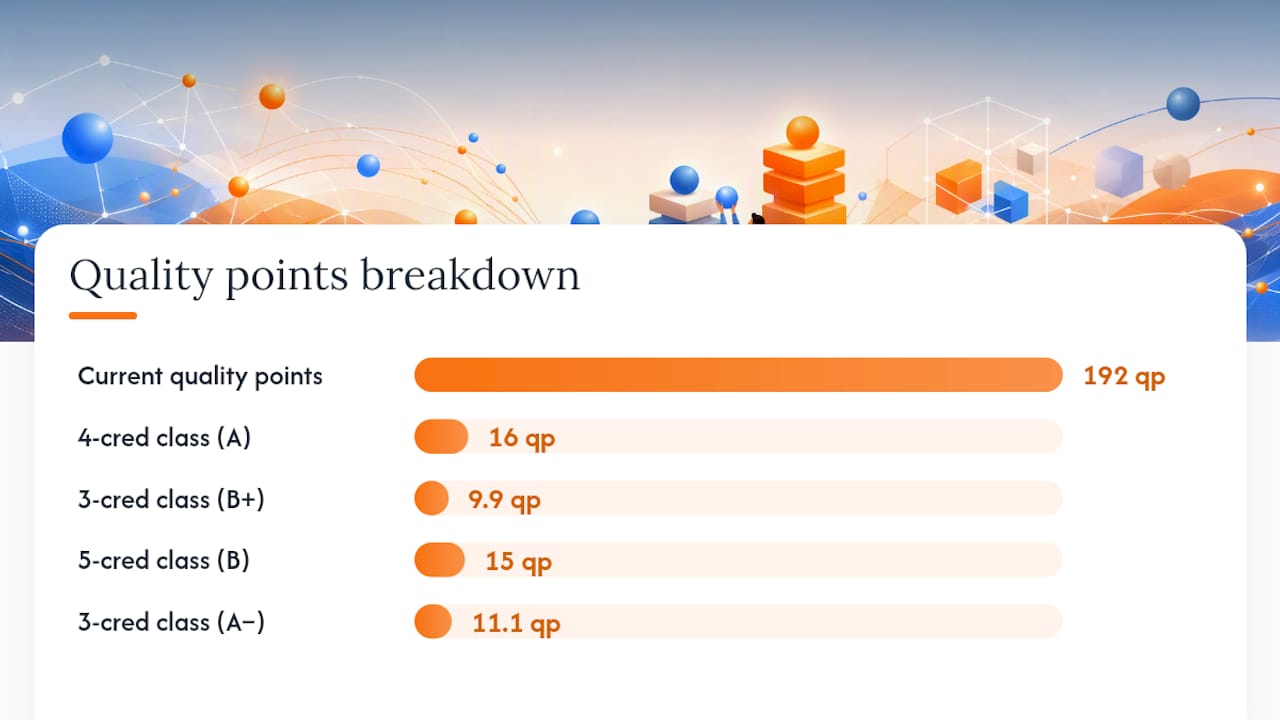
Registrars use exactly this quality points over credit hours structure to calculate semester and cumulative GPA, so this is the same math your transcript runs behind the scenes.
Setting Up A Gpa Calculator The Right Way
Bad inputs produce a confident, wrong number. Before you touch a planner, pull your official transcript or log into your registrar portal and copy your exact cumulative GPA and total completed credit hours; don't estimate from memory.
- Enter your current cumulative GPA and total GPA hours exactly as your transcript lists them.
- Add each planned course with its real credit value and your honestly expected letter grade.
- Confirm the grading-scale setting matches your school, especially whether A+ counts as 4.0 or 4.3 and whether plus/minus increments apply at all.
- Check whether the tool groups courses by semester or treats everything as one flat pool, since grouping affects how retake and prior-GPA settings behave.
- Look for a retake or grade-replacement toggle and a way to save a snapshot of your current what-if scenario.
Most calculators also let you choose a grade-format input (letter, percentage, or raw point value) and add prior semesters one at a time rather than dumping in a single lump GPA. Both settings exist specifically to catch input errors before they warp your projection.
Pro Tip: Run the same scenario twice, once with your school's default scale and once with a plain 4.0 no-plus-minus scale. If the two numbers differ by more than a tenth of a point, you've found a setting that matters more than you thought.
Modeling Best Case, Worst Case, And Your Target Gpa
A single projection tells you one story. Running best case and worst case side by side tells you the range you're actually working with, and that range is what should drive decisions, not the middle number.
- Best case: every planned course lands at your optimistic grade estimate.
- Worst case: shave a half grade point off each expected grade and rerun the formula.
- Reverse-solve: rearrange the formula to find the grade you need. If you want a target cumulative GPA, the required planned grade points equal (target GPA × total future credits) minus current quality points, divided by planned credits.
Say you're at 2.9 GPA with 70 credits and want a 3.0 after 15 more credits: required points = (3.0 × 85) − (2.9 × 70) = 255 − 203 = 52, divided by 15 credits = a 3.47 average across those courses. That's a B+/A− blend, not a stretch, but it tells you exactly what you need instead of hoping.
Credit weight matters enormously here. A 4-credit course that drops from an A to a B costs you far more than a 1-credit lab making the same drop, since higher completed-credit totals dilute the effect of any single course while high-credit courses still swing the average hard in either direction.

Institutional Rules That Change Your Projected Gpa
Your school's policy manual matters as much as the formula. Three areas trip up almost every student running a first projection:
- Retakes: some schools fully replace the old grade in your GPA calculation, others average both attempts, and a few use an additive model that keeps both grades on the transcript but adjusts GPA differently.
- Transfer credit: credits from another institution often count toward your degree but get excluded from your institutional GPA entirely, so don't include them in your GPA hours.
- Pass/fail and audit grades: these typically don't factor into GPA math at all, even though they count for credit toward graduation.
Pull up your registrar's academic catalog and confirm which of these apply before you set your planner's retake or transfer settings. A projection that ignores your school's actual replacement policy can be off by a tenth of a point or more, which matters a lot when you're chasing a scholarship or Dean's List cutoff.
Where To Put Your Effort For The Biggest Gpa Gain
Not all courses are worth the same fight. A few habits separate students who hit their target GPA from students who just hope for the best:
- Prioritize high-credit courses first; a 4-credit class moving from a B+ to an A shifts your cumulative GPA more than two 1-credit electives combined.
- Model a conservative worst-case scenario alongside your hopeful one, since advisors consistently flag over-optimistic projections as a source of false security that delays students from seeking help when they actually need it.
- If your worst-case scenario still misses your target, that's the signal to talk to an advisor, book tutoring, or seriously weigh a withdrawal before a bad grade posts.
Pro Tip: Grade your own past performance honestly before you plug in an "expected grade." If you've never earned an A in a 300-level class before, don't project one now just because the target math needs it.
How Semester Flow Automates The Whole Projection
Running this math manually every time a grade posts gets old fast. Semester Flow's Grade Goal Projection tool applies the same weighted-average formula automatically, updating your cumulative projection the moment a new grade lands.
- The Grades Cockpit shows your current GPA trajectory and flags courses dragging it down before the semester ends.
- Per-class grade profiles track credit weight and grade history per course, so you can see exactly which class would move your GPA most if you improved it. Full details live on the grade profile documentation page.
- Syllabus parsing pulls credit hours and grading weights directly from your uploaded syllabus and syncs deadlines to Google Calendar, cutting out the manual data entry that usually introduces errors into a hand-built projection.
| Manual process | Semester Flow equivalent |
|---|---|
| Copy GPA and credits from transcript | Auto-pulled from synced grade history |
| Re-run formula after each grade | Live projection updates automatically |
| Track credit weight per course by hand | Per-class grade profile shows it instantly |
Authoritative Calculators And Registrar Tools
Check your own registrar's calculator first for official numbers, then cross-check with tools like University of Illinois's registrar guide or CalcmyGPA's academic planner for scenario modeling.
What Most Advice On Gpa Planning Gets Wrong
Most GPA advice treats prediction like a one-time calculation you run in a panic before finals. That's backward. The real value of a projection shows up when you run it early enough to still change the outcome, not late enough to just confirm the damage.
The bigger blind spot is credit weight. Students obsess over which classes feel hardest instead of which classes carry the most mathematical leverage. A 1-credit seminar you're bombing feels urgent, but it barely moves your cumulative number. A 4-credit gateway course sitting at a B− is where your actual GPA problem lives, and almost nobody checks that math until it's too late to fix it.
Conservative modeling gets dismissed as pessimism, but it's the opposite. Running your worst realistic case isn't about expecting to fail, it's about knowing your floor so a bad midterm doesn't blindside you. Combine that habit with a tool that recalculates automatically as grades post, like Semester Flow's projection feature, and you stop reacting to your GPA and start steering it.
Turn Your Gpa Projection Into A Live Dashboard
Semester Flow keeps your GPA projection accurate without you re-running the formula every time a grade posts. Upload your syllabus once, and the AI pulls credit hours and grading weights automatically, feeding them straight into your Grade Goal Projection and Grades Cockpit.

Where a spreadsheet or a one-time calculator gives you a static snapshot, Semester Flow's per-class grade profiles update live as new grades come in, so your projected cumulative GPA is never more than a few clicks stale. That matters most in weeks when three grades post in two days and a manual recalculation just doesn't happen. Students juggling a full course load and a GPA target get the most out of this, especially anyone trying to reverse-solve for a scholarship cutoff or Dean's List threshold mid-semester.
Start by uploading your syllabus at Semesterflow and let it build your first live projection today.
Frequently Asked Questions About Gpa Prediction
What information do I need to predict my GPA? You need your current cumulative GPA, your total completed credit hours, and a list of planned courses with their credit values and your honestly expected grades.
How accurate is a GPA projection? It's only as accurate as your inputs and your school's actual grading scale and policies. A projection using your real transcript numbers and a realistic grade estimate is typically accurate to within a few hundredths of a point.
Can I predict my final grade in a single class, not just my overall GPA? Yes. The same weighted approach applies: take your current grade in the course, weight it by the assignments already completed, then model your remaining assignments at different expected scores to see where your final grade could land.
Does retaking a class always help my GPA prediction? Not automatically. Some schools replace the old grade entirely, others average both attempts. Check your registrar's retake policy before assuming a retake will move your GPA the way you expect.
How often should I update my GPA projection? Update it every time a significant grade posts, or at minimum once per month during the semester, so you catch a downward trend early enough to actually respond to it.
Sources
- Hfcc
- Calculate your GPA (University of Illinois registrar)
- GPA Calculator and Predictor | SUNY Oswego
- GPA Planner | Future GPA Calculator | CalcmyGPA