

Yes, parents can see a college student's grades, but only when the student grants permission or the family sets up a monitored parent account. Once that link exists, some apps pull data from the college's learning system and turn it into real-time GPA tracking, per-class breakdowns, and alerts when a course starts slipping. The rest of this guide walks through exactly how that connection works, how to set it up, and how to use it without turning grade monitoring into a source of conflict.
TL;DR:
- Parent access to college grades requires student permission or setup of a monitored account, with data pulled from LMS or student systems.
- Real-time GPA updates depend on grades being entered in the LMS, not instant posting; weighted and unweighted GPA are calculated separately.
- Alerts focus on missing assignments, grade drops below set thresholds, or downward trends, with early detection often three weeks ahead of report cards.
- Privacy relies on student consent, two-factor authentication, and clear sharing boundaries; sensitive data like messages or browsing history are typically excluded.
- Revoke access anytime, and platforms like Semesterflow simplify monitoring with unified dashboards, calendar syncs, and security practices.
Table of Contents
- How Parent Access to College Grades Actually Works
- How Do Parents and Students Set Up Grade Monitoring?
- What Grades and Analytics Can Parents Actually See?
- What Are the Privacy Rules for Grade Monitoring Apps?
- How to Use Grade Alerts Without Overreacting
- What Do College Policies Say About Parent Access to Grades?
- How Does FERPA Affect Parents Trying to See Grades?
- What Else Can Parents Use Instead of Grade Monitoring?
- Do Dependent and Independent Students Have Different Access Rules?
- A Publisher's Take on Responsible Grade Monitoring
- Start Monitoring Grades With Semesterflow
- Sources
- FAQ
How Parent Access to College Grades Actually Works
Grades don't travel from a professor's laptop straight to a parent's phone. They move through a learning management system (LMS) like Canvas, Blackboard, or a student information system like PowerSchool, and a monitoring app either connects directly to that system or reads data the student has authorized it to pull. No app invents a grade that isn't already posted somewhere. If a professor hasn't entered a score, there's nothing for the app to show, no matter how good the integration is.
"Real time" means the app checks for updates frequently and recalculates GPA the moment new data lands, not that grades appear the instant an exam is graded. That recalculation matters more than people expect: a course with heavily weighted finals can look fine at 85% and still tank a GPA if the weighting isn't applied correctly. Apps built for this compute weighted and unweighted GPA separately so a single low-stakes quiz doesn't trigger a false alarm.
Alert logic typically watches for:
- A missing assignment that's past its due date with no submission on record
- A grade dropping below a threshold the parent or student sets (say, below a B in a prerequisite course)
- A downward trend across two or more consecutive assignments in the same class
The MyUNNES-Parent case study found that university-scale monitoring tools built on institutional data feeds increased parental engagement specifically because the alerts caught real problems early, not because they gave parents constant visibility into everything. The limits are practical, not technical: a professor who batches grading at the end of the module, a grade that gets corrected after a regrade request, or a class using a nonstandard pass/fail scale can all create gaps an app can't paper over.
How Do Parents and Students Set Up Grade Monitoring?
Getting a parent linked to a student's grades takes about ten minutes if both people are ready to do it together. Here's the sequence:
- The student initiates access. In most LMS platforms, this means enabling observer or parent-viewer permissions in account settings. In a planner app, it means the student authorizes a parent-monitoring link, usually by sharing an invite code or approving an OAuth connection.
- The parent accepts the invitation. This usually means creating a separate parent or observer account rather than logging in as the student. Using shared credentials skips the consent trail entirely and undermines the entire point of a permissioned system.
- Both sides confirm the connection. The app should show a clear confirmation that the student's account is linked, along with a summary of what scope was granted.
- The parent checks what's actually visible. Scope varies. Some setups share only overall GPA; others share assignment-level detail, per-class analytics, and calendar sync for deadlines.
If grades aren't showing up after linking, work through this in order: refresh the connection inside the app, confirm the professor has actually posted grades in the LMS (check with the student directly), verify the parent account still has active permissions, and if none of that works, the block may be on the institution's end. Some colleges restrict third-party API access to their student information systems, which means the student may need to contact campus IT.
Pro Tip: Do the first setup call together, on video, with both accounts open side by side. Troubleshooting a broken link after the fact is far more frustrating than catching a typo in an invite code together on day one.
What Grades and Analytics Can Parents Actually See?
Once the connection is live, what shows up depends on the app and the scope the student approved, but most permissioned monitoring tools organize the view around a few core pieces.
- Per-class grade profiles. Current grade, a list of assignments, how each one is weighted, and a flag on anything missing or ungraded.
- A consolidated GPA dashboard. Semesterflow's Grades Cockpit pulls every class into one screen and tracks weighted versus unweighted GPA in real time, so a parent isn't manually averaging five separate course pages.
- Grade projections. A feature like Grade Goal Projection calculates what score a student needs on the next assignment or final to hit a target GPA, turning "how's it going" into a concrete number.
- Priority alerts. A short list of at-risk classes with a suggested next step, like submitting overdue work or booking office hours.
The timing advantage is the part most families underestimate. A product analysis on real-time GPA tracking found that parents monitoring grades continuously catch problems roughly three weeks earlier than parents who wait for a report card or semester-end transcript. Three weeks is often the exact window where a missed quiz can still be made up or a tutoring session can still change the outcome. Semesterflow's per-class grade profile view is built for that window: it shows the specific assignment that's dragging a grade down, not just a final percentage that leaves everyone guessing.
What Are the Privacy Rules for Grade Monitoring Apps?
Student consent isn't a formality here, it's the entire mechanism. Parent access exists because a student either flipped on observer permissions themselves or a family set up a paid parent-monitoring subscription with the student's knowledge. Neither path works around the student's control; both depend on it.
Families do better when they draw a clear line around what gets shared. Grades and alerts are useful. Private messages, full LMS login access, or browsing history inside the platform generally aren't, and sharing that much tends to erode the trust that makes monitoring work in the first place. Peer-reviewed research on parent portal use found real benefits in early intervention, alongside real tension around student autonomy when monitoring extends past academics into everything else.
Before granting access to sensitive academic data, check for:
- Two-factor authentication on both the student and parent accounts
- Unique, non-reused passwords rather than shared logins
- A published security and privacy policy, like Semesterflow's Security & Trust page, that explains how data is stored and who can see it
Pro Tip: Agree upfront on how access gets revoked if things change. The student should be able to turn off observer permissions from their own settings at any time, and the parent should be able to close the monitoring account without a fight over logins.
How to Use Grade Alerts Without Overreacting
An alert is a signal to check in, not a reason to panic. The families who get the most out of monitoring set a threshold in advance, so a single missed quiz doesn't trigger the same reaction as a genuine slide.
- Decide what actually warrants a conversation. Three missed assignments in one class, or a GPA drop of more than 0.3 in a semester, is a reasonable line. A single 78% on one quiz usually isn't.
- Plan the conversation before the alert fires. A private, low-pressure check-in works better than a text sent the moment a notification pops up. Ask what happened before deciding what to do about it.
- Turn the alert into a specific next step. That might mean booking office hours, setting up tutoring, or blocking out study time on a shared calendar.
- Tune the notification frequency. Constant pings breed alert fatigue fast. A 2020-2025 evidence synthesis on parental involvement points to timely intervention, not constant surveillance, as the actual driver of better outcomes.
What Do College Policies Say About Parent Access to Grades?
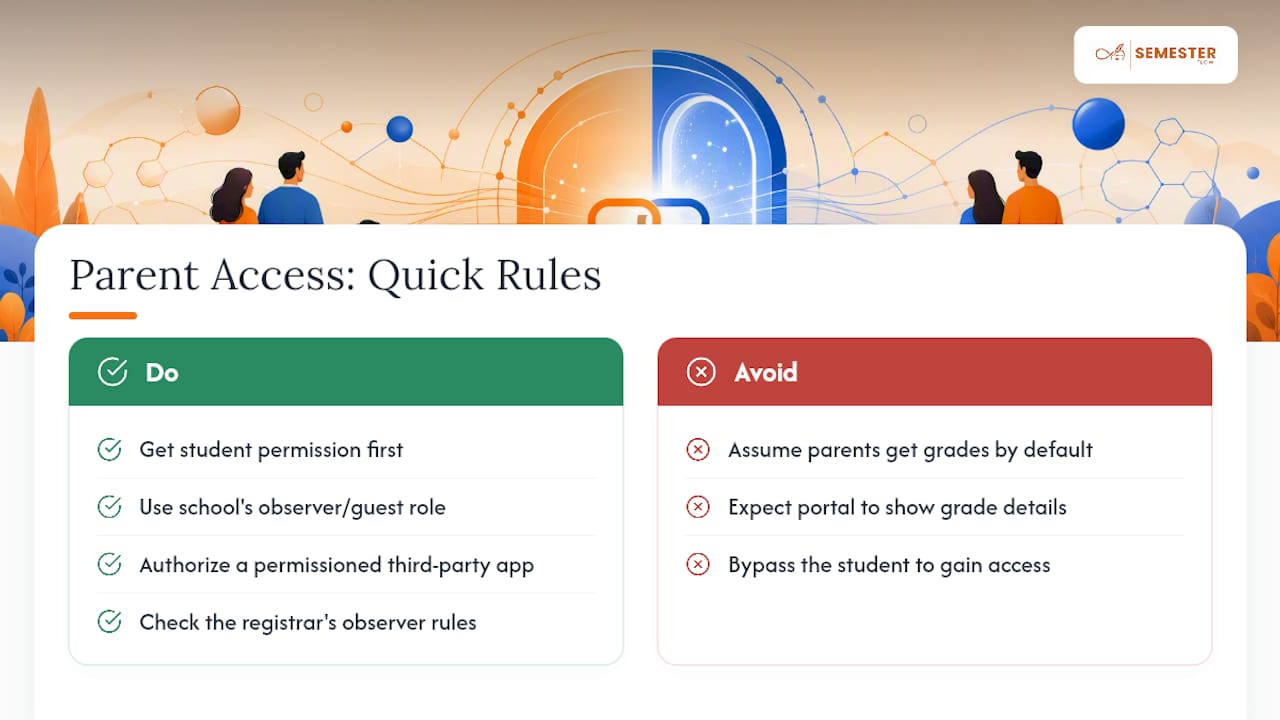
Colleges don't hand grade access to parents by default, and that's true regardless of who's paying tuition. Institutional policy generally treats grades as the student's own record, managed through the student's LMS or portal account. If a parent wants visibility, the standard path runs through the student, either by the student turning on an observer role inside the school's own system, where one exists, or by the student authorizing a separate app to pull that same data.
Some schools offer a built-in "guest" or "observer" account tied to specific features, usually billing and financial holds rather than grades. Grade-level detail is far less commonly exposed through the institution's own portal than most parents expect, which is precisely why third-party monitoring apps have become the more practical route for families who want that visibility. Policy specifics vary by school, so a parent working directly through a university portal (rather than a permissioned app) should check that institution's registrar page for its exact observer-access rules.
How Does FERPA Affect Parents Trying to See Grades?
FERPA generally shifts control over education records to the student once they enroll in college, which is the practical reason colleges don't automatically share grades with parents. That single fact explains why so many parents hit a wall trying to get grade information straight from a registrar's office or a professor.
It's also exactly why the permission-based approach covered in this guide exists in the first place. A student can voluntarily grant access to their own records at any time, and that consent is what makes a linked parent account or an authorized app work, without touching the institution's disclosure rules at all. The technical setup described earlier, the observer link, the OAuth authorization, the invite code, is the practical expression of that consent. It's a workaround built on cooperation, not a legal maneuver, and it only functions because the student chooses to turn it on.
What Else Can Parents Use Instead of Grade Monitoring?
Not every family wants, or needs, a live data feed. Plenty of parents get what they need through simpler habits that don't require linking any account at all.
A recurring weekly call focused specifically on academics—separate from the general "how's it going" check-in—surfaces more than most people expect. Asking about specific classes by name, rather than GPA in the abstract, tends to get more honest answers. Some families set a standing rule: the student shares a screenshot of their grade portal once a month, no app, no live link, just a manual update on their own terms.
Shared calendars work well as a lighter-touch alternative too. A parent doesn't need to see a grade to know a midterm is coming up and ask how prep is going. Semesterflow's syllabus-to-calendar sync, for instance, exists mainly for the student's own planning, but a shared calendar link built around deadlines rather than scores gives a parent a natural, low-friction way to check in at the right moments without watching every number move.
Do Dependent and Independent Students Have Different Access Rules?
Financial dependency status, the one used for FAFSA, has no bearing on who can see a student's grades. That's a common mix-up worth clearing up directly: being claimed as a dependent on a parent's taxes doesn't grant that parent any automatic right to academic records, and being an independent student doesn't block a parent from getting access either.
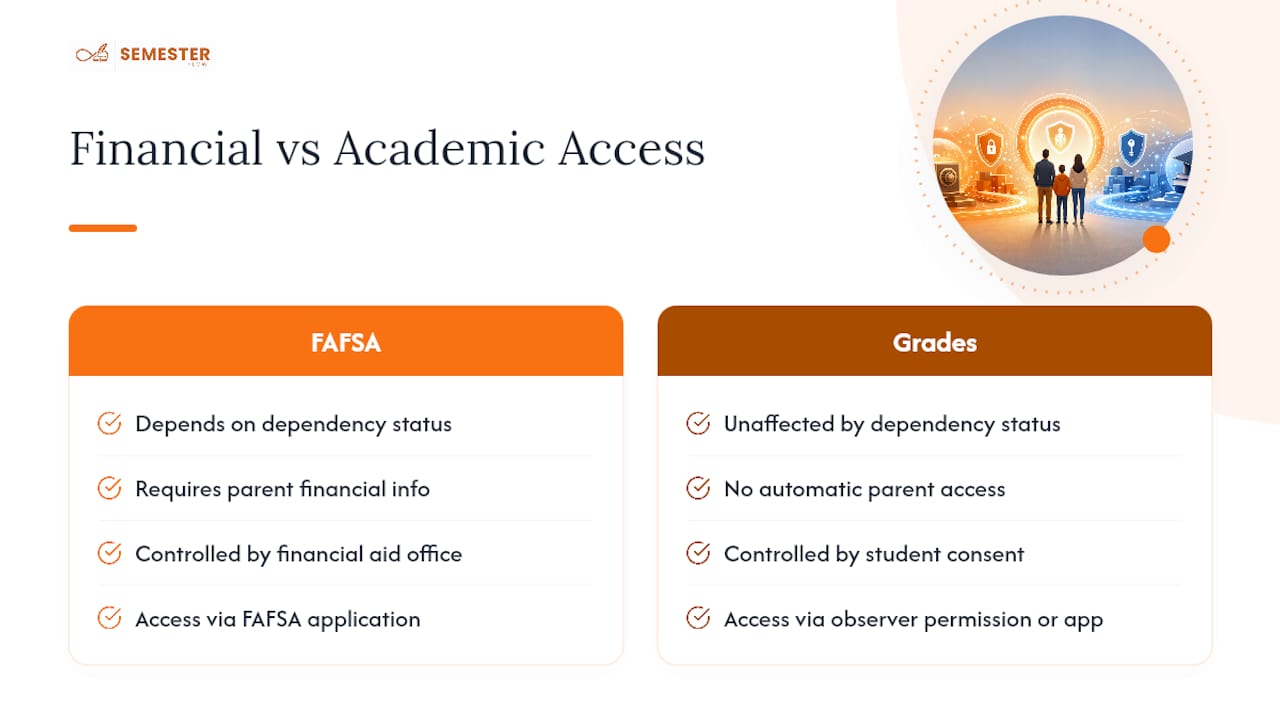
What actually changes access is consent, full stop. An 18-year-old independent student and a 19-year-old dependent student are on exactly the same footing when it comes to their own grades: both control who sees them, and both grant access the same way, through an observer permission or an authorized monitoring app. The one place dependency status does show up is financial, since dependent students' FAFSA applications require parent financial information regardless of grade-sharing decisions. Academic records and financial aid dependency are two separate systems that happen to get confused constantly.
A Publisher's Take on Responsible Grade Monitoring
Some apps are built around a simple premise: the syllabus already contains everything a student needs to stay on track, and most academic stress comes from that information being scattered across multiple platforms instead of one calendar. When a student uploads a syllabus, AI can parse out class schedules, assignments, and exams, then sync all of it to Google Calendar. Parents and students may end up looking at the same timeline, which changes the tone of a check-in call before a single grade even comes up.
The Grades Cockpit and Grade Goal Projection features exist for the same reason: to replace guessing with a specific number, whether that's a current grade or the score needed on the next assignment to hit a target. Anyone building tools that touch a student's academic record has an obligation to be upfront about the security behind it, which is why the security practices behind that data are worth reading before granting any access at all.
— Haden
Start Monitoring Grades With Semesterflow
Semesterflow gives parents a single dashboard instead of five different login screens, one for the LMS, one for the school portal, one for whatever spreadsheet the family improvised last semester. Once a student links their account, parents see real-time GPA tracking through the Grades Cockpit, a per-class grade profile for every course, and calendar sync that keeps everyone looking at the same deadlines.

Getting started doesn't require a long-term commitment. Students can try a free tier on their own first, and families who want ongoing visibility can move to a parent-monitoring account billed per child, with organization plans available for academic groups that need bulk access. If data security is the deciding factor, read through the Security & Trust page first. Otherwise, head to Semesterflow and start the trial with your student today.
Sources
- Tracking Secondary School Students: A Qualitative Investigation of an Online Student Monitoring System With Parent Portal
- MyUNNES-Parent: A Parental Involvement App for Preventing Academic and Non-Academic Student Issues at Universitas Negeri Semarang
FAQ
How Often Do Grade Updates Show Up in the App?
Updates typically sync as soon as a professor posts a grade in the LMS, but the app can only reflect what's already entered. Delays usually trace back to the professor's own grading schedule, not the app.
What Exact Details Can a Parent See?
That depends on the scope the student approves. It can range from overall GPA only up to per-class grade profiles, assignment-level detail, and calendar deadlines, depending on what the student shares in Semesterflow or a similar tool.
Can a Student Revoke Parent Access at Any Time?
Yes. The student can turn off observer or parent-monitoring permissions from their own account settings whenever they choose, and the parent can also close a monitoring account on their end.
What Should a Parent Do if Grades Aren't Showing Up?
Refresh the connection first, confirm with the student that the professor has actually posted grades, then check that the parent account still has active permissions. If the block persists, the student may need to contact campus IT about institutional data access.
Does FERPA Block Parents From Ever Seeing Grades?
FERPA gives control of education records to the student once enrolled, which is why colleges don't share grades with parents by default. It doesn't block a student from voluntarily granting access through an observer link or a monitoring app.