
Start by making three top-level folders — Inbox, Current Semester, and Archive — and backing all three up to cloud storage today. From there, rename your five most urgent files using a date-plus-subject format, confirm your cloud sync is actually working, and set one weekly reminder to sort what lands in Inbox. Everything else in a document organization system, folder trees, naming rules, digitizing paperwork, backups, is just scaffolding around that first move.
TL;DR:
- Creating and regularly updating a top-level folder structure with cloud backups is key to stopping document chaos early.
- Using a consistent, clear naming pattern and small weekly review routines keeps files organized and prevents system breakdowns.
- Choosing a folder model aligned with workload—semester-based, topic-based, or PARA—improves long-term usability and reduces clutter.
- Digitizing critical documents immediately with OCR and proper naming helps prevent loss of essential transcripts and financial papers.
- Employing a proper backup strategy, including two-factor authentication and avoiding reliance on email attachments, secures vital files effectively.
Table of Contents
- Organize College Documents: A 30-90 Minute Starter Checklist
- Choosing a Folder Structure: Semester-First, Topic-First, or PARA
- File Naming, Version Control, and Killing Duplicates
- Digitizing Transcripts, Letters, and Financial Paperwork
- Cloud Storage, the 3-2-1 Backup Rule, and Basic Security
- The Weekly and Semester Maintenance Routine
- Where an AI Planner Fits Into Your Document System
- Try Semester Flow for Your Next Term
- Why Small Weekly Habits Beat the One-Time Overhaul
- Sources
Organize College Documents: A 30-90 Minute Starter Checklist
You don't need a perfect system today. You need one that stops the bleeding. Here's the order that gets you there fastest:
- Create your top-level folders. Make "Inbox / To Sort," "Current Semester," and "Archive" in whatever cloud drive you already use. Nothing fancy yet.
- Rename your five to ten most important files right now. Transcripts, financial aid forms, your lease, anything you'd panic about losing. Use a clear pattern like
2026_FinancialAid_FAFSA.pdf. - Upload copies to the cloud and confirm they synced. Open the file from a different device or the web browser version to double check it actually landed there, not just on your desktop.
- Set a recurring 15 to 30 minute weekly reminder on your phone or calendar to empty the Inbox folder.
That's it for day one. Microsoft's guidance on digital file organization points to the same pattern across office workers and students alike: consistency plus a standing reminder beats any one elaborate system. The folder structure you pick next matters less than whether you actually stick to a routine.
Choosing a Folder Structure: Semester-First, Topic-First, or PARA
Three models cover almost every student situation, and picking the wrong one is usually why a filing system dies by October.
Semester-first organizes everything by term, then course. It's the default for most undergrads because your workload is genuinely structured that way.
- Fall 2026 → BIO 210 → Lectures
- Fall 2026 → BIO 210 → Assignments
- Fall 2026 → BIO 210 → Notes
- Fall 2026 → ECON 301 → Assignments
Topic or project-first works better if you're doing research that spans semesters, a thesis, a lab you're in for two years, or a job search that doesn't care what term it is.
- Senior Thesis → Literature Review
- Senior Thesis → Data
- Senior Thesis → Drafts
PARA (Projects, Areas, Resources, Archives) sorts by whether something needs action now, not by when it happened. A course becomes a "Project" while it's active, then drops into "Archives" the day finals end. According to Pixno's breakdown of the PARA method for students, this actionability filter solves the specific problem of having twelve folders open and no idea which one needs attention today.
| Model | Best for | Weakness |
|---|---|---|
| Semester-first | Standard course loads, clear terms | Awkward for multi-semester projects |
| Topic-first | Research, thesis work, job search | No natural semester boundary |
| PARA | Students juggling deadlines across contexts | Takes a week or two to get used to |
If your workload is mostly classes with clean start and end dates, go semester-first. If you're doing something that outlives a semester, PARA or topic-first fits better.
File Naming, Version Control, and Killing Duplicates
A folder structure only works if the files inside it have names you can read at a glance, without opening them. Here are three templates worth stealing:
- Assignments:
CourseCode_AssignmentName_DueDate→HIST220_Essay2_2026-03-14 - Notes:
CourseCode_Topic_Date→CHEM101_Thermodynamics_2026-02-03 - Scanned documents:
DocType_Date_Source→Transcript_2026-01_Registrar
For versions, skip vague labels like "final" or "final2." Use a date suffix or a simple v1, v2, v3 tag, and only write FINAL once you've actually submitted the thing. Sortio's guide to organizing academic files recommends this exact pattern because it prevents the classic problem of three "final" drafts sitting in a folder with no way to tell which one you turned in.
To catch duplicates fast, sort a folder by file size or name and scan for near-matches. Cloud drives like Google Drive also flag duplicate uploads automatically in many cases. For material that spans multiple courses, like a source you're citing in two different classes, a shared tag or a short index note beats copying the file twice.
Pro Tip: Keep folder depth to two levels max. A third or fourth nested layer is where files go to disappear. If you need more granularity, rely on your drive's search bar instead of more subfolders.
Digitizing Transcripts, Letters, and Financial Paperwork
Physical paper is a liability. One coffee spill or one move out of a dorm and a transcript or recommendation letter is gone for good. Digitize these the moment you get them:
- Scan transcripts, recommendation letters, and financial aid award letters immediately, not "when you get around to it." These are the documents that cause real problems if lost.
- Use at least 300 DPI for anything with fine print, and save as PDF/A when your scanner app offers it, since that format is built to stay readable for decades.
- Run OCR (optical character recognition) so the scanned file becomes searchable text, not just a picture of a page. Most phone scanning apps, including Adobe Scan and the Notes app's built in scanner, do this automatically now.
- Batch scan and file directly into course or financial folders rather than dumping everything into one pile to sort later.
CollegeXpress's advice on digitizing college and scholarship documents backs a simple naming rule here too: date plus document type, then a secure cloud backup. For receipts and financial aid paperwork specifically, a FAFSA document checklist is worth reviewing before you scan, so you know which categories of paperwork actually need to be kept on file.
Cloud Storage, the 3-2-1 Backup Rule, and Basic Security
Your cloud drive plays two different jobs, and treating them as one job is how files get lost. The working folder is where active semester material lives, the stuff you touch weekly. The archive is long-term cold storage for things you rarely open but can't afford to lose: transcripts, tax forms, old syllabi.
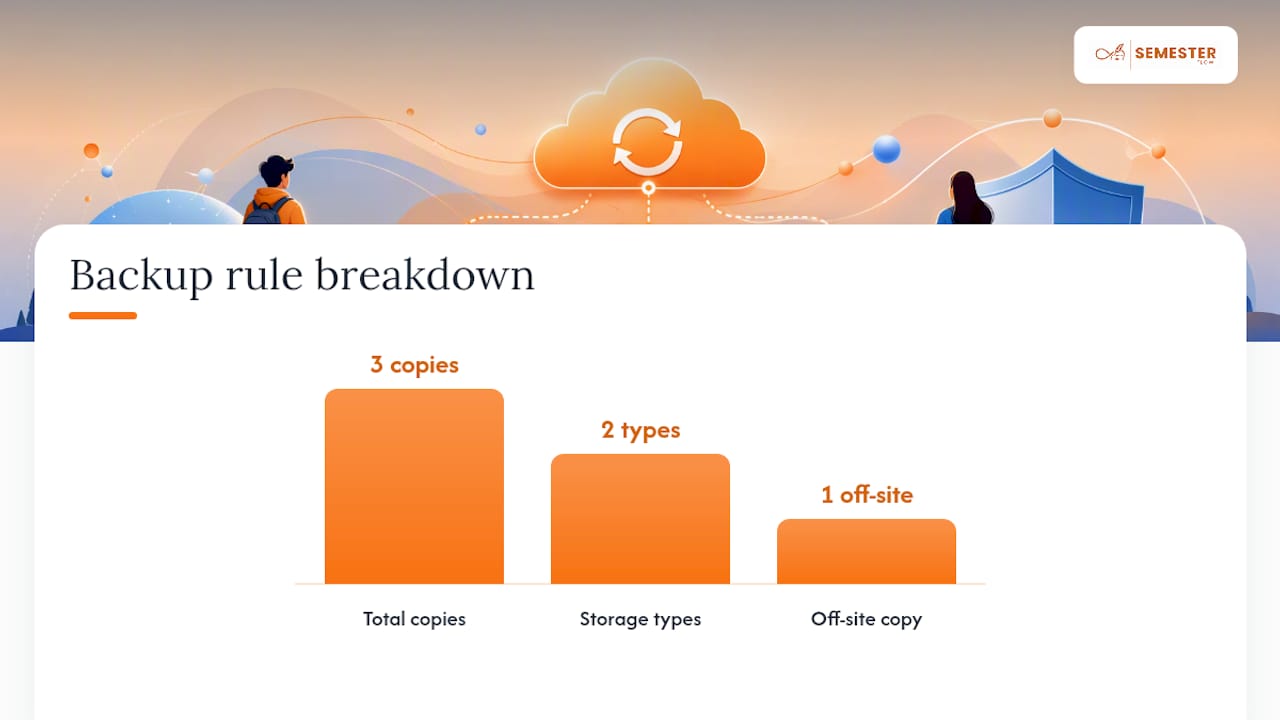
The 3-2-1 rule keeps both safe: three copies of anything important, on two different types of storage, with one copy stored somewhere physically separate. For a student, that's realistically your laptop, a cloud drive like Google Drive or Dropbox, and either an external drive or a second cloud account.
A few habits make this actually secure, not just backed up:
- Turn on two-factor authentication on every account holding academic or financial documents.
- Use a password-protected or encrypted folder for anything with a Social Security number or bank details.
- Don't rely on email as storage. Attachments get buried and email accounts get compromised.
- Review Semesterflow's security practices if you're weighing how a document tool handles backup and encryption.
Losing files to a dead hard drive is common enough that Microsoft's own guidance treats redundancy as a baseline expectation, not a nice extra.
The Weekly and Semester Maintenance Routine
A filing system doesn't fail because the folders were wrong. It fails because nobody kept up with it after week three. Two routines fix that.
Weekly, in 15 to 30 minutes:
- Empty the Inbox/To Sort folder into its real home.
- Rename any files saved with default or unclear filenames to something descriptive and consistent.
- Spot check that your last few uploads actually synced to the cloud.
End of semester:
- Move completed course folders into Archive.
- Delete obvious duplicates and outdated drafts.
- Update your Areas or Resources folders if you're running PARA, since a project that's done becomes a reference, not an active task.
Academics who've kept file systems running for years lean on exactly this pattern. Raul Pacheco-Vega's notes on organizing academic files point out that a short, scheduled maintenance window beats waiting for one massive cleanup that never actually happens.
Pro Tip: Attach your weekly file check to something you already do, like Sunday laundry or your Monday morning coffee. New habits stick better when they're bolted onto an old one.
Where an AI Planner Fits Into Your Document System
Most of the folder work above exists because deadlines and documents get separated the moment a syllabus lands in your inbox. Some AI planners parse an uploaded syllabus and pull out class schedules, assignments, and exam dates automatically, then sync them to Google Calendar. Some solutions also organize related documents in cloud storage, so a course folder builds itself instead of creating one by hand every semester. Paired with real-time grade tracking and per-class performance profiles, it removes a good chunk of the manual folder-and-deadline bookkeeping this article just walked through.
Try Semester Flow for Your Next Term
Everything in this system, the folders, the naming, the weekly resets, still takes manual effort to maintain. Certain AI planner apps remove the setup step: upload a syllabus and the app builds the course folder, schedule, and deadline structure, then keeps them synced to Google Calendar as the semester progresses.

If you're starting a new term soon, this is the moment to test it. Try the free tier at Semesterflow and upload your first syllabus to see how much of the folder work disappears before you've touched a single file.
Why Small Weekly Habits Beat the One-Time Overhaul
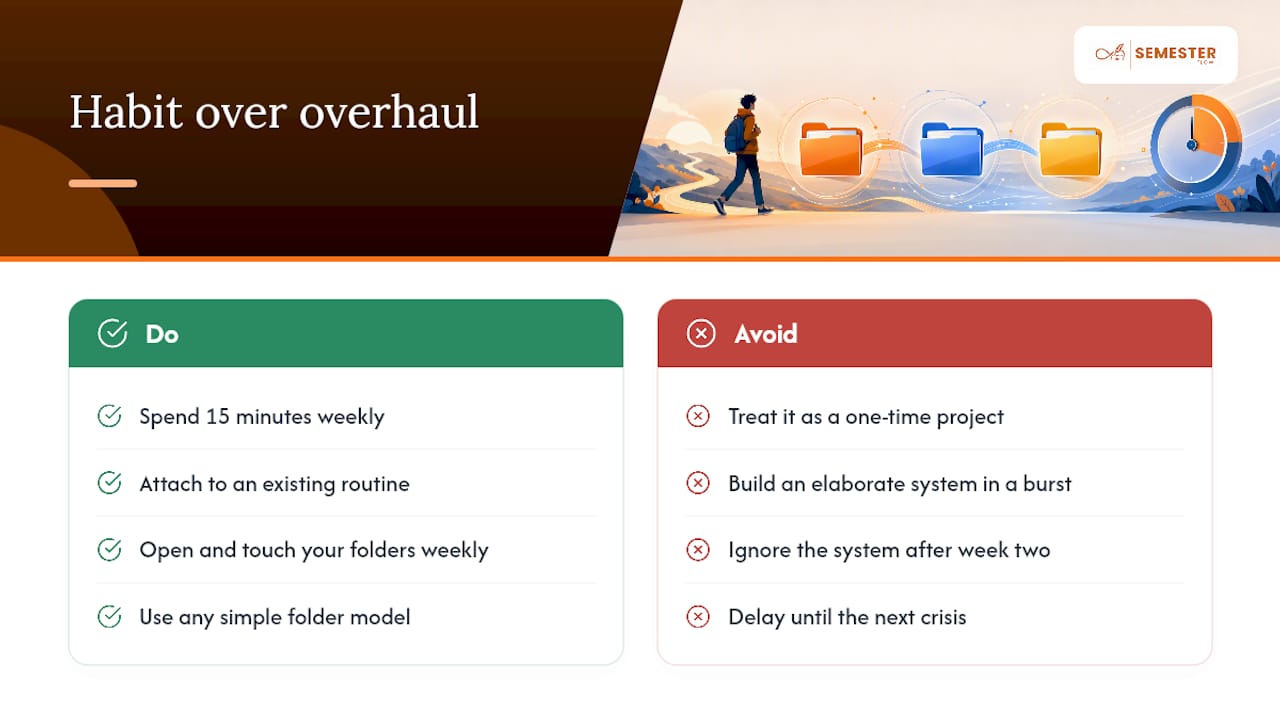
Most students don't fail at organizing documents because they picked the wrong folder structure. They fail because they built an elaborate system in a burst of motivation during finals week, then never opened it again until the next crisis. I'd argue the folder model matters far less than people think. Semester-first, PARA, topic-first, they all work fine if you actually touch the system weekly.
What doesn't work is treating organization as a one-time project instead of a standing habit. Fifteen minutes a week, attached to something you already do, will outperform a beautifully designed system that gets ignored after the second week of classes.
— Haden