

Federal law puts your college student, not you, in charge of their grades the moment they turn 18 or set foot in a postsecondary classroom. That means you generally need their written permission to see anything on a transcript, and paying every dollar of tuition changes nothing about that rule. A signed FERPA release, a narrow health or safety emergency, or the rarely used dependent-for-tax exception are the only doors in.
TL;DR:
- Family educational records, including grades, transcripts, and disciplinary actions, are protected by FERPA and cannot be shared with parents without student consent.
- A signed FERPA release is required for parents to access any academic records, and it must be actively renewed each semester if ongoing access is desired.
- Most colleges do not automatically notify parents of grades or academic issues unless a specific release is in place or an emergency threat is identified.
- Using third-party tools for grade monitoring requires student consent, secure login, and privacy-compliant data practices; simply having access to billing portals does not grant academic record access.
- Balancing support with independence involves framing requests as collaborative and problem-solving rather than surveillance, and establishing clear review and revocation policies.
Table of Contents
- Parent Monitor College Grades: What FERPA Actually Controls
- How to Monitor College Grades the Right Way: The FERPA Release Process
- Exceptions and Edge Cases: Emergencies, Dependency, and Minors
- Billing Access, Authorized Users, and Third-Party Apps: What's Actually Different
- How to Talk With Your Student About Grade Access
- How Semesterflow Supports Consent Based Monitoring
- Parent Access Rules Can Vary by State and by School
- How Colleges Actually Notify Parents (and Why It's Less Than You'd Expect)
- Reading a College Transcript When You Finally See One
- Author Perspective: Balancing Help With Independence
- Try Semesterflow With Your Student's Full Consent
- Where to Verify These Rules Yourself
- Sources
Parent Monitor College Grades: What FERPA Actually Controls
The Family Educational Rights and Privacy Act is the reason your student's registrar won't just email you a transcript, and it's worth understanding the mechanics before you call anyone. FERPA protects "education records," a term that covers a lot more than the final grade on a report card.
Education records under FERPA typically include:
- Grades and grade point averages, current and historical
- Transcripts and academic standing (probation, honors, dean's list)
- Class schedules and enrollment status
- Disciplinary records tied to academic conduct
- Financial aid records, in most cases
Here's the part that trips up almost every parent: FERPA rights transfer to the student at 18 or upon enrollment in a postsecondary institution, whichever comes first, regardless of who signs the tuition check. A high schooler who dual-enrolls in college courses at 16 already holds those rights for that coursework. A 22-year-old senior living at home and fully supported by mom and dad still holds them too.
Pro Tip: Don't assume your student's high school habits carry over. In K-12, you had automatic access to report cards and parent portals. That access doesn't transfer to college. It resets to zero, and your student has to actively grant it back.
This surprises a lot of families, and it's the single most common misconception in this whole conversation: paying tuition, claiming your student as a tax dependent, or even being listed as an emergency contact does not, by itself, unlock academic records. Registrars follow this rule closely because violating FERPA can put a university's federal funding at risk, so a frustrated phone call from a parent rarely changes the answer you get from the front desk. The school isn't being difficult. It's following a law with real financial teeth.
How to Monitor College Grades the Right Way: The FERPA Release Process
Getting lawful access comes down to one document: a FERPA release, sometimes called an authorization to release education records or a records-release waiver. Your student signs it, names you as an authorized party, and specifies what you're allowed to see. Here's how that typically plays out.
1. Start the conversation before the semester gets stressful. The easiest time to ask for a release is move-in weekend or the first week of classes, not after a midterm goes sideways. Kiplinger's advice to parents on this point is blunt: ask early, because asking after a bad grade already happened reads as suspicion, not support.
2. Frame the ask around a specific, practical reason. "I want to help if you're struggling, and I'd rather hear it from you than guess" lands very differently than "I'm your parent, I deserve to know." Coverage from USA Today on family friction over grade access makes the same point: students grant access more readily when it's framed as collaborative support rather than a parental entitlement.
3. Have your student locate the release form through the registrar. Nearly every university publishes this somewhere on the registrar's site, often under a name like "FERPA release," "records release authorization," or a proxy-access system with its own branding. The University of Tennessee at Chattanooga's MyMocsPASS parent access system is a solid example of what these typically look like: the student logs into the registrar portal, designates a parent or guardian by email, and checks boxes for exactly which record categories that person can view, from grades to financial aid to nothing at all beyond an emergency contact flag.
4. Scope the release deliberately, don't just check every box. This is the step most families skip, and it's the one that matters most for keeping trust intact. A release can be limited to a single semester, restricted to financial aid only, or set to expire automatically at a chosen date. According to UniversityParent's guide to the release process, treating the scope as negotiable rather than all-or-nothing makes students far more comfortable saying yes.
5. Confirm the release actually went through. Registrar systems vary, but most send a confirmation email to both the student and the newly authorized parent once the proxy account is set up. If you haven't received anything within a few business days, that's usually a sign the form stalled somewhere in processing, not that it's still "pending."
6. Log in through the parent portal, not your student's account. Once the release is active, you'll typically get your own login credentials tied to the parent or proxy account, separate from your student's. This is the version that stays lawful and keeps your student's password entirely their own.
7. Revisit the scope each semester or academic year. A release signed freshman year doesn't have to define the relationship senior year. Some families narrow access over time as trust builds; others expand it temporarily during a rough semester and pull back once things stabilize.
Pro Tip: If your student's school uses a proxy or portal system like MyMocsPASS, ask your student to send you the exact registrar page, not just tell you "it's somewhere on the website." Specific links get forms signed. Vague instructions get forgotten for a month.
If a release seems to be active but you still can't see anything, the most common culprits are a typo in the email address the student entered, a release that only covers billing and not academic records, or a registrar system that requires the parent to complete a separate account activation step after the student's authorization. A quick call to the registrar's office, with your student on the line to verify identity, usually resolves it in one conversation.
Exceptions and Edge Cases: Emergencies, Dependency, and Minors
FERPA carves out a handful of situations where a school may disclose records without a signed release, though "may" is doing a lot of work in that sentence. None of these are guarantees, and colleges apply them inconsistently.
- Health or safety emergency exception: Schools can share information, including academic records, if there's an articulable and significant threat to the health or safety of the student or others. This covers situations like a student who has stopped attending class entirely amid a mental health crisis, not routine academic struggle.
- Dependent-for-tax exception: Federal law permits, but never requires, colleges to disclose records to parents who claim the student as a dependent on their taxes. Many schools decline to use this exception at all, partly out of privacy caution and partly to avoid inconsistent enforcement, so confirming your specific school's policy directly with the registrar matters more than assuming the exception applies to you.
- Students under 18 or under documented guardianship: A student who is under 18 and not yet enrolled in a postsecondary program, or one with a documented legal guardian, may fall under different disclosure rules than a typical 18-plus college freshman. This gets genuinely complicated and usually requires a direct conversation with the registrar's office rather than a general answer.
If you believe one of these exceptions applies to your situation, the right move is a direct call to the registrar or dean of students' office, not an email demand. Bring documentation. For a dependency claim, that might mean a recent tax return. For a safety concern, be ready to describe specific, observable behavior rather than a general worry. Registrars field these calls regularly and can tell you within minutes whether your school's policy allows disclosure in that scenario.
Billing Access, Authorized Users, and Third-Party Apps: What's Actually Different
A huge amount of parent confusion traces back to one mix-up: assuming that because you can see the tuition bill, you can see the grades behind it. Those are two entirely separate systems, and understanding the difference saves a lot of frustrated registrar calls.
Being added as an "authorized user" on a billing portal, common at schools that use services like Nelnet or TouchNet for tuition payments, typically lets you view invoices, make payments, and see payment history. It does not grant access to grades, transcripts, or academic standing. Those two systems live in different databases governed by different rules, and FERPA protections apply to academic records specifically, regardless of what your billing login shows you.
Third-party apps and academic planning tools sit in a different category entirely. Legitimate tools built for families and students only work with your student's active consent, which usually means your student logs in themselves and either shares their own account or explicitly connects a parent view. Before trusting any tool with your family's academic information, run it through a short checklist:
- Does the tool require the student's own login and consent, rather than asking a parent to somehow obtain the student's school password?
- Does it clearly state where its data comes from (student-uploaded documents, calendar sync, manual entry) rather than claiming to "scrape" a school portal?
- Does it publish an actual privacy policy explaining how student academic data is stored and who can see it?
- Does the company describe its security practices in plain language rather than vague marketing terms?
Pro Tip: Never ask your student for their school portal password so you can "just check quickly." Beyond the trust damage, most university systems flag shared logins as a security violation, which can create real problems for your student separate from anything about grades.
Reviewing a company's approach to student data security before signing up for anything is a reasonable step, the same way you'd check a bank's security page before linking an account. Free trials are common across this category, and it's worth checking how free-tier limits typically work on any tool before assuming it will cover a full semester at no cost.
How to Talk With Your Student About Grade Access
The legal mechanics are the easy part. The conversation is where most families actually get stuck, and the way you open it shapes whether your student says yes, stalls, or shuts the door entirely.
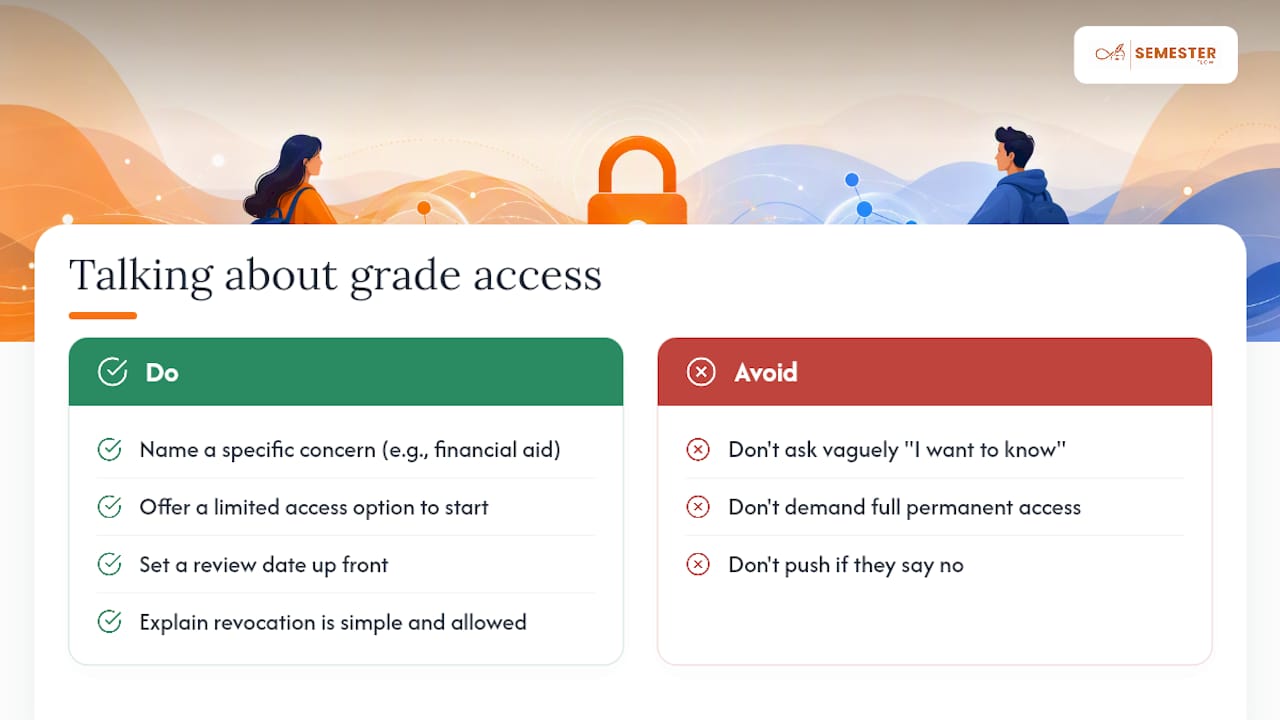
1. Name the specific concern, not a general desire for oversight. "I want to know if you're on track for financial aid renewal" is a request your student can evaluate. "I want to know what's going on" is vague enough to sound like surveillance.
2. Offer a defined scope instead of asking for everything. Three reasonable starting points: financial-aid-only access (useful since scholarships often carry GPA minimums), a flagged alert only when a grade drops below a threshold you agree on together, or a full review at the end of each semester rather than ongoing access. Presenting options, rather than one all-or-nothing ask, changes the tone of the whole conversation from a demand to a negotiation.
3. Set a review date up front. Agreeing that you'll revisit the arrangement at winter break or the start of sophomore year gives your student an exit ramp that doesn't feel like a fight. It also signals that you see this as proportional to a particular stage of their independence, not a permanent monitoring arrangement.
4. Make revocation explicit and low drama. Your student can withdraw a FERPA release at any time, and knowing that upfront tends to make them more comfortable granting it in the first place. Access that can be taken back feels very different from access that feels permanent.
5. If your student says no, ask what would change their mind rather than pushing harder. Sometimes the real objection isn't privacy at all. It's a fear of disappointing you, or resentment about a comment made after a bad grade two years ago. Family communication research on this exact friction point consistently finds that access requests framed as support rather than entitlement get better outcomes, and that pattern holds even when the first ask gets a no.
Pro Tip: Try leading with what you're worried about missing, not what you want to see. "I don't want to find out about a problem three months late" invites a real conversation. "Send me your grades" invites a shrug or a fight.
A refusal isn't the end of the road. It's information. A student who says no to full grade access but yes to "tell me if you're worried about a class" has just told you exactly what kind of support they want. Take that answer seriously instead of treating it as a smaller version of what you originally asked for.
How Semesterflow Supports Consent Based Monitoring
Semesterflow was built around a simple premise: families do better with early information, not surveillance. The app lets students upload their syllabi, and its AI automatically extracts class schedules, assignment deadlines, and exam dates, syncing all of it to Google Calendar so nothing gets missed.
What matters for the parent-access conversation is how Semesterflow handles grades specifically. It tracks real-time GPA and flags courses showing a downward trend well before a final grade posts, using per-class grade profiles that surface a slipping average early enough to actually act on it. That's a meaningfully different experience than waiting for a semester-end transcript to explain what already happened.
With a student's consent, a parent account built on this kind of alert system can:
- Flag a struggling course weeks before the final grade, not after
- Show projected GPA outcomes based on current performance in each class
- Prompt a specific, low-drama conversation ("I saw your Chem grade dipped, everything okay?") instead of a vague check-in
- Keep the underlying academic data under the student's own consent settings, not a shared password
The goal here isn't to replace the FERPA conversation. It's to make that conversation more useful once you've had it. An alert that a class is trending downward is a reason to ask a good question, not a substitute for asking it.
Parent Access Rules Can Vary by State and by School
FERPA sets the federal floor, but individual states and institutions layer additional rules on top of it, and the differences are real enough to matter. Some state privacy statutes add extra protections for students at public universities, occasionally covering categories like counseling records more strictly than federal law alone requires. A handful of states have also passed laws addressing dependent-student access differently for state-funded scholarship or grant programs, particularly where continued eligibility depends on academic standing a parent may be helping to track.
Institutional policy varies just as much as state law, sometimes more. One university might honor the dependent-for-tax exception readily with a simple tax-document request; another might decline to use it under any circumstances, requiring a signed release regardless of dependency status. Community colleges, large public universities, and small private schools often have different registrar staffing and different comfort levels with proxy-access systems, which changes how smooth or clunky the actual sign-up process feels.
The practical takeaway: never assume a policy you read about a friend's school, or even a sibling school in the same state system, applies to your student's institution. Call your specific registrar's office and ask directly what their FERPA release process requires and which exceptions, if any, they actually apply in practice. A five-minute phone call settles more than an afternoon of searching general advice online.
How Colleges Actually Notify Parents (and Why It's Less Than You'd Expect)
Most colleges do not proactively notify parents about grades, academic probation, or GPA drops unless a signed FERPA release specifically authorizes that kind of communication. This is a significant shift from the K-12 world of automatic report cards and parent portal notifications, and it catches a lot of freshman families off guard.
Some schools send a general, non-specific letter home when a student's cumulative GPA falls below a threshold, but that notice is typically about financial aid eligibility rather than academic performance itself, since federal aid programs carry their own minimum GPA and completion-rate requirements. Even then, many institutions send that notice to the student only, not the parent, unless a release is active.
Advising offices sometimes reach out to a struggling student directly to schedule a check-in, but that outreach almost never loops in parents automatically. If your family wants a heads-up before a semester ends badly, that visibility has to be built deliberately, either through an active FERPA release scoped to academic standing, or through a consented tool that shows in-progress trends the way grade projection features do, rather than waiting on the school to volunteer information it generally isn't set up to share.
Reading a College Transcript When You Finally See One
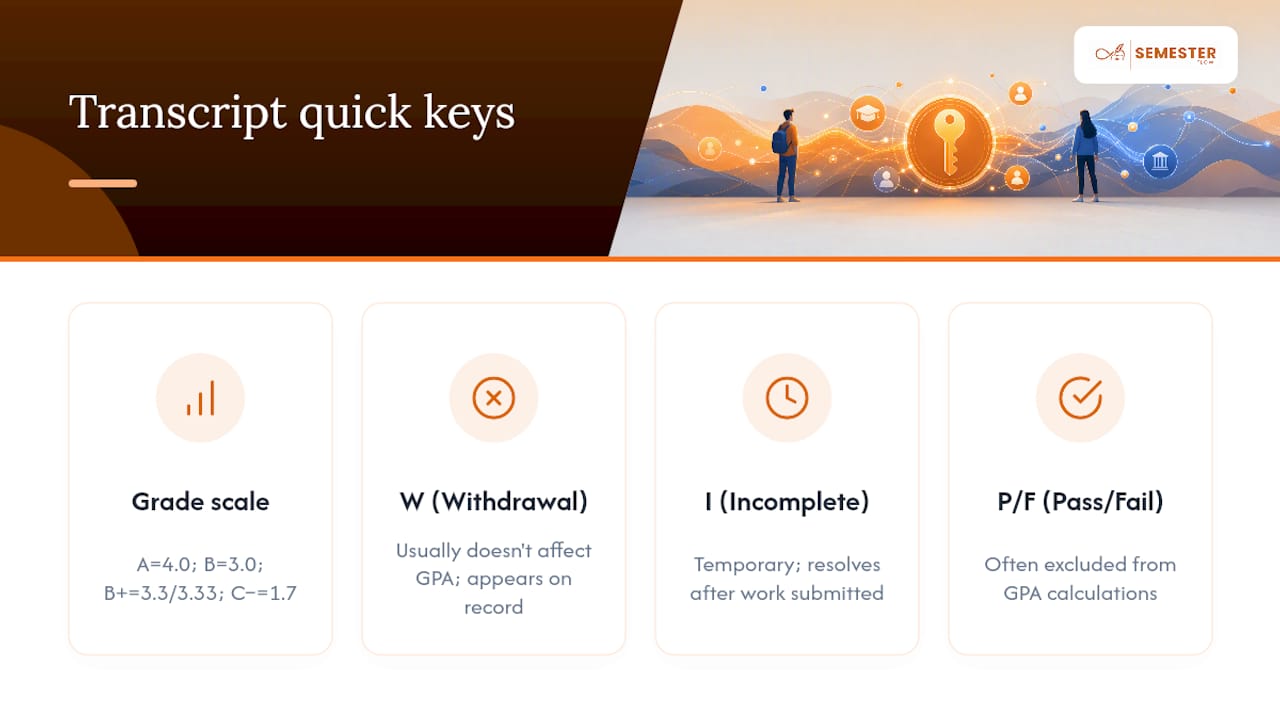
Once you have lawful access, the grading format itself can throw a parent who's used to reading a high school report card. Most colleges use a 4.0 scale, where an A equals 4.0, a B equals 3.0, and so on, but the increments matter: a B+ often carries 3.3 or 3.33 depending on the institution, and a C minus might drop as low as 1.7. Small differences in decimal points compound across a full course load.
Cumulative GPA and semester GPA are not the same number, and mixing them up leads to unnecessary alarm. A single rough semester can impact a cumulative GPA only slightly if the years before it were strong, though it may look more dramatic when viewed alone. Look at both numbers together before drawing conclusions.
Watch for a few codes that show up more in college transcripts than in high school ones: "W" for a withdrawal, which usually doesn't affect GPA but does show up on the record, "I" for an incomplete, which is often temporary and resolves once outstanding work is submitted, and "P/F" for pass/fail coursework, which many schools exclude from GPA calculations entirely. None of these automatically signal trouble. They're just part of how college transcripts document a more flexible academic path than most high schools allow.
Author Perspective: Balancing Help With Independence
The instinct to check in constantly on a college freshman's grades usually comes from love, but it rarely produces the outcome parents actually want. Step in directly when there's a pattern, not a single data point: two consecutive bad exam grades in the same class tells you more than one.
What's worked in families I've talked to isn't more monitoring. It's monitoring paired with a standing offer to problem-solve, not to judge. "I noticed, want to talk through it?" beats "why is this grade so low?" nearly every time. And access without coaching is close to useless. A parent who sees a dropping GPA but has no idea how to help beyond worrying has gained information without gaining leverage. Pair any visibility you get with a genuine push toward the resources already sitting on campus: tutoring centers, academic advisors, professor office hours. Those exist for a reason, and they work better than a parent trying to reteach organic chemistry over the phone.
— Haden
Try Semesterflow With Your Student's Full Consent
Every step above assumes one thing: your student is in the room, agreeing to what gets shared and with whom. That's exactly how Semesterflow is built to work. Instead of chasing a registrar release just to find out about a grade after the fact, a student connects their own syllabi and coursework, and any parent visibility flows from settings they control themselves.

Semesterflow parses uploaded syllabi automatically, syncs every deadline to Google Calendar, and tracks real-time GPA so a slipping grade shows up as a trend, not a surprise on a final transcript. Individuals can start on a free tier to see how the syllabus parsing and calendar sync work before committing to anything, and families who want ongoing shared visibility can move to a parent monitoring account billed per student. Academic organizations, including fraternities, sororities, and university chapters, can also set up group plans with admin dashboards for tracking multiple members at once.
If this sounds like a better fit than chasing down registrar forms every semester, start with Semesterflow's planner and see how the syllabus upload and grade tracking work for your student's actual course load.
Where to Verify These Rules Yourself
Before you sit down with your student, it helps to have a few pages open and ready rather than relying on secondhand summaries.
- The U.S. Department of Education's FERPA guidance for the actual federal language on education records and disclosure rules
- UniversityParent's step-by-step release guide for a plain-language walkthrough of scoping a release
- Your student's own registrar site, searching specifically for "FERPA release," "parent proxy access," or "authorized user," using a system like UTC's MyMocsPASS as a reference point for what that page typically looks like
- USA Today's coverage of family friction over grade access for framing the conversation itself, not just the paperwork
Sources
- MyMocsPASS Parent Instructions and FAQ | University of Tennessee at Chattanooga
- Family Educational Rights and Privacy Act (FERPA) — U.S. Department of Education
- FERPA educational records release: A step-by-step guide for parents - UniversityParent
- Should parents have access to college grades? Things can get sticky. — USA Today