

A real-time grade tracker calculates your current course grade the moment you add a new score, then projects what you need on remaining work to hit a target. For a quick gut check, an online calculator works fine. For ongoing tracking across a full course load, an integrated planner like Semester Flow updates automatically and flags a slipping grade before it becomes a crisis, and shows you exactly what score you need next.
TL;DR:
- Grade trackers based on weighted categories update only with accurate current category weights, so frequent syllabus checks are essential.
- Real-time tools like Semester Flow automate syllabus parsing and grade tracking, reducing manual entry and alerting users to grade issues early.
- Using a calculator is fastest for quick one-off checks, but ongoing management requires spreadsheets or dedicated planning apps to avoid stale data inaccuracies.
- Tracking grades weekly, immediately after scores are posted, helps catch drops or errors and allows timely correction strategies.
- Automated syncing with LMS or grading platforms enhances accuracy and transparency, benefiting students and teachers by providing up-to-date progress insights.
Table of Contents
- How Real-Time Grade Trackers Calculate and Update Your Grade
- Fast Ways to Get Live Grade Visibility Right Now
- Set Up a Working Grade Tracker in 10 to 20 Minutes
- Reading Live Grades: What's Stable and What's Noise
- Syncing, Privacy, and Keeping Your Data Straight
- How Semester Flow Handles Real-Time Grade Tracking
- Best Practices for Keeping Your Tracked Grades Accurate
- Comparing Real-Time Grade Tracker Options
- How Teachers Use Real-Time Grade Trackers With Students and Parents
- Why I Track Every Grade the Week It Posts
- Start Tracking Grades Automatically With Semester Flow
- Quick Tools to Check Your Grade Right Now
- Sources
- FAQ
How Real-Time Grade Trackers Calculate and Update Your Grade
Two formulas drive almost every grade tracker you'll ever use. The first is the points-based method: total points earned divided by total points possible, multiplied by 100. If you've scored 340 out of 400 available points, you're sitting at 85%, full stop.
The second, more common in college courses, is weighted categories. Say homework is 20% of your grade, quizzes are 30%, and the final exam is 50%. A current grade calculator multiplies each category average by its weight, sums those results, then divides by the total weight of categories you've actually completed. That last step matters. If the final hasn't happened yet, the calculator divides only by the 50% you've earned so far, not the full 100%, so your running grade doesn't get artificially deflated.
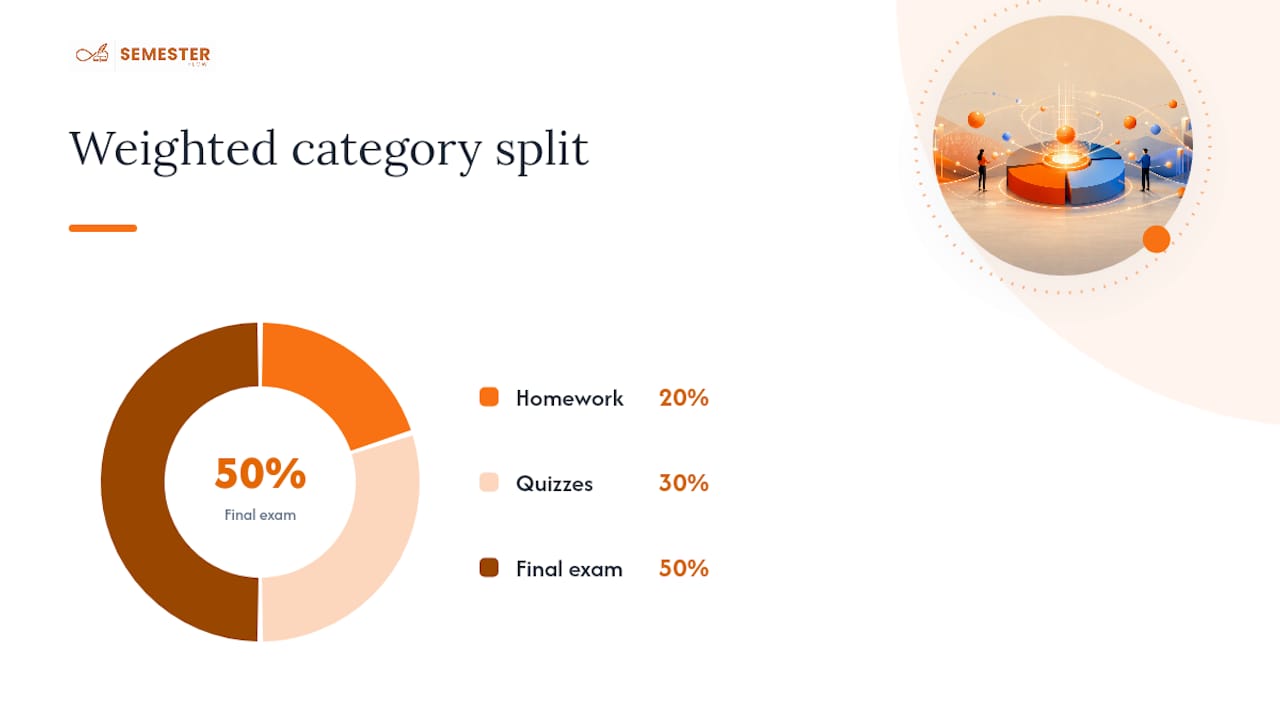
Most tools also track percent-of-course-completed. This number tells you how much weight is still in play.
Update mechanisms vary by tool:
- Manual entry into a calculator or spreadsheet, updated after each graded item
- CSV or file import for bulk score uploads
- Calendar or LMS sync, where grades pull in automatically as instructors post them
Fast Ways to Get Live Grade Visibility Right Now
You have three real options, and they trade speed for persistence.
- Online calculators. No account, no setup. Plug in scores and weights, get an instant percentage. Tools built for this, like the Calculator, also compute the score you need on a final to hit a target grade. The catch: close the tab and your data is gone.
- Spreadsheets. A Google Sheets template persists across sessions and you can customize columns for every category your professor uses. The trade-off is upkeep. You're the one typing in every score, every week, forever.
- Dedicated planners. Tools built specifically for grade tracking parse your syllabus, store your categories, and alert you when something shifts. Some browser-based trackers give instant running averages but reset once you close the session unless you pair them with a saved spreadsheet, which is exactly the gap an integrated planner is built to close.
Pro Tip: If you only need to know your grade before an exam this week, use a calculator. If you're managing five classes all semester, that quick fix will cost you more time than it saves.
The decision rule is simple: one-time check, use a calculator. Weekly maintenance you're willing to do yourself, use a spreadsheet. Ongoing tracking across every class without manual upkeep, use a planner that automates it.
Set Up a Working Grade Tracker in 10 to 20 Minutes
- Pull your syllabus details. Write down every grading category, its weight, and the credit hours for the course.
- Choose your mode and tool. Decide if your professor grades on raw points or weighted categories, then pick a calculator, spreadsheet, or planner that matches.
- Enter existing grades. Input every score you already have and double check the formula divides only by completed weight, not the full course.
- Run a what-if scenario. Test what score you'd need on the final or a big project to land at a B+ or A minus, and note your percent-of-completed-weight.
- Set a weekly update habit. Pick one day to log new grades, and turn on calendar or alert sync if your tool supports it.
Twenty minutes now saves you from finding out your grade dropped the week finals start.
Reading Live Grades: What's Stable and What's Noise
A 90% built on three quizzes means something very different from a 90% built on twelve. The percent-of-course-completed figure is your stability check, and it deserves more attention than the grade percentage itself.
A 90% based on 30% of total course weight can swing significantly once the remaining part of the course lands. A 90% based on 80% of the weight is close to locked in. Treat early-semester grades as estimates, not verdicts.
Once you know how stable your number is, use what-if projections to set a target: what do you need on the final, the capstone project, or the last three homework sets to land where you want?
Prioritize by weight times achievable gain, not by whichever assignment feels most urgent:
- A 50%-weighted final where you can realistically improve 10 points beats obsessing over a 5%-weighted quiz.
- If your grade has dropped more than five points in a single category, that's your signal to email the professor, not wait for office hours to open naturally.
- Recovery plans work best when they target one or two high-weight items, not everything at once.
Syncing, Privacy, and Keeping Your Data Straight
Real-time only means something if the sync behind it is trustworthy. Manual entry is the most accurate because you control it, but it's also the most likely to fall behind. CSV import and LMS or calendar sync automate the process, and platforms like Assignify that connect grading systems to communication tools show how much friction automated sync removes compared to typing scores in by hand.
Persistence matters just as much as accuracy. A browser calculator forgets everything when you close it. A cloud-based planner keeps a running history and usually backs it up automatically.
Before trusting any tool with your academic data, run through this:
- Check what permissions the app requests and whether it needs access beyond your grade data
- Confirm your school's policy on third-party apps connecting to its learning management system
- Verify your first few calculations by hand to catch formula errors early
- If a sync suddenly looks wrong, check whether a category weight changed or an assignment was dropped
How Semester Flow Handles Real-Time Grade Tracking
Semester Flow takes the manual work out of the setup steps above. Upload a syllabus and its AI extracts class schedules, assignments, and exams, then syncs everything with Google Calendar so deadlines and grading periods live in one place automatically.
The platform doesn't stop at organization. It's built to flag academic problems early rather than let you discover them at midterms.
- The Grades Cockpit gives you a live view of GPA and grade trends across every course
- Grade Goal Projection calculates what you need on remaining work to hit a target grade, the same what-if logic covered earlier, done automatically
- Per-Class Grade Profiles let you break down performance course by course instead of guessing which class is dragging your average
- Alerts surface a slumping grade before it becomes a semester-ending problem
Combined with real-time monitoring features like historical trend views and early-alert systems that similar performance-tracking tools have shown make early intervention practical, the goal is the same one this article has pushed from the start: know your number before it's too late to change it.
Best Practices for Keeping Your Tracked Grades Accurate
The single biggest accuracy killer isn't math. It's stale data. A tracker is only as good as your last update, and most students go weeks between logging scores, which is exactly when a category weight changes or a dropped-lowest-quiz rule gets applied wrong.
Set a fixed update cadence, ideally right after each class posts a grade, not a batch session once a month. Batching invites errors because you're reconstructing scores from memory instead of copying them fresh.
Double-check category weights every time your professor updates the syllabus. Weight changes are more common than students expect, especially when an assignment gets dropped or a curve is applied to a specific category.
Watch for these specific accuracy traps:
- Extra credit that doesn't get added to the right category, skewing that category's average
- Dropped-lowest policies that your calculator or spreadsheet formula doesn't actually apply
- Rounding differences between your tracker and your professor's gradebook, usually a half-point or less but worth verifying before a final grade dispute
- Category mismatches, where a quiz gets logged under "homework" and throws off both weighted averages
Run a manual spot check once a month: pick one category, add the points by hand, and compare it to what your tool shows. If they match, trust the system for another month. If they don't, you've caught a setup error before it compounds across the semester.
Comparing Real-Time Grade Tracker Options
No single tool wins on every axis, so the right pick depends on what you're optimizing for: speed, persistence, or automation.
Standalone online calculators win on speed. Open a tab, type in scores and weights, get your percentage and your "what you need on the final" number in under a minute. The Grade Calculator at Calculator.net handles both points and letter-grade inputs, which makes it useful for a one-off check before an exam. The obvious limitation: nothing saves. Every session starts from zero.
Spreadsheet templates solve persistence. Google Sheets stores your categories, weights, and every score you've ever entered, and you can build formulas that match your exact syllabus. The cost is your own time. You're the sync mechanism, and a missed update means a stale grade sitting in your tracker for weeks.
App-based trackers aimed at category tracking, the kind that let you log quizzes, tests, and projects separately, tend to emphasize real-time calculation by class and assignment type. These work well for students who want mobile access but don't need syllabus parsing or calendar integration.
Integrated planners like Semester Flow sit at the automation end. Instead of manual entry, the syllabus upload handles setup, and grade tracking connects to the same system managing your deadlines and calendar. You trade a bit of setup time upfront for near-zero maintenance afterward, plus alerts you'd never get from a static calculator.
The honest answer to "which is best" is that it depends on how many courses you're juggling and how much manual upkeep you're willing to do every week.
How Teachers Use Real-Time Grade Trackers With Students and Parents
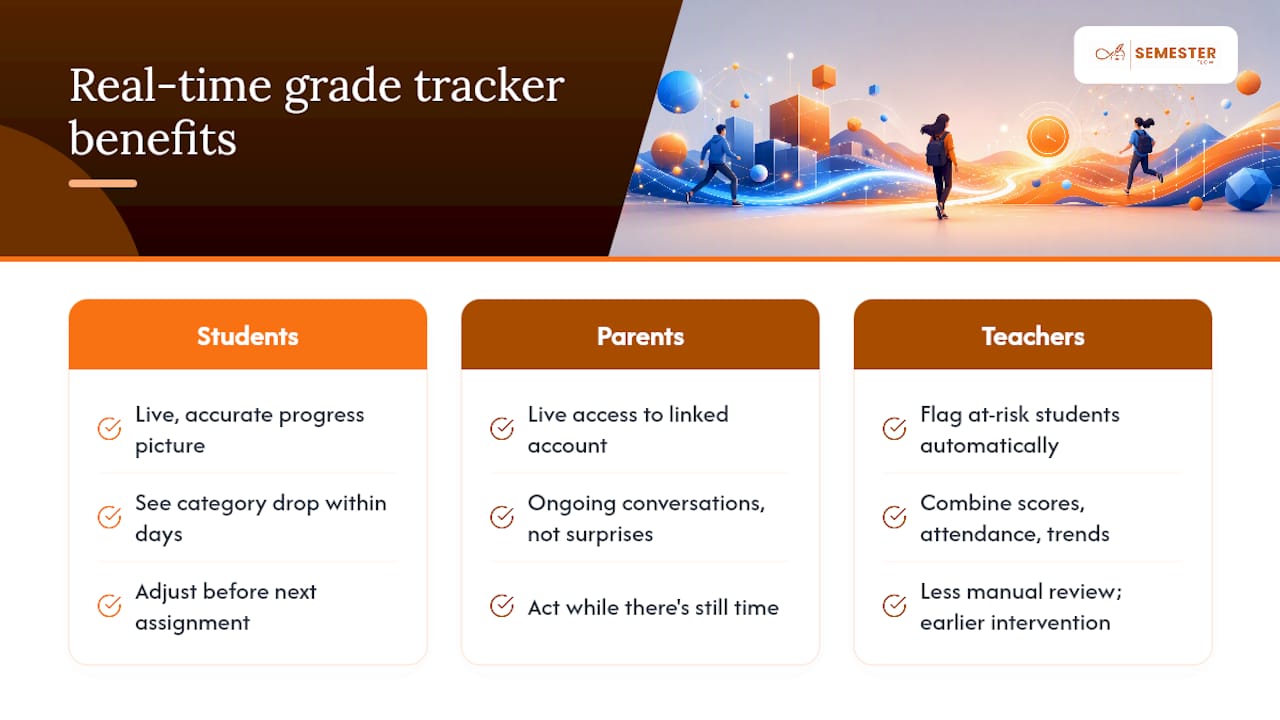
Grade tracking isn't only a student tool. Instructors who post scores to a connected gradebook the same day they grade an assignment give students and parents a live, accurate picture instead of a surprise at progress-report time.
When a learning management system syncs grades in real time, a slumping average shows up within days, not weeks. That gap matters. A student who sees a category average drop five points right after a bad quiz has time to adjust before the next one. A parent monitoring a linked account gets the same visibility, which turns a report-card conversation into an ongoing one.
Teachers benefit from this too, in a less obvious way. Real-time systems that combine assignment scores with attendance and trend data, the kind of setup performance-tracking platforms are built around, let instructors flag at-risk students automatically rather than waiting for a midterm review to notice a pattern. That's earlier intervention with less manual review on the teacher's end.
For parent-monitoring situations specifically, real-time access changes the conversation from "how did you do" after the fact to "what do you need on the next assignment" while there's still time to act. That shift, from retrospective to proactive, is the whole argument for tracking grades live instead of waiting for a final report card. Whether the communication runs through a school's own portal or a third-party planner with parent accounts built in, the principle holds: the sooner the data reaches everyone involved, the sooner someone can actually do something about it.
Why I Track Every Grade the Week It Posts
I once watched a midterm grade in a required course drop nine points in a single week because two quiz scores landed at once. Catching it that week, instead of at the next progress report, meant a recovery plan built around one assignment, not a semester-long scramble. Pick one method. Keep it current. That's the entire skill.
— Haden
Start Tracking Grades Automatically With Semester Flow
Spreadsheets and calculators get you a number. They don't tell you why that number is moving or what to do about it. This tool closes that gap: upload your syllabus, and the AI extracts your assignments, exams, and grading categories, then keeps tracking your grades against them automatically, no weekly data entry required.

Every graded item you log feeds straight into your Grade Goal Projection, so you always know the score you need on what's left. If a class performance declines, you find out through an alert, not a surprise progress report. Start with the free tier at Semester Flow and upload your first syllabus to see your current grades calculated automatically within minutes.
Quick Tools to Check Your Grade Right Now
- Current Grade Calculator: points-based and weighted-category math with a completed-weight indicator
- Calculator: final-exam-needed scenarios in seconds
- Canva's Grade Calculator: forecasting and target-setting in a simple interface
Sources
FAQ
What is the best app for tracking grades?
The best choice depends on what you need. A quick calculator works for a single check, while an integrated planner like Semester Flow suits students who want automatic tracking and alerts across every class without manual entry.
Is a 92% an A or a B?
Check your syllabus for the exact scale, since some professors set the A minus boundary differently.
Can I use AI to grade my papers?
AI tools can help you check formatting, structure, and some grammar and style issues, but instructors still apply their own rubrics for content and originality, so treat AI feedback as a preview, not a final grade. Tools designed for AI-assisted studying are meant to support your work, not replace instructor grading.
What is a good grade tracker for students?
A good tracker shows your current grade, projects what you need on remaining work, and updates without heavy manual effort. Some tools cover all three by parsing your syllabus automatically and flagging grade drops before they become a bigger problem.