
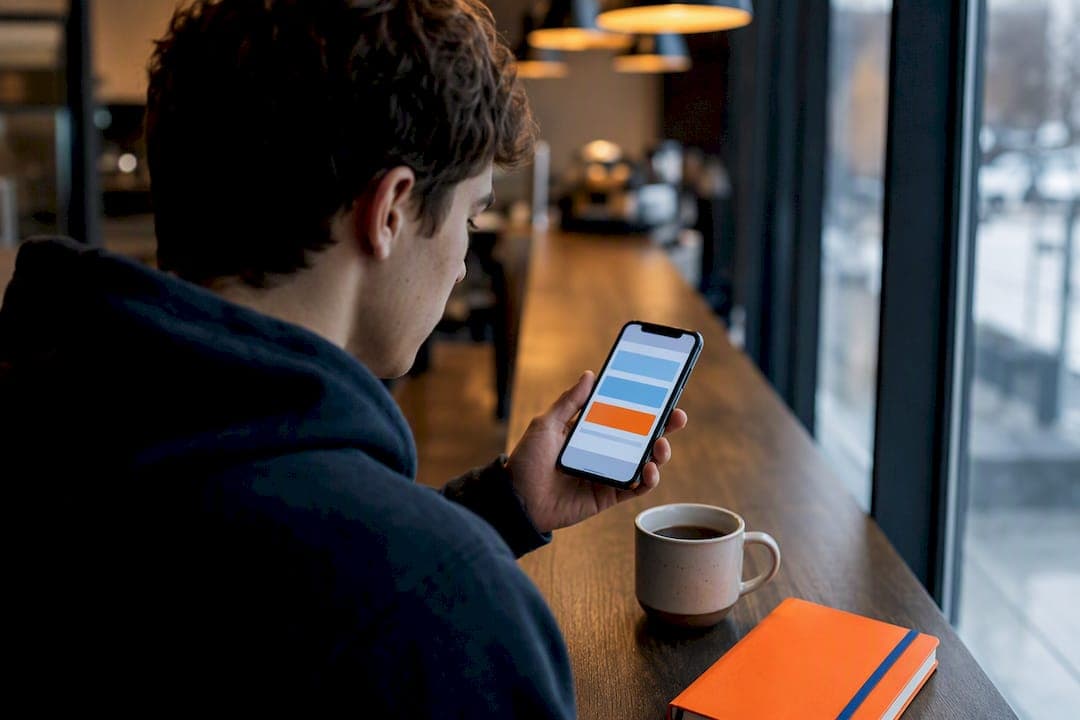
Real-time study alerts are instant notifications generated by an AI academic planner when something in your academic life changes: a due date approaches, a grade drops, or a pattern signals you're falling behind. The core benefit is timing. Catching a problem in week three instead of week ten gives you room to fix it. Tools like Semester Flow build these alerts directly from your syllabus and grade data, so the warning arrives before the damage does.
TL;DR:
- Thresholds for grade and GPA drops should be set conservatively initially to prevent alert fatigue and adjusted as the semester progresses.
- Alerts that include specific next steps and links to relevant coursework or syllabus details significantly increase student engagement and follow-through.
- Prompt response to an alert should involve immediate triage, confirming submission status, and scheduling focused study sessions to address the flagged issue.
- Privacy considerations require verifying encrypted data storage, clear consent, and permission controls, especially for parent monitoring features.
- System reliability depends on accurate syllabus parsing, with poor formatting or unreported deadline changes impairing alert effectiveness.
Table of Contents
- How Real-Time Study Alerts Actually Work
- Does Early Intervention Actually Improve Grades?
- How Do You Set Up Real-Time Study Alerts?
- What Should You Do When an Alert Arrives?
- How Semester Flow Designs Alerts That Students Actually Use
- Is Your Academic Data Safe With Real-Time Alerts?
- What Limits Real-Time Alerts in Practice?
- What Matters Most in a Real-Time Alert System
- Try Semester Flow to Get Alerts That Actually Help
- Sources
How Real-Time Study Alerts Actually Work
An AI planner doesn't guess when trouble is coming. It reads your syllabus, tracks your grades, and watches for patterns that predict a problem before you'd notice one yourself.
It starts with syllabus parsing. When you upload a syllabus, the AI extracts due dates, exam windows, assignment weights, and class meeting times, then converts that into a structured calendar instead of a wall of text you have to reread every week.
From there, grade and GPA monitoring takes over. Small dips get compared against thresholds you or the system set. A single quiz grade slipping from a B to a C might not trigger anything. Two in a row, combined with a missed assignment, usually will.
Behavioral triggers add a second layer: missed submissions, thinning attendance, or a string of low quiz scores. These are the early warning signs university academic status report programs like ASU's have used for years to flag students before midterms.
Alerts typically arrive through a few channels:
- Push notifications inside the planner app for immediate visibility
- Email summaries for less urgent, weekly-style updates
- SMS for time-sensitive deadline warnings
- Parent-monitoring dashboards with permission-based access, allowing parents to see alerts without controlling the student's account
That last option matters for families paying attention to a student's first year. Parents get visibility, students keep control of the response.
Does Early Intervention Actually Improve Grades?
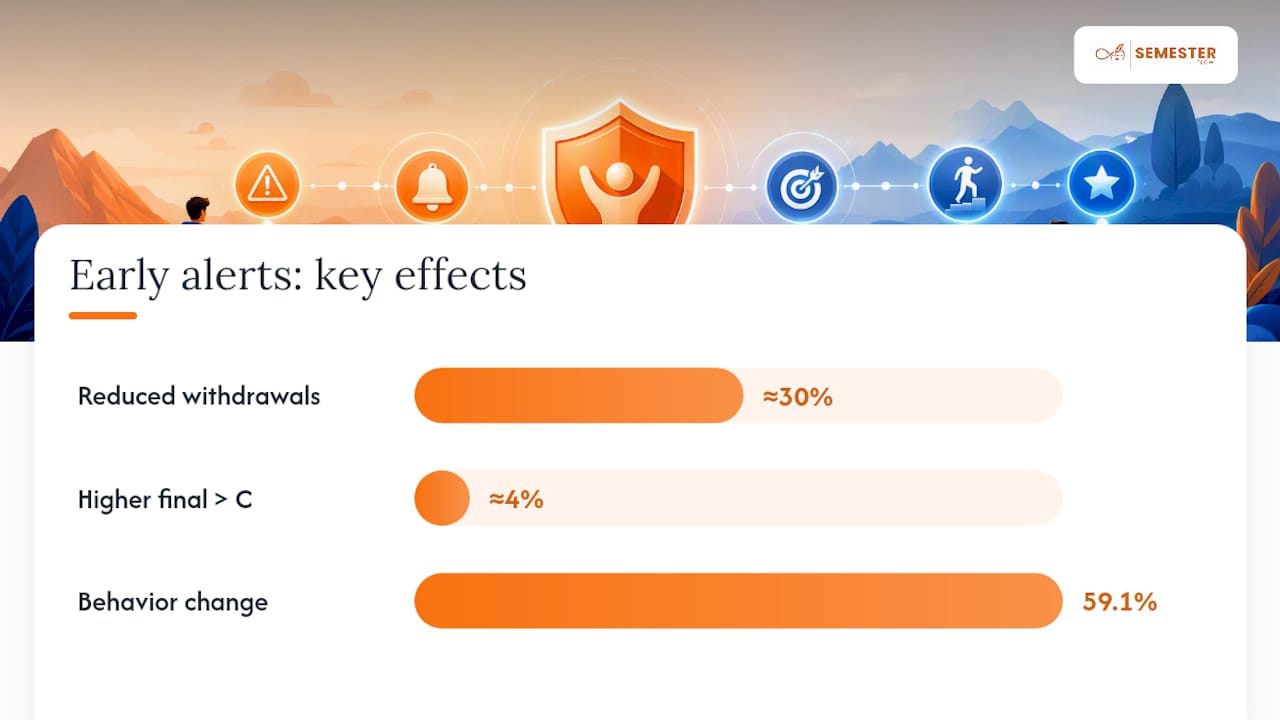
Yes, and the data isn't marginal. Students who received proactive academic notifications were about 30% less likely to withdraw from their courses, and roughly 4% more likely to finish with a grade above a C. That's a meaningful swing for something as simple as a well-timed notification.
Timing is the variable that matters most. The same research found alerts sent as soon as a problem surfaces, rather than at the traditional midterm check-in, are far more likely to reverse a downward trend. By midterm, a shaky grade has often calcified into a bad one.
Institutional programs back this up structurally. Arizona State University's Academic Status Reports pull instructor feedback into advisor portals, creating cases early enough for a human to step in before a warning becomes a withdrawal. Oklahoma State runs a similar model.
Quasi-experimental app research adds a second data point. A study on the 4Planning app among Chilean university students found users who got structured, self-regulated-learning support through the app scored higher on post-test SRL measures and outperformed control groups academically.
The design detail that ties it together: wording matters. Student survey research on early alert systems found that when notifications skew negative and vague, students disengage.
Students overwhelmingly asked that alerts be constructive and paired with a clear next step, not just a warning that something had already gone wrong. Roughly 59.1% of surveyed students reported changing their behavior after receiving an alert framed this way.
A scary notification with no instructions is just noise. A notification that says what to do next is an intervention.
How Do You Set Up Real-Time Study Alerts?
Getting alerts that actually help, instead of ones you learn to ignore, comes down to setup discipline in the first two weeks.
- Upload your syllabus first. Verify the AI correctly pulled due dates, assignment weights, and exam windows. A syllabus with a confusing grading rubric can trip up parsing, so double-check the first week's entries.
- Turn on real-time GPA and grade tracking. Set your at-risk thresholds. A conservative starting point avoids the "alert fatigue" that comes from too many low-value pings.
- Pick your delivery channels and quiet hours. Push notifications during the day, email for weekly digests, no alerts after 10 PM unless it's a deadline within 24 hours.
- Enable parent-monitoring access if you want it. Set the permission level once, together, so there's no confusion later about what's shared.
- Attach a next step to every alert type. A low-grade alert should link to the relevant grade profile or syllabus entry, not just report a number.
- Test everything in weeks one and two, then review weekly. Adjust thresholds up or down based on what turned out to be signal versus noise.
Pro Tip: Set your at-risk threshold slightly loose for the first two weeks of the semester. Assignment patterns haven't stabilized yet, and a threshold that's too tight will bury you in false alarms before you've even settled into the course.
What Should You Do When an Alert Arrives?
The alert itself is only half the job. What you do in the next ten minutes decides whether it helped.
Start with immediate triage: read the full alert, open the linked syllabus entry it references, and put a corresponding task on your calendar right away. Don't just acknowledge it and move on.
Then run through the quick fixes:
- Check whether the assignment was actually submitted, since sometimes an alert fires on a sync delay, not a real miss.
- Confirm there wasn't a simple explanation, like a rubric change or a late posted grade.
- Block off a focused 50 to 90 minute study session tied directly to the flagged material.
If the same course keeps triggering alerts, that's the signal to escalate. A short, specific email to your instructor or TA, referencing the exact assignment or concept you're stuck on, tends to get faster and more useful responses than a vague "I'm struggling in this class" message. Persistent risk flags across multiple weeks are also a good trigger for booking time with an academic advisor, following the same instructor-to-advisor pipeline ASU's status report model is built around.
For parents monitoring an account, the job is support, not takeover. Ask what the plan is instead of emailing the professor yourself, and agree ahead of time on how often you'll check in so the monitoring feels like backup, not surveillance.
How Semester Flow Designs Alerts That Students Actually Use
An AI planner builds alerts around actionable next steps, parsing the syllabus, syncing deadlines to Google Calendar, and tracking GPA in real time so that grade issues surface early.
At-risk highlights link directly to the assignment or exam driving the flag, following the research-backed principle that alerts tied to a specific, gradable task get more follow-through than generic study reminders. Parent-monitoring access can be configured to provide visibility without transferring control of the student's account.
[Author credentials in academic planning and AI technology to be added.] [Case studies and testimonials demonstrating Semester Flow's effectiveness to be added.]
Is Your Academic Data Safe With Real-Time Alerts?
Any tool that reads your syllabus, tracks your GPA, and pushes notifications to your phone is handling data you'd rather not see leaked. That's worth taking seriously before you connect anything.
The sensitive pieces are the grade data itself, the calendar sync that shows your daily schedule, and, for monitored accounts, the parent-student data-sharing relationship. A planner that syncs to Google Calendar is only as private as the permissions you grant it, so check what access you're approving during setup rather than clicking through it.
Parent monitoring is where privacy questions get sharpest. Research on early alert systems found something worth building into any monitoring setup: students respond better when they can accept or mute a shared alert rather than having every notification automatically forwarded without their knowledge. Respecting that control preserves the student's motivation instead of turning the planner into a surveillance tool.
Look for a few concrete markers of a responsible setup: encrypted data storage, clear opt-in consent for any parent-sharing feature, and a stated policy on what happens to your data if you cancel. Semester Flow outlines its approach to these questions on its security and trust page, which is worth reading before you upload a semester's worth of syllabi and grades.
If a platform is vague about where your grade history lives or who else can see it, that vagueness is itself the answer. A specific, published privacy policy beats a reassuring marketing paragraph every time.
What Limits Real-Time Alerts in Practice?
Alerts aren't a fix for every academic problem, and pretending otherwise sets students up for disappointment.
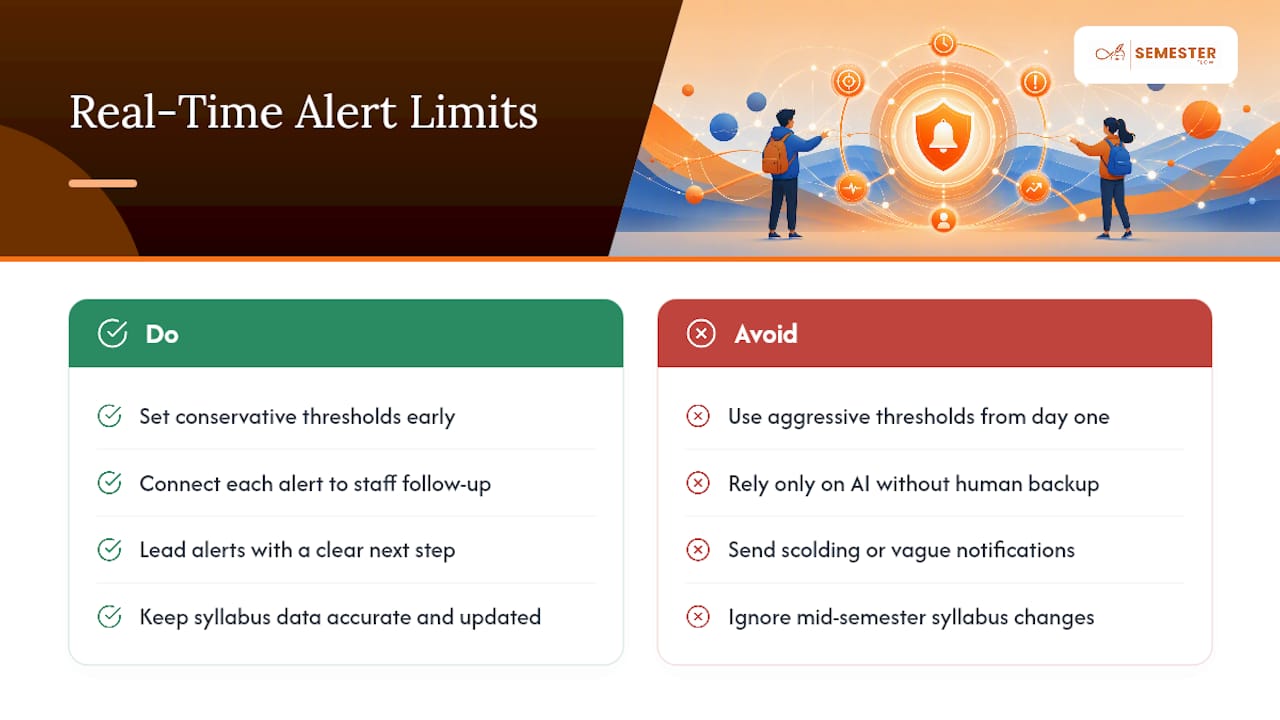
The most common failure mode is alert fatigue. If thresholds are set too tight, students get flooded with low-value pings and start ignoring all of them, including the ones that matter. This is why conservative thresholds in the first two weeks, tightened gradually as the semester's rhythm becomes clear, work better than aggressive settings from day one.
Institutional adoption is uneven, too. Programs like ASU's and Oklahoma State's work because they connect the alert to a human: an advisor, an instructor, a support office ready to act on the flag. A personal AI planner doesn't have that built-in staff layer, which means the follow-through step, emailing the professor, booking the advisor meeting, still falls on the student or parent.
Data quality is another limiter. Alerts are only as good as the syllabus parsing behind them. A poorly formatted syllabus or a professor who changes deadlines mid-semester without updating a syllabus can throw off the whole system until someone corrects the entry.
There's also an emotional cost worth naming plainly. Survey data on early alert systems shows these notifications often provoke real anxiety alongside the behavior change they're meant to spark. A well-designed alert should minimize that by leading with a next step, not a scolding tone, but it can't eliminate the discomfort of finding out you're behind. That's a feature of catching problems early, not a flaw in the alert itself.
What Matters Most in a Real-Time Alert System
The evidence here points somewhere specific: the alert itself isn't the innovation. Grade tracking has existed for decades. What actually moves outcomes is the combination of speed and specificity, catching the dip in week three and telling the student exactly what to do about it, not just that it happened.
Most conventional advice on academic tracking still treats it as a passive dashboard problem: check your grades, look at a portal, notice the trend yourself. That places the entire cognitive load on a student who is, by definition, already stretched thin. The research on wording and framing makes clear that passive visibility doesn't change behavior nearly as reliably as an active, worded, action-linked notification does.
If you take one thing from all this, prioritize the setup over the software. A planner that parses your syllabus accurately and lets you tune thresholds in week one will outperform a fancier tool configured carelessly. Semester Flow's design leans into that principle. It's a piece of the equation, not the whole answer. Your response in the ten minutes after an alert lands still decides the outcome.
— Haden
Try Semester Flow to Get Alerts That Actually Help
The described features—syllabus parsing, grade thresholds, and action-linked notifications—are automated in an AI academic planner that parses your syllabus, monitors grades, and syncs deadlines to your Google Calendar.

Grade projection shows you exactly what score you need on remaining assignments to hit a target grade, which turns a vague "I should study more" into a specific number. Per-class grade profiles show you which course is actually driving an at-risk flag, so you're not guessing which class needs attention this week.
If you want a clearer point of comparison, planning tools like MedSchoolPilot approach long-term degree tracking from a similar angle, mapping out a multi-year path rather than a single semester.
Start with the free trial on Semester Flow's planner, upload your current syllabus, and see what your first real-time alert looks like before your next quiz.
Sources
- How OSU’s academic alerts support student success
- Awareness to Action: Student Knowledge of and Responses to an Early Alert System
- Self-Regulated Learning and Academic Performance in Chilean University Students in Virtual Mode During the Pandemic: Effect of the 4Planning App