

Here's the plan: collect every syllabus, plot every deadline on one calendar, then backward-map the big assignments into weekly milestones. Do those three things this week and you have a working semester plan.
- Collect: Pull due dates, weights, and instructions from every syllabus into one place.
- Plot: Put all of it on a single semester calendar sized to your term (most run about 15 weeks).
- Backward-map: Break big papers and exams into weekly checkpoints, with a "ghost deadline" set before the real one.
Do this and you'll spot collision weeks, the ones where three things land at once, before they ambush you. If typing it all in by hand sounds like a Sunday you'd rather not lose, a tool like Semester Flow can pull those dates straight from your syllabus PDFs.
Key Takeaways
A workable semester plan requires a one-page deadline map, backward-mapped milestones with ghost deadlines, and a realistic unit load, updated weekly rather than built once and forgotten.
| Point | Details |
|---|---|
| Collect and plot first | Audit every syllabus in a two-hour session and put every deadline on one semester calendar. |
| Use three planning levels | Match semester, weekly, and daily views to the right kind of decision instead of mixing them. |
| Backward-map big tasks | Break major assignments into weekly milestones and set ghost deadlines 48 hours early. |
| Right-size the unit load | Stay within your school's minimum and maximum, often near 13 to 20.5 units, based on your own commitments. |
| Automate the tedious part | Semester Flow extracts deadlines from uploaded syllabi and syncs them to Google Calendar to save audit time. |
Table of Contents
- Why semester planning works in three levels, not one
- How do you build a one-page semester schedule?
- Turning the map into weekly and daily action
- How many units should you take?
- Backward mapping: how to avoid the cram-week spiral
- How automation speeds up semester planning
- Keeping the plan alive after week 6
- What the research gets right, and where it stops short
- Get your semester mapped out with Semester Flow
- Frequently Asked Questions
- Sources
Why semester planning works in three levels, not one
Trying to plan a whole semester and tomorrow's to-do list on the same document is why most planners get abandoned by week 4. The scale is wrong. A semester plan, a weekly plan, and a daily plan each solve a different problem, and mixing them creates clutter you'll stop reading.
Advisers at Princeton's McGraw Center frame it as three distinct levels, and the logic holds up:
- Semester level gives you the big picture. Every deadline, every exam, every collision week, visible at once so you can spot trouble in September instead of discovering it in November.
- Weekly level handles time allocation. This is where you decide Tuesday afternoon is chemistry problem sets and Thursday morning is the history reading you're behind on.
- Daily level breaks that into tasks small enough to finish. Not "work on paper," but "write the intro paragraph and find two sources."
You update the semester map maybe twice a month. The weekly plan gets a rewrite every Sunday. The daily list changes every morning. They interlock: the semester map feeds the week, the week feeds the day.
How do you build a one-page semester schedule?
Set aside two hours in week one. That's the window USF's faculty writing guide recommends for pulling accurate dates out of every syllabus you've got, and it's the single highest-leverage two hours of your term.
Open every syllabus and extract:
- Course name and section
- Due date for every assignment, quiz, and exam
- Point value or percentage weight
- Where the actual instructions live (LMS folder, email, handout)
- Names of teammates for any group project
Put it all into one grid, one row per deadline, columns for the fields above. A Google Sheet works well because you can sort by date instantly; a printable grid works if you want it taped above your desk. Those flagged weeks are your collision weeks, and you'll deal with them in a later step.
| Column | What Goes Here |
|---|---|
| Course | Course code and section |
| Due date | Exact date, not "week 10" |
| Weight | Percent or points toward final grade |
| Instructions | Where the rubric or prompt lives |
| Team | Names, if it's a group assignment |
Turning the map into weekly and daily action
The semester map tells you what's coming. It doesn't tell you when to actually sit down and do the reading. That's the weekly plan's job, and it starts with a rough hour estimate per course.
- Estimate hours per course. A 4-unit course with a paper due in three weeks needs more hours this week than a 3-unit course with nothing due until next month. Weight the hours toward what's closest and heaviest, a method the McGraw Center backs for realistic load-balancing.
- Block the week. Assign each course specific chunks of time, morning, afternoon, whatever fits your energy. Leave 10 to 20% of the week unscheduled. Something always runs long.
- Write daily tasks that are actually finishable. "Study for midterm" is not a task, it's a mood. "Review chapters 4 and 5, make flashcards for chapter 4" is a task. Aim for focus windows between 25 and 90 minutes, and phrase each task so you know exactly what "done" looks like.
Pro Tip: Cross off finished tasks instead of erasing them. Watching a list of strikethrough lines build up over a week does something for motivation that a blank checkbox never will.
How many units should you take?
A semester plan built on top of an unrealistic course load falls apart no matter how good the calendar looks. Get the load right first.
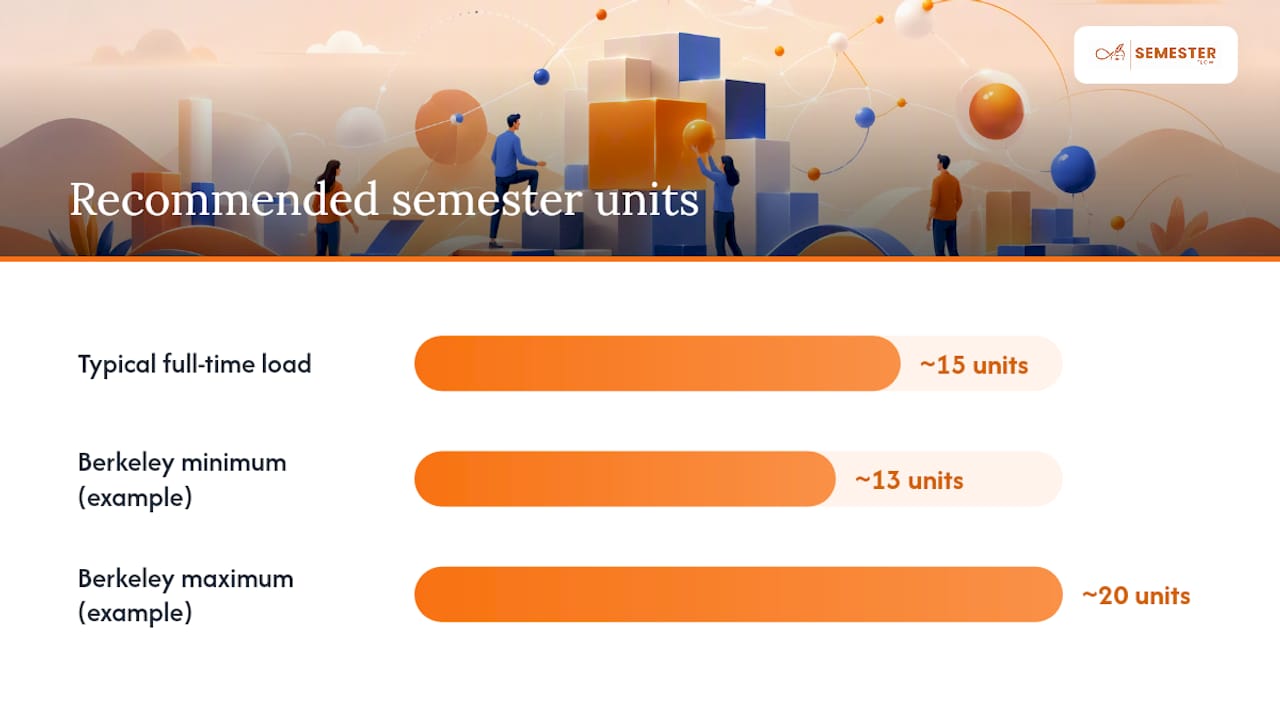
Most full-time undergraduates land near 15 units a semester, and plenty of schools set formal guardrails around that number. UC Berkeley's advising office, for instance, lists a minimum unit load near thirteen and a maximum near twenty units for a standard term, numbers that exist precisely because too few units jeopardizes financial aid or on-time graduation, and too many wrecks your ability to do any of it well.
Before you lock in a schedule, weigh:
- Course difficulty. Two lab sciences and a proof-based math course in the same term is a specific kind of pain.
- Prerequisites. Does this term's mix unlock what you need next term?
- Outside commitments. A job, an athletic season, a caregiving role. Real hours, not aspirational ones.
- Graduation timeline. Sometimes an extra unit now saves a whole extra semester later.
Advisers at Berkeley are direct about this: balance isn't about matching your roommate's course load, it's about what fits your own timeline and life. Use the first two weeks of add/drop, the "shop and drop" window most schools allow, to test a course before committing, and always keep a backup elective in mind in case you need to drop something without falling below the minimum-unit threshold.
Backward mapping: how to avoid the cram-week spiral
A 12-page paper due in week 12 feels distant in week 3. That's exactly the trap. Backward mapping fixes it by starting from the due date and working in reverse.
- Start at the deadline and list every step: research, outline, draft, revise, cite, proofread.
- Assign each step its own week, working backward from the due date to today.
- Set a ghost deadline, a personal cutoff roughly 48 hours before the real one. Kalamazoo College's Learning Commons recommends this exact buffer, and it exists to absorb printer failures, sudden group-member silence, or the file that won't upload at 11:58 p.m.
- Run your two-hour syllabus audit in week one specifically looking for collision weeks, then shift the start date for your highest-weight task two weeks earlier if multiple deadlines stack in the same seven days.
That last step matters more than it sounds. Students who handle unavoidable collision weeks well don't cram more hours into that week, they start the biggest task earlier and temporarily scale back lower-stakes courses, which keeps the total workload from spiking all at once.
How automation speeds up semester planning
Manual syllabus audits work, but they're tedious, and tedious tasks are the ones students skip when week three gets busy. This is where a syllabus-parsing tool earns its place in the workflow.
The process looks like this: upload each syllabus, the software extracts due dates and weights automatically, the semester map populates itself, and everything syncs to Google Calendar. Semester Flow runs on exactly this workflow, and it also flags at-risk courses by tracking grade trends against what's still ahead on the calendar, catching a slumping grade before it becomes a semester-ending problem.
The most reliable version of this isn't automation instead of the manual audit. It's automation first, then a human pass to verify dates, add group-member names, and link the actual rubric. Speed from the software, accuracy from the two-hour check.
Used this way, the tool doesn't replace your judgment. It removes the data-entry grind so you spend your two hours verifying and thinking instead of retyping dates from twelve PDFs. Semester Flow's per-class grade profile feature extends that same logic into the weeks after your plan is built, tracking whether your actual grades are tracking the plan you made.
Keeping the plan alive after week 6
A semester plan that isn't touched after syllabus week is just a nice-looking document you made once. The plan needs a weekly checkup, and it needs to actually influence decisions when things go sideways.
- Run a 30 to 45 minute check-in every week. Update anything that shifted, note any milestone you missed, and re-estimate hours for the week ahead based on what's actually left.
- Email your instructor or advisor when a deadline conflict is unavoidable or a grade trend looks bad, ask specifically about extension policies or whether a lower-weight assignment can be dropped.
- Decide early if a course needs to go. If you're consistently short on hours for one class, weigh dropping it against your unit minimum. Falling below your school's floor, often near 13 units, can affect financial aid or visa status, so check that number before you drop anything.
What the research gets right, and where it stops short
Most semester-planning advice treats the calendar as the whole solution. It isn't. The calendar tells you what's due; it says nothing about whether your estimate of "two hours for this reading" was honest. The gap between the plan on paper and the plan you actually execute is where most students lose the semester, not in the planning step itself.
The three-level system, semester, week, day, holds up because it matches how attention actually works. Nobody thinks in 15-week arcs day to day, and nobody can plan a whole term hour by hour. Where conventional advice falls short is treating the one-page schedule as a one-time exercise instead of a living document you revisit weekly.
If you take one thing from this, prioritize the two-hour audit and the backward mapping over any app or template. Those two habits catch collision weeks before they happen. Automation like Semester Flow is genuinely useful for cutting the data-entry time out of that audit, but it's a tool for executing the habit faster, not a substitute for having the habit. Get the method right first. Let the software carry the busywork after that.
Get your semester mapped out with Semester Flow
Building the one-page schedule and running the two-hour syllabus audit by hand works, but it takes an evening you probably don't have during add/drop week. Semester Flow does the extraction for you: upload your syllabi, and it pulls out due dates, weights, and exam schedules, then syncs the whole thing straight into Google Calendar.

Beyond the calendar sync, Semester Flow tracks your grades in real time and flags a course before a slumping average turns into a semester-ending problem, something a static spreadsheet can't do. It fits students who want the backward-mapping and collision-week benefits from this guide without spending hours rebuilding the map by hand every time a syllabus gets revised. Parents can also monitor progress through a linked account, and academic organizations can roll it out across an entire chapter with an admin dashboard.
Check the pricing plans for students, parents, and organizations, or head to the Semester Flow homepage to upload your first syllabus and see your semester map build itself.
Frequently Asked Questions
What is semester planning, exactly? Semester planning means mapping every deadline, exam, and major assignment from all your courses onto one calendar at the start of the term, then breaking that map into weekly and daily action steps. It's the difference between reacting to due dates and seeing them coming weeks in advance.
How far in advance should I plan my semester? Start in week one. A two-hour syllabus audit right when classes begin gives you the most accurate picture, since instructors sometimes revise dates after the first week, and catching collision weeks early gives you room to shift your start dates.
What's a good semester plan example for a busy week? If three deadlines land in the same week, a solid semester plan shifts the start date for the highest-weight assignment two weeks earlier and temporarily trims planned hours on lower-stakes courses, rather than trying to cram more total hours into that single week.
Do I need an app, or is a spreadsheet enough? A Google Sheet or printable grid covers the basics fine. Where an app like Semester Flow adds value is pulling dates automatically from your syllabus files and flagging grade risk, which saves the manual re-entry every time a due date changes.
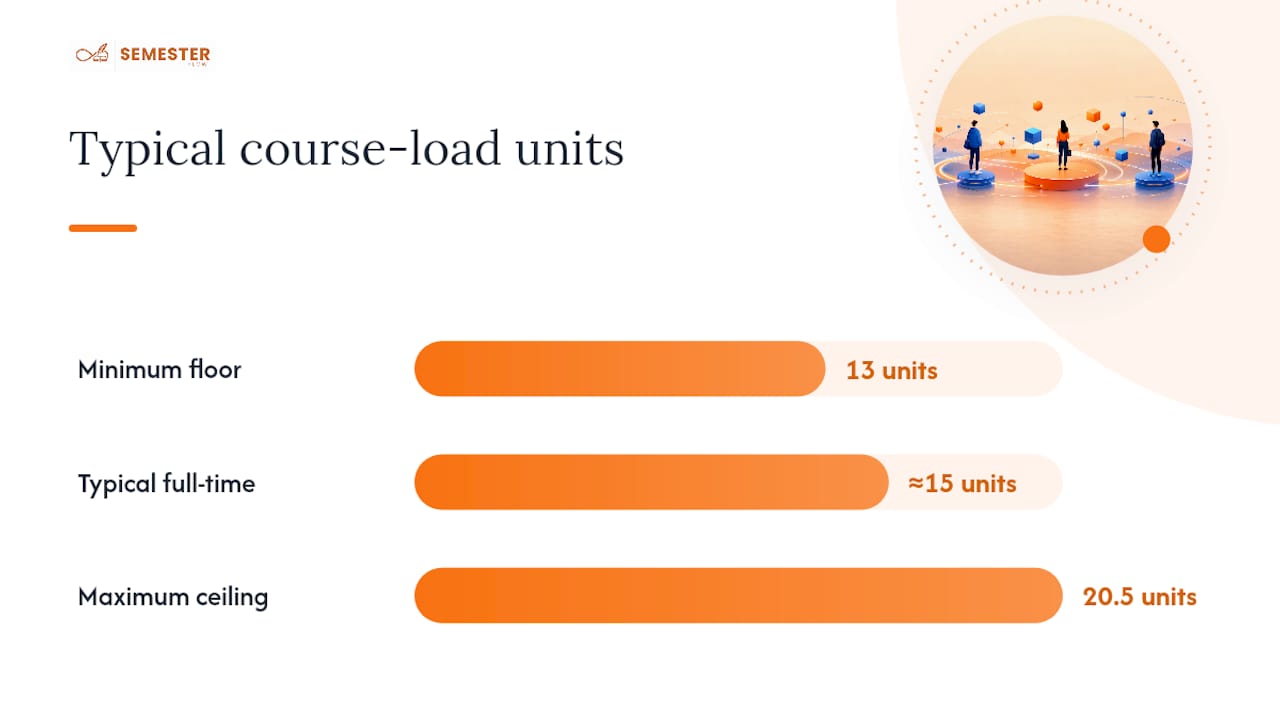
How many units count as a balanced course load? Most full-time students take around 15 units, with many schools setting a floor near 13 units and a ceiling around 20.5 units. The right number for you depends on course difficulty, outside commitments, and how it affects your graduation timeline, not just what's typical.
Sources
- How long is a semester? | Furman University blog
- Unit minimum and maximum | L&S Advising, UC Berkeley
- Semester planning and time management | Princeton McGraw Center
- Tips for creating a semester plan | USF blog (Crase)