

The fastest fix is picking one system and feeding it this week's due dates today: a spreadsheet if you want control, phone calendar reminders if you're already glued to your screen, an LMS sync app if your school runs Canvas or Google Classroom, or an AI syllabus parser if you're juggling five classes and don't want to type a single date by hand. Whatever you choose, the goal is the same: a live dashboard you actually open, not a document you build once and forget.
TL;DR:
- Manual control through spreadsheets suits detail-oriented students who want to track grades, weights, and progress but requires regular updating.
- Phone reminders are the quickest setup option, ideal for simple alerts but limited in grading detail and tracking stages of work.
- Linking LMS platforms like Canvas or Google Classroom automates assignment import, but depend on updates from instructors to stay current.
- AI syllabus parsers reduce setup time by extracting deadlines and grading info from PDFs, offering the most benefit for heavy course loads with complex rubrics.
- Consistent weekly review and minimal tracker entries keep digital plans active, preventing systems from becoming outdated and ensuring timely task completion.
Table of Contents
- Which method actually works to track college assignments?
- How do I set up a living assignment tracker in 20 minutes?
- Syncing with calendars and LMS: what to set up and watch for
- Templates and quick setups: spreadsheet columns, Notion outline, and import tips
- Why use an AI syllabus parser and planner?
- How do you add syllabus entries, due dates, and priorities the right way?
- How do you keep an assignment tracker from going stale?
- How should you prioritize assignments by deadline and difficulty?
- What's the best way to track assignment progress and completion status?
- How do you fit study time planning around your assignment tracker?
- Can you share an assignment tracker with classmates or a study group?
- Small habits that make a tracker stick
- Try Semesterflow if typing every due date by hand sounds exhausting
- Quick links and templates to open now
- Sources
- FAQ
Which method actually works to track college assignments?
There's no single right answer here. It depends on whether you'd rather build something yourself or let software do the typing for you.
A spreadsheet tracker gives you the most control. You decide the columns, you can weight assignments by how much they affect your grade, and nothing gets auto-imported wrong. This suits students who like seeing the whole semester laid out and who don't mind ten minutes of manual entry each week. Many students already use Google Sheets for exactly this, entering due dates and weights and highlighting finished work so the semester stays visible at a glance.
Your phone calendar plus reminders is the lowest-effort option. Setup takes minutes, and because you're already checking your phone forty times a day, the reminders actually reach you. The tradeoff: it's clumsy for tracking grade weights or partial progress on longer projects.
LMS-sync aggregators pull assignments straight from Canvas, Blackboard, or Google Classroom into one feed, cutting out manual entry almost entirely. Library research guides point students toward exactly this kind of calendar-and-app pairing when the goal is fewer moving pieces.
AI syllabus parsers take the most setup patience upfront but the least ongoing work. You upload a PDF once, and the software extracts every due date, weight, and exam window, then projects how each grade affects your GPA. That's the right call if you're carrying a heavy course load with dense grading rubrics.
- Spreadsheet: full control, manual upkeep, best for detail-oriented students
- Calendar + reminders: near-zero setup, weak on grade tracking
- LMS sync: automatic imports, depends on your school's platform
- AI parser: one-time setup, strongest for complex or heavy semesters
How do I set up a living assignment tracker in 20 minutes?
Building a tracker that survives past week three comes down to starting small and making the updates automatic instead of optional.
- Gather your inputs first. Pull up your syllabus PDFs, your LMS assignment lists, any due dates buried in emails, and whatever's already sitting on your calendar.
- Open your tracker and enter only the next one to two weeks. Don't try to map the entire semester in one sitting. Students who succeed at this long-term almost always start with what's due soon rather than trying to build a perfect system on day one.
- Add six columns: course, assignment, due date, weight (if your syllabus lists one), status, and estimated hours.
- Set two calendar reminders per assignment, one for "start work" a few days out and one for the due date itself, plus a standing 10-minute weekly review on your calendar.
- Color-code or filter by urgency so anything overdue or due this week jumps out without you having to scan the whole list.
That weekly review matters more than people expect. Campus advising blogs consistently point to a short, recurring check-in as the habit that keeps a tracker from going stale by midterms.
Pro Tip: Set your weekly review for the same time every Sunday night. Pair it with something you already do, like laundry or meal prep, so it piggybacks on an existing habit instead of competing for a new time slot.
Syncing with calendars and LMS: what to set up and watch for
Syncing removes the step where you forget to write something down in the first place. Turn on iCal export or native calendar sync wherever your school's LMS offers it, and make sure push notifications are on for your phone's calendar app, not just the LMS app itself, since most students check their phone calendar far more often.
A few things trip people up after the initial sync:
- Confirm instructor updates (a pushed-back deadline, an added quiz) actually flow through to your calendar instead of just updating inside the LMS.
- Turn off duplicate notifications if both your LMS app and calendar are pinging you for the same assignment. Pick one source of truth.
- Set two distinct reminders per item: a "start work" nudge several days ahead, and a sharper "due in a few hours" alert.
- Recheck the sync at the start of each unit or after add/drop period, since new assignments sometimes don't backfill automatically.
Feature sets built around calendar sync and push alerts exist specifically because visibility on the device you already check reduces missed deadlines more reliably than a tracker you have to remember to open.
Templates and quick setups: spreadsheet columns, Notion outline, and import tips
You don't need to design a tracker from scratch. A minimal spreadsheet needs seven columns: course, assignment, due date, days left (a simple formula subtracting today's date), weight, estimated hours, and status.
If you prefer Notion, build a database with three saved views: due this week, overdue, and grouped by course. Keep the mobile layout simple, just title, due date, and status, so checking it on your phone between classes doesn't feel like opening a spreadsheet.
For faster entry:
- Copy-paste assignment lists straight from a syllabus PDF into rows instead of retyping them.
- Use bulk entry for recurring weekly homework (same class, same day, different week) rather than adding each one individually.
- Set your due-date column to auto-format so you're not fixing date formats by hand every time.
The dashboard effect: Templates that sort tasks into urgency buckets, overdue, due today, upcoming, push students to act earlier instead of just recording a date and moving on. A list is passive. A dashboard with urgency built in is a prompt.
Why use an AI syllabus parser and planner?
Syllabus parsing takes the one task everyone dreads, typing every due date, exam, and weight from a dense PDF into a tracker, and does it automatically. You upload the document, and the software reads it for you.
Some academic planners build their approach around this: upload a syllabus and AI extracts class schedules, assignments, and exam dates, then syncs everything with Google Calendar. From there it tracks real-time GPA, builds a grade profile for each class, and flags courses that are trending toward trouble before you're staring at a final exam trying to do math on what you need to pass.
- Syllabus upload with AI extraction of dates, weights, and exam schedules
- Automatic two-way Google Calendar sync
- Real-time GPA tracking with per-class grade profiles
- Alerts for classes at risk of a grade drop, with projections for what you need on remaining work
This fits best if you're carrying a heavy course load, dealing with syllabi that bury grading policies in dense paragraphs, or you just want grade projections without doing the arithmetic yourself. Try it by uploading one syllabus, checking that the extracted dates and weights match what's actually printed, syncing it to your calendar, and then running your normal weekly review against it.
How do you add syllabus entries, due dates, and priorities the right way?
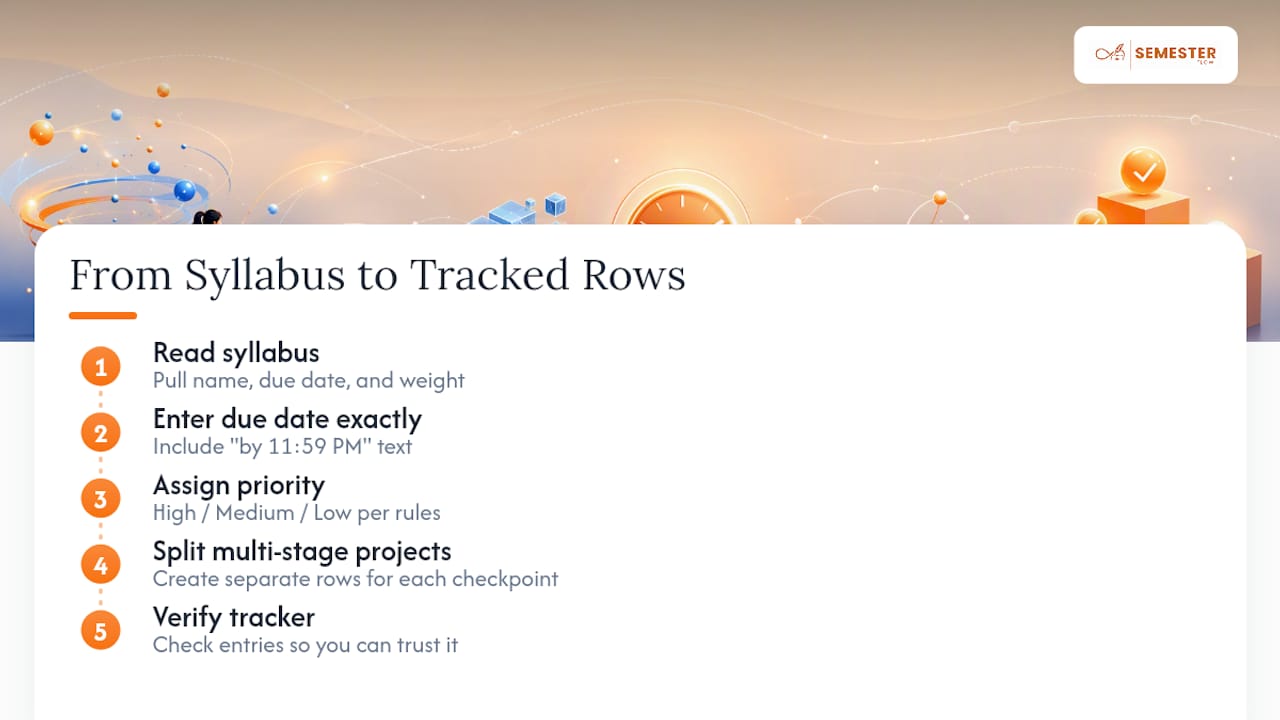
Start with the syllabus, not the calendar. Read through each one and pull out three things for every assignment: what it's called, when it's due, and how much it's worth toward your final grade.
Enter due dates exactly as written on the syllabus, including any "by 11:59 PM" language, since a lot of missed deadlines come from assuming an assignment is due at the start of class when it's actually due the night before.
For priority, use a simple three-tier system: high (worth more than 15% of your grade, or a hard deadline with no late policy), medium (regular homework or quizzes), and low (optional or extra credit). Assigning priority at entry time, rather than scrambling to figure it out the week it's due, is what separates a tracker you trust from one you have to double-check.
If a syllabus lists a project with multiple checkpoints, break it into separate rows rather than one entry with a distant final due date. A single line reading "Research Paper, due Week 14" hides the fact that your outline was due in Week 9 and your sources were due in Week 11.
How do you keep an assignment tracker from going stale?
A tracker only works if it stays current, and most abandoned systems die within the first month because updating them feels like a chore instead of a habit.
The fix is a recurring weekly check, ten minutes, same day and time each week, where you add anything new from class, mark off what's done, and re-sort by what's coming up. This single habit is what separates students who use a tracker all semester from students who build one during syllabus week and never open it again.
Notifications do the heavy lifting between those weekly reviews. Set a "start work" reminder several days before anything substantial and a sharper reminder the day it's due. If your tracker or calendar app supports it, turn on a recurring notification for your weekly review itself, so the habit doesn't depend on remembering to remember.
Watch for drift, too. Instructors change due dates, add pop quizzes, or move an exam. If your tracker doesn't reflect that within a day or two, it stops being a source of truth and starts being a liability. Pair every syllabus update announcement with a two-minute tracker update, right then, not "later."
How should you prioritize assignments by deadline and difficulty?
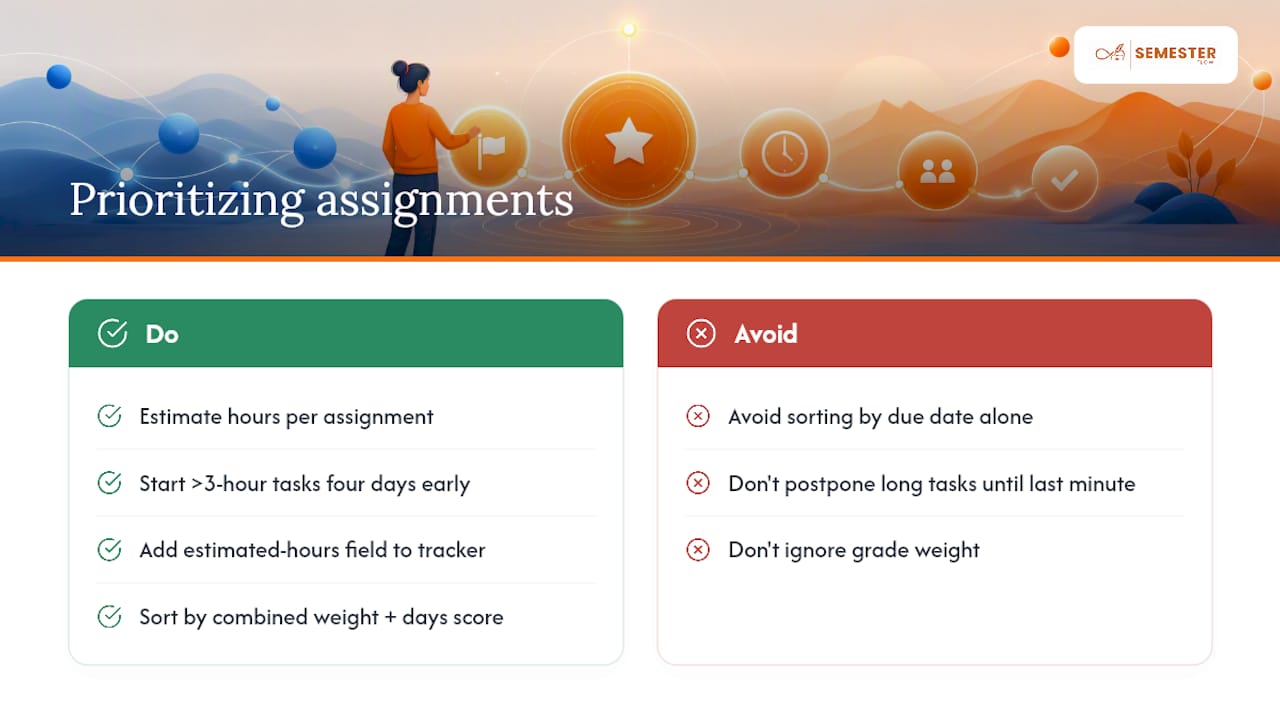
Sorting purely by due date is the most common trap. A quiz due tomorrow and a term paper due in ten days aren't equally urgent once you factor in how long each one actually takes.
A better approach weights two variables: how soon it's due, and how much time or difficulty it demands. Guides aimed at college students recommend adding an estimated-hours field to your tracker specifically so you can see, at a glance, which "easy" assignment is actually going to eat your whole Saturday.
Use this rough rule: start anything estimated at more than three hours at least four days before it's due, even if the deadline feels far off. Short assignments, quizzes, discussion posts, quick worksheets, can wait until a day or two out without much risk.
Grade weight matters as much as time. A 25% midterm two weeks away deserves earlier attention than a 3% homework set due tomorrow, even though the homework feels more urgent on the calendar. Sort your tracker view by a combined score of weight and days-until-due rather than by due date alone, and the assignments that actually matter to your GPA will surface to the top instead of getting buried under busywork.
What's the best way to track assignment progress and completion status?
A due-date list tells you what's coming. It doesn't tell you what's actually done. That distinction is where most trackers fall short.
Use a status field with four to five states instead of a simple checkbox: not started, in progress, drafted, submitted, and graded. This matters most for multi-stage projects, where "in progress" for two weeks straight is a warning sign you'd otherwise miss.
For submission tracking specifically, add a separate confirmation step. Plenty of students mark something "done" the moment they finish writing it, then forget to actually upload it to the LMS. A quick "submitted, confirmed" tag, checked against your LMS grade book once a week, catches the assignments that technically got finished but never got turned in.
If you're using a spreadsheet, conditional formatting that changes row color by status turns a wall of text into something you can scan in five seconds. If you're on Notion, a Kanban-style board view sorted by status does the same job visually. Either way, the point is the same: status tracking exists to catch the gap between "I did the work" and "the work is actually in."
How do you fit study time planning around your assignment tracker?
Tracking deadlines and planning study time are two different problems, and treating them as one usually means neither gets done well.
Once your tracker shows what's due and roughly how long each item takes, block that time directly on your calendar rather than leaving it as a vague intention. If a paper is estimated at six hours, don't write "work on paper" once. Split it into two or three calendar blocks across several days, each tied to a specific chunk: outline, draft, edit.
Treat exam prep the same way. Instead of one entry labeled "study for midterm," break study time into sessions spread across a week or two, with each session pulling from a specific unit or chapter. This also makes it obvious when you've underestimated how much prep an exam actually needs, because you'll run out of scheduled sessions before you run out of material.
The tracker feeds the schedule, and the schedule protects the time. Without that second step, a perfectly organized list of due dates still leaves you cramming the night before, because knowing something is due Thursday doesn't automatically carve out the hours to prepare for it.
Can you share an assignment tracker with classmates or a study group?
Group projects and shared courseloads are where a personal tracker starts to show its limits, and a shared version solves a real problem: nobody has to ask "wait, when is this due again?" in the group chat.
For spreadsheets, shared Google Sheets with edit access let everyone in a study group or project team see the same due dates and mark their own sections complete. Use a "assigned to" column so it's clear who owns which piece of a group project, not just what's due.
Notion databases work similarly, and you can create a filtered view per person so each group member sees only their assigned tasks without wading through everyone else's.
For a full class or study group tracking the same syllabus, a shared calendar subscription is often simpler than a shared spreadsheet. Everyone gets the same due dates pushed to their own calendar app without needing edit permissions on a shared document, which avoids the classic problem of someone accidentally deleting a row three days before finals.
Small habits that make a tracker stick
The tracker that survives the semester isn't the one with the most columns. It's the one you actually open. A 10-minute weekly review, two push reminders per assignment, and starting anything substantial four or more days early will outperform a color-coded spreadsheet you built once in August and never touched again.
The biggest failure mode I see is overengineering. Students build a system with fifteen fields, three linked databases, and a priority matrix, then abandon it by week four because updating it feels like homework itself. Keep it minimal. Track what's due, how much it's worth, and whether it's done. Everything else is optional.
— Haden
Try Semesterflow if typing every due date by hand sounds exhausting
If building and maintaining a spreadsheet or Notion board isn't how you want to spend your Sunday nights, Semesterflow skips the manual entry entirely. Upload a syllabus and its AI pulls out class schedules, assignments, and exam dates, then syncs them straight to Google Calendar. From there, it tracks your GPA in real time and flags any class that's trending toward trouble before it becomes a crisis.

Start with the Free Trial and upload one syllabus to see what it extracts. If you like what you see, the Pro plan is available for a monthly subscription, and there is also a Parent plan with additional visibility features for those who want to monitor deadlines and grades. Check the pricing and plan details or see the full feature breakdown before you commit to anything.
Quick links and templates to open now
- Assignment tracker template: urgency-bucket layout for overdue, due-today, and upcoming work.
- Google Sheets tracking example: a campus-tested spreadsheet workflow.
- Homework planner app roundup: library-curated app and calendar recommendations.
Sources
- Assignment tracker template | Asana
- Time After Time: How to Keep Track of your Schedule in College — Experience Iowa
- Best apps for students: homework planners — Research Guides | Georgetown College
FAQ
Can ChatGPT do my assignment?
ChatGPT can help brainstorm ideas, explain concepts, or draft an outline, but it can't reliably track your deadlines, weights, or submission status for you. Most schools also have academic integrity policies that restrict using it to complete graded work directly, so check your syllabus before relying on it for anything you'll turn in.
What is a good app to track school assignments?
The right app depends on whether your school uses Canvas, Blackboard, or Google Classroom, since LMS-sync apps import assignments automatically only when they match your platform. Semesterflow works differently: instead of syncing to your LMS, it reads your uploaded syllabus directly and builds your schedule and calendar sync from that.
What are some examples of college assignments?
Common types include problem sets, reading responses, lab reports, discussion posts, group projects, research papers, and exams, each usually carrying a different weight toward your final grade. Multi-stage assignments like research papers often have hidden checkpoints, an outline, a draft, a bibliography, that deserve their own due dates in your tracker rather than one final deadline.
Which app is best for college assignments?
There isn't a single best option. It depends on whether you want manual control (a spreadsheet), automatic LMS imports, or full automation. For students who want to skip manual entry entirely, Semesterflow's syllabus upload and AI extraction handles due dates, weights, and exam schedules without you typing them in one by one.
How do I stop forgetting about assignments buried in syllabi?
Enter every due date from a syllabus into your tracker or calendar during the first week of class, rather than waiting until an assignment is announced in class. Pair that with a weekly 10 minute review so anything you missed on the first pass gets caught before it becomes a surprise.